Google Translate

by Google LLC

4.3 9M+ reviews
1.6B+ Installs
Google Translate icon
Tools

Google Translate

by Google LLC

4.3 9M+ reviews
1.6B+ Installs
Google Translate screenshot 1
Google Translate screenshot 2
Google Translate screenshot 3
Google Translate screenshot 4
Google Translate screenshot 5
Google Translate screenshot 6

Ratings Breakdown

4.3 ★★★★★ 9M+ ratings
5 71%
4 10%
3 5%
2 3%
1 11%

Data from Google Play at the time of writing.

What This App Actually Does

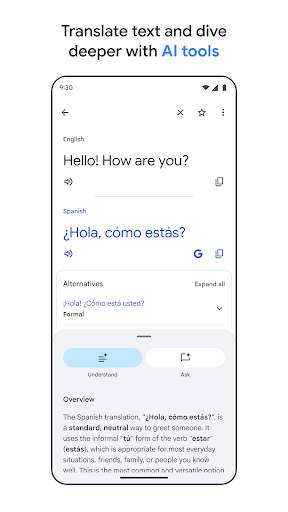
Google Translate is the default translation tool for most smartphone owners, and with over 1.6 billion installs it is safe to say nearly everyone has it or has used it at some point. It covers 108 languages for typed text, with narrower support for offline packs, camera translation, handwriting, and conversation mode. Anyone traveling abroad, communicating with family who speak another language, or trying to decipher a foreign menu or sign is the target user here.

The core value proposition has not changed in years: type or speak something, get a translation back, and in many cases hear it read aloud. What has expanded over time is the number of ways to get text into the app, from your camera to your voice to your own handwriting.

Where It Genuinely Shines

Real users consistently praise the breadth of dialects and languages covered, with one reviewer calling it ‘better than many dictionaries you find now’ and noting it handles both text and voice output well. The conversation feature also gets specific praise for letting people communicate on the fly when they don’t share a language, with one user describing it as ‘fast, easy, reliable’ for exactly that purpose. For quick, single-sentence translations, or for reading a foreign word aloud, it clearly delivers on its basic promise, which is why it remains so widely installed.

The sheer number of supported languages, including many South Asian, African, and regional languages rarely found in competing apps, is a genuine differentiator. For casual, short-burst use, it’s fast and mostly reliable.

The Offline Mode Problem

The most damaging complaints in user reviews center on offline functionality failing exactly when it’s needed most. One reviewer described downloading a language pack before a trip, being told it was ready, then finding the app demanded a re-download once there was no wifi or service available. This is about as bad a failure mode as a translation app can have, since offline mode exists specifically for travelers without reliable connectivity, and losing it abroad with no way to fix it defeats the entire purpose of downloading languages in advance.

Voice Translation Has Real Limits

Multiple users report that voice-based translation breaks down beyond simple sentences. One reviewer estimated only 70% accuracy and noted the feature stops entirely if you pause to take a breath or hesitate for even a fraction of a second, with no way to resume without restarting. Another long-time user said a recent update caused the app to catch only about 5% of speech it used to translate in real time at 95% accuracy, calling out slower processing and multiple redundant translations appearing on screen. For anyone relying on this for actual spoken conversation rather than short phrases, these are serious functional regressions, not minor annoyances.

Interface Changes Keep Frustrating Regular Users

Several reviews point to unwanted UI overhauls disrupting established workflows. One user called a forced update ‘absolutely terrible,’ citing more taps required to reach basic functions and specifically complaining that typing in Chinese now requires minimizing the keyboard just to see Pinyin suggestions. Another user who switched from iPhone to Android missed a ‘new translation’ button that let them clear a screen and start fresh with one tap, something apparently missing on Android entirely. These complaints suggest the app’s cross-platform experience isn’t consistent and that Google periodically ships changes that make daily use clunkier for people who’ve built habits around the old layout.

Who Should Actually Download This

For occasional use, quick text lookups, camera translation of signs or menus, or casual conversations with someone speaking another language, Google Translate remains a solid, free, no-brainer install, and its language coverage is genuinely unmatched. But if you’re planning to depend on offline mode in a remote area with no connectivity, test it thoroughly before you travel rather than trusting a ‘downloaded’ confirmation. And if extended real-time voice translation is your main use case, temper your expectations, since multiple users report it struggling with anything beyond short, uninterrupted sentences. It’s a essential utility with real cracks in its more ambitious features.


Pros

  • Supports 108 languages, more than rivals
  • Strong text and voice-readout accuracy
  • Useful conversation mode for live chats
  • Camera translation works well for text
  • Free and nearly universal availability

Cons

  • Offline language packs can fail unexpectedly
  • Voice translation stops during pauses
  • Frequent UI changes disrupt regular users

What Real Users Say

Laurel Jones 1/5

“I used this app for years. Recently, it stopped working. I downloaded the needed language before a trip last week. It told me it was downloaded. When I tried using it offline, it told me I had to download the language. It was super frustrating because i didn't have service or access to wifi. I have tried fixing it several…”

👍 2,299 found this helpfulDeveloper responded
George Grant 5/5

“Great translator app for many dialects. It is better than many dictionaries you find now. It is text based, and also reads it in voice aloud. It is supposed to have a voice input reading feature, too. Only the online version does much. It worked much better on the Android phone than the PC browser window for a while, in…”

👍 539 found this helpful
Pavel Dz 5/5

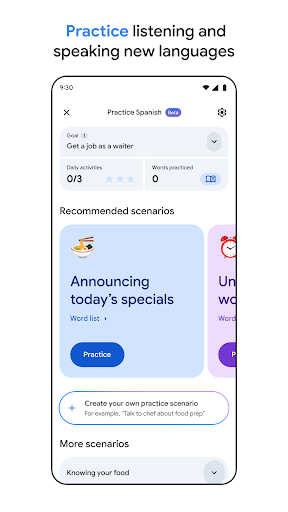
“Beta functionality like "practice" is a good direction! For many years, I thought about this. But I am really confused why practicing the English language is not available. I think even native English speakers can practice English. I would love to have a way to practice my saved English words (not useless or stupid words that many English-learning-apps force you…”

👍 397 found this helpful

Reviews sourced from Google Play, selected by helpfulness at the time of writing.

App Info & Permissions

Developer Google LLC
Content rating Everyone
Contains ads No
Installs 1.6B+
Price Free

Permissions this app requests

📷 Camera Take pictures and videos
👥 Contacts Find accounts on the device
🪪 Identity Find accounts on the device; add or remove accounts
🎙️ Microphone Record audio
🖼️ Photos/Media/Files Read the contents of your USB storage; modify or delete the contents of your USB storage
💬 SMS Read your text messages (SMS or MMS)
💾 Storage Read the contents of your USB storage; modify or delete the contents of your USB storage
📶 Wi-Fi connection information View Wi-Fi connections

Similar Apps

Frequently Asked Questions

1

What is Google Translate?

Google Translate is a free translation app from Google that supports 108 languages for typed text, with additional support for camera translation, voice conversations, handwriting input, and offline use. It's built for travelers, language learners, and anyone communicating across a language barrier. The app also offers a phrasebook and cross-device syncing for saved translations.

2

Is Google Translate free?

Yes, Google Translate is completely free to download and use, with no subscription or in-app purchases required. All core features, including camera translation, conversation mode, and offline packs, are included at no cost. This makes it accessible compared to many paid translation tools.

3

Does Google Translate work without internet?

It has an offline mode supporting 59 languages, but user reports indicate this feature can be unreliable. Some users have found that downloaded language packs stop working offline even after confirming a successful download. It's wise to test your downloaded languages before relying on them in an area without connectivity.

4

How accurate is the voice translation feature?

Accuracy varies significantly depending on how you use it. Users report it works reasonably well for short, uninterrupted sentences but struggles with longer speech, with one reviewer estimating around 70% accuracy and noting it stops if you pause. Recent updates have reportedly made real-time speech recognition less reliable for some users.

5

Is Google Translate good for travel?

For quick phrase lookups, reading signs via camera, and basic conversations, it's a genuinely useful travel companion with unmatched language coverage. However, given reported issues with offline reliability, travelers heading to areas without connectivity should double-check downloaded language packs before departure. It shouldn't be your only communication tool in a remote area.

