
ZArchiver

by ZDevs

4.2 ★ 1.4M+ reviews
473M+ Installs
01/24/2012 Released
ZArchiver icon
ZArchiver icon
Tools

ZArchiver

by ZDevs

4.2 ★ 1.4M+ reviews
473M+ Installs
01/24/2012 Released
Advertisements
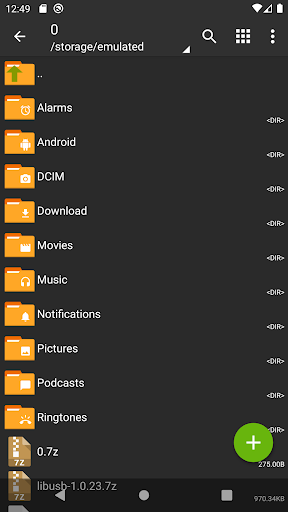
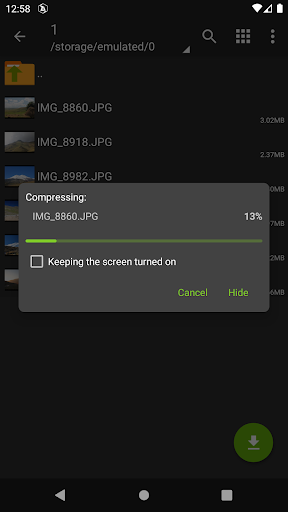
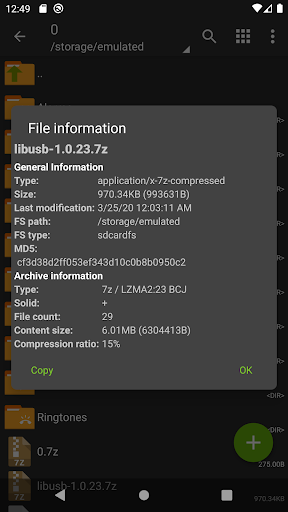
ZArchiver screenshot 1
ZArchiver screenshot 2
ZArchiver screenshot 3
ZArchiver screenshot 4
ZArchiver screenshot 5
ZArchiver screenshot 6

Ratings Breakdown

4.2 ★★★★★ 1.4M+ ratings
5 ★ 70%
4 ★ 8%
3 ★ 4%
2 ★ 3%
1 ★ 15%

Data from Google Play at the time of writing.

What ZArchiver Actually Does

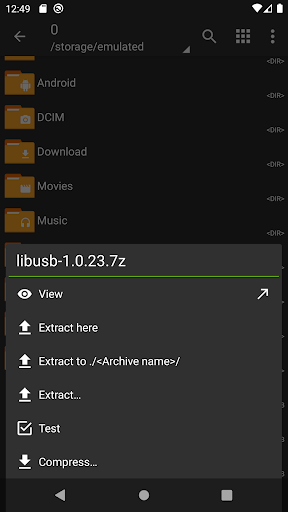
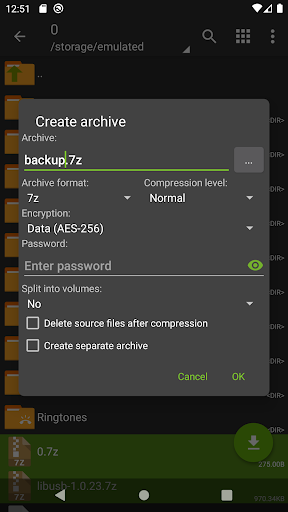
ZArchiver is a file compression and extraction tool for Android that handles an enormous range of archive formats, including 7z, zip, rar, rar5, tar, iso, dmg, cab, and many more obscure ones like alz, egg, and cramfs. It also doubles as a basic file manager, letting you browse folders, open compressed files directly from email attachments, and even install APK and OBB files pulled straight from a backup archive. This is squarely a tool for people who regularly deal with compressed files on their phone: downloading rar files, backing up apps, unpacking ROMs, or managing password-protected archives without needing a desktop computer.

Where It Genuinely Shines

The standout strength users keep pointing to is that it just works, reliably, across an unusually wide format list, with no ads and no internet permission requested at all. One long-term user called it solid and reliable over a couple of years of use, specifically noting that zipping files preserves modification timestamps, something other methods on Android often lose. Another reviewer flatly stated it’s the only file manager or archive tool they’ve needed for years of working with 7z and rar files, praising it as lightweight, free, and even including a built-in text editor and viewer. Multiple reviewers also highlight the value angle: full functionality for free, with only minor extras locked behind a small one-time payment, which feels increasingly rare compared to ad-heavy alternatives on the Play Store.

The Bugs That Keep Coming Up

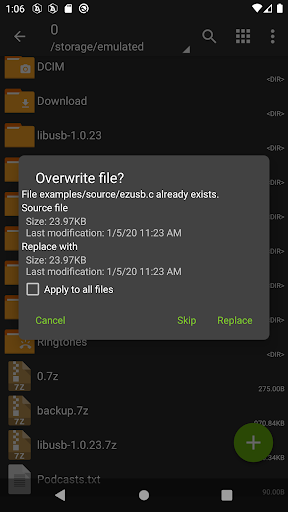
The most serious recurring complaint is a data corruption bug when overwriting files. One reviewer with thousands of helpful votes described that overwriting a file with a smaller one leaves leftover corrupted data at the end, effectively ruining the file. Another separate reviewer reported a related issue: copying a file sometimes results in a corrupted 0-byte file, forcing them to reinstall the app to get it working again. These aren’t edge-case nitpicks; they’re described by users as recurring problems serious enough to affect trust in the app for anything mission-critical, even though both reviewers still rated the app highly overall.

Interface Quirks That Trip People Up

Beyond the corruption bugs, the complaints are mostly about unintuitive UI choices rather than missing features. One user noted that opening a folder requires a very light, precise tap, which feels finicky compared to standard file manager gestures. Another pointed out that multi-selecting files for compression doesn’t work the way most Android users expect; long-pressing files doesn’t select them, and instead you have to open a menu and tap ‘Multi-select’ first, something the reviewer flagged as an odd, non-standard design decision. These are learnability issues rather than dealbreakers, but they mean new users may need a minute to figure out basic workflows that feel like they should be obvious.

Who Should Actually Install This

ZArchiver is best suited for power users, developers, or anyone who regularly handles rar, 7z, or other niche archive formats and wants a no-ads, no-internet-permission tool that respects privacy. It’s particularly valuable on phones with barebones or missing file managers, since it covers both compression and general file browsing in one app. If you mainly need to unzip an occasional file, it’s overkill but still works fine. The main caution is the overwrite and copy corruption bugs reported by real users; if you’re archiving anything irreplaceable, keep a backup elsewhere until you’ve confirmed your specific workflow doesn’t trigger the issue. For everyone else, the combination of format support, price, and lack of ads makes it hard to beat.


Pros

  • ✓Supports huge range of archive formats
  • ✓No ads and no internet permission
  • ✓Free with optional low-cost extras
  • ✓Includes built-in text editor/viewer
  • ✓Preserves file modification timestamps

Cons

  • ✕Overwrite bug can corrupt files
  • ✕Copying can produce 0-byte corrupted files
  • ✕Multi-select and tap gestures unintuitive

What Real Users Say

Triston Shaw ★ 4/5

“I wish I could give 4.9 stars. This is a really good file manager, but there is one tiny bug... Whenever I try to overwrite a file and the old file was bigger than the new file, there will be extra room on the end of the file, but it's basically just corrupted data. It corrupts the file and makes…”

👍 4,831 found this helpfulDeveloper responded
J P ★ 5/5

“This is a great app; it's been solid and reliable for the couple of years I've used it. I've only used it to archive photo files (unlike other methods, zipping files preserves their modification times). My only complaint is that, if you want to open a folder, you have to tap on it very lightly and quickly... otherwise the app…”

👍 2,976 found this helpful
AnderWriter ★ 5/5

“Great! It took me a moment to understand that, to compress multiple files, you don't just long-tap them to select them (the usual way), but that you must first open the menu and tap "Multi-select" (maybe an example of developers thinking they must "reinvent the wheel?"). But the rest of the app is very well designed and easy to use.…”

👍 2,622 found this helpful

Reviews sourced from Google Play, selected by helpfulness at the time of writing.

App Info & Permissions

Developer ZDevs
Content rating Everyone
Contains ads No
Installs 473M+
Released 01/24/2012
Price Free

Permissions this app requests

🖼️ Photos/Media/Files Read the contents of your USB storage; modify or delete the contents of your USB storage
💾 Storage Read the contents of your USB storage; modify or delete the contents of your USB storage

Similar Apps

Frequently Asked Questions

1

What is ZArchiver?

ZArchiver is an Android app for creating, extracting, and viewing compressed archive files such as zip, rar, 7z, tar, and dozens of other formats. It also manages application backups and can install APK or OBB files directly from an archive. It functions partly as a general file manager alongside its core compression tools.

2

Is ZArchiver free?

Yes, ZArchiver is free to download and use, with its core archiving and extraction features fully available at no cost. Some minor, nonessential extras can be unlocked for a small one-time payment. Reviewers specifically praise it for offering strong value without ads or paywalls blocking core functionality.

3

Does ZArchiver require an internet connection?

No, ZArchiver does not request internet access permission at all, meaning it cannot transmit data to any external service or person. This makes it appealing for users concerned about privacy when handling sensitive archives or backups. All operations happen locally on the device.

4

Does ZArchiver support password-protected archives?

Yes, it can both create and decompress password-protected archives. Note that this password is separate from your phone's lock screen password and is specific to the encrypted archive contents. Support covers formats like zip and 7z that allow encryption.

5

Are there any known bugs in ZArchiver?

Yes, real users report two notable issues: overwriting a file with a smaller one can leave corrupted leftover data, and copying files sometimes results in corrupted 0-byte files. Both issues have been described by long-term reviewers despite otherwise rating the app highly. It's worth keeping backups of important files until you've tested your specific use case.

