
Waze Navigation & Live Traffic

by Waze

4.2 8.8M+ reviews
664M+ Installs
Waze Navigation & Live Traffic icon
Maps & Navigation

Waze Navigation & Live Traffic

by Waze

4.2 8.8M+ reviews
664M+ Installs
Waze Navigation & Live Traffic screenshot 1
Waze Navigation & Live Traffic screenshot 2
Waze Navigation & Live Traffic screenshot 3
Waze Navigation & Live Traffic screenshot 4
Waze Navigation & Live Traffic screenshot 5
Waze Navigation & Live Traffic screenshot 6

Ratings Breakdown

4.2 ★★★★★ 8.8M+ ratings
5 70%
4 10%
3 5%
2 4%
1 11%

Data from Google Play at the time of writing.

What Waze Does and Who It’s For

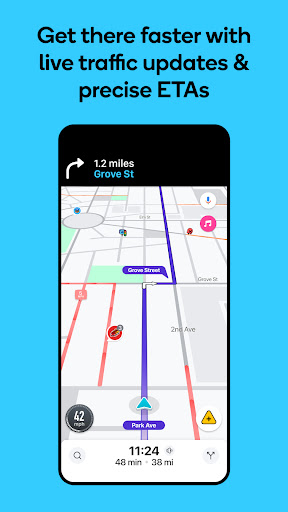
Waze is a crowdsourced navigation app that layers live driver reports on top of turn-by-turn GPS directions. Instead of relying purely on algorithmic traffic data, it pulls in real-time input from other drivers on the road: accidents, police, potholes, debris, speed cameras, and more. It’s built for daily commuters and regular drivers who want to shave minutes off familiar routes, not for occasional road-trippers who just need a basic map. With over 664 million installs, it’s clearly found a large audience among people who drive the same roads often enough to benefit from live rerouting.

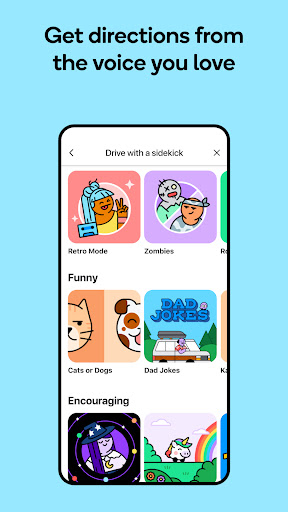
The app also bundles in extras like fuel and EV charging station prices, parking comparisons, toll information, lane guidance, and the ability to run audio apps like podcasts or music directly through its interface. It syncs with Android Auto, and it supports multiple voice options, including celebrity voice packs, for turn-by-turn guidance.

Where Waze Genuinely Delivers

The standout strength, echoed repeatedly in user feedback, is real-time accuracy for everyday driving. One long-time user called it ‘the only directional app I use,’ praising its precision in flagging police, construction, and cars on the shoulder. That kind of live hazard reporting is Waze’s core differentiator, and it clearly works well enough that many drivers won’t touch another navigation app. Users also appreciate being able to actively contribute reports while driving, something one reviewer specifically noted Google Maps didn’t offer as smoothly.

The variety of voice options is another point in its favor, though even fans note there’s room for more variety. Overall, for dense urban driving where traffic patterns shift by the minute, Waze’s community-driven model gives it an edge that static map data can’t match.

The Rerouting Problem That Frustrates Users

The most damaging complaint in user reviews is Waze’s tendency to reroute drivers straight into the same accident or closure it just detected. One reviewer described watching Waze insist on sending them back toward a total lane blockage, even after they manually reported the closure themselves, calling the alternate routes ‘convoluted’ attempts that still ended at the same jam. Another user, focused on rural driving, said the app changed directions mid-transit without notifying them, once even swapping their destination for a similarly named street in a different location entirely. That’s a serious reliability gap for anyone driving outside dense city grids.

A removed ‘detour’ button is another sore point. A reviewer who’s used Waze for years said the app used to let drivers manually trigger a detour, and its absence now, combined with no easy way to add a stop mid-route, has pushed them to split time between Waze and Google Maps instead of using Waze exclusively.

Audio and Stability Issues Worth Knowing About

Multiple complaints center on audio behavior. One user reported that Waze now refuses to play voice directions through the phone speaker whenever any Bluetooth device is connected, even with the speaker option selected properly, forcing them to disable Bluetooth entirely just to hear directions. Another said the character voice packs are too quiet to hear over road noise or background music, even at full volume. These aren’t minor gripes since audio guidance is the entire point of hands-free navigation.

Stability has also come up: one reviewer described the app crashing repeatedly, failing to respond to typed or spoken addresses, and needing a full reinstall before it worked again. It’s not clear how widespread this is, but it’s a real occurrence, not a hypothetical.

Who Should Actually Download This

Waze makes the most sense for city and suburban commuters who deal with unpredictable daily traffic and want live, human-reported hazard data that generic map apps don’t offer. If you drive the same routes often and want the fastest path around accidents, construction, or speed traps, the crowdsourced reporting genuinely pays off. It’s less convincing for rural drivers, given the reported issues with inaccurate rerouting and destination mix-ups outside urban areas.

If you rely heavily on Bluetooth audio for calls or music while navigating, test the app’s behavior first, since the reported speaker/Bluetooth conflict could be a dealbreaker. Overall, Waze remains a strong, free navigation option, but it’s not flawless, and long-time users clearly miss some control features that were quietly removed.
Pros

  • Accurate real-time traffic and hazard alerts
  • Community-reported police and speed cameras
  • Multiple voice guidance options available
  • Users can report incidents while driving
  • Extras like fuel prices and parking info

Cons

  • Reroutes sometimes lead back to blockages
  • Bluetooth connection blocks phone speaker audio
  • Missing detour button and route stop options

What Real Users Say

Crissi 5/5

“Great app!!!! It's the only directional app I use. Very accurate and precise real time! Tells you where police, construction, cars on shoulder or debris in road. Could use some more voices, just to switch it up a bit, but no complaints! It's too bad Robin Williams is past. He would have been a fun voice to drive along with!!…”

👍 2,324 found this helpful
LG Hakubi 2/5

“Omgggg literally an accident blocking all lanes for up to that point, an hour (cars are turning around) and Waze insists on rerouting every route to the accident. I'm putting up closures and it just finds more convoluted routes back to the accident. I know there's another way and want to see the time difference (and Waze knows I go…”

👍 730 found this helpfulDeveloper responded
Carly Gonnelli 4/5

“Edit, Waze is running again. Hopefully, it doesn't crash... After using Waze for years, the app has now crashed. I typed in and spoke the address I wanted to go to multiple times. Most of the time, Waze didn't respond, or if it did, it couldn't give directions. I un-installed and then reinstalled the app, and I can't log back…”

👍 372 found this helpfulDeveloper responded

Reviews sourced from Google Play, selected by helpfulness at the time of writing.

App Info & Permissions

Developer Waze
Content rating Everyone
Contains ads Yes
Installs 664M+
Price Free

Permissions this app requests

📅 Calendar Read calendar events plus confidential information
📷 Camera Take pictures and videos
👥 Contacts Read your contacts
📱 Device ID & call information Read phone status and identity
🪪 Identity Read your own contact card
📍 Location Approximate location (network-based); precise location (GPS and network-based); access extra location provider commands
🎙️ Microphone Record audio
📞 Phone Read phone status and identity

Similar Apps

Frequently Asked Questions

1

What is Waze Navigation & Live Traffic?

Waze is a GPS navigation app that combines turn-by-turn directions with live, crowdsourced reports from other drivers. It alerts users to accidents, police, potholes, road closures, and speed cameras in real time. It also includes tools for fuel prices, parking comparisons, toll info, and lane guidance.

2

Is Waze free to use?

Yes, Waze is free to download and use, supported by the data and reports contributed by its driver community. There's no mention of a paid tier in the app's own description, and it functions as a full-featured free navigation tool.

3

Does Waze work well outside of cities?

Based on user feedback, Waze is noticeably less reliable in rural areas. One reviewer reported the app changing routes mid-drive without warning and once confused their destination with a similarly named street elsewhere, so rural drivers should double-check directions.

4

Why won't Waze play voice directions through my phone speaker?

Some users have reported that Waze now defaults to playing audio through any connected Bluetooth device, even when the phone speaker is selected in settings. The only workaround mentioned by users is disabling Bluetooth entirely, which isn't ideal for those who also want Bluetooth for calls or music.

5

Does Waze still have a detour or manual reroute button?

According to long-time users, a detour button that used to let drivers manually trigger an alternate route has been removed, and there's currently no straightforward way to add a mid-route stop either. This has led some users to switch between Waze and Google Maps depending on their needs.