
네이버 – NAVER

by NAVER Corp.

3.4 545K+ reviews
122M+ Installs
02/25/2010 Released
네이버 – NAVER icon
네이버 – NAVER icon
Books & Reference

네이버 – NAVER

by NAVER Corp.

3.4 545K+ reviews
122M+ Installs
02/25/2010 Released
네이버 – NAVER screenshot 1
네이버 – NAVER screenshot 2
네이버 – NAVER screenshot 3
네이버 – NAVER screenshot 4
네이버 – NAVER screenshot 5
네이버 – NAVER screenshot 6

Ratings Breakdown

3.4 ★★★★★ 545K+ ratings
5 46%
4 11%
3 10%
2 5%
1 28%

Data from Google Play at the time of writing.

What NAVER Actually Is and Who It’s For

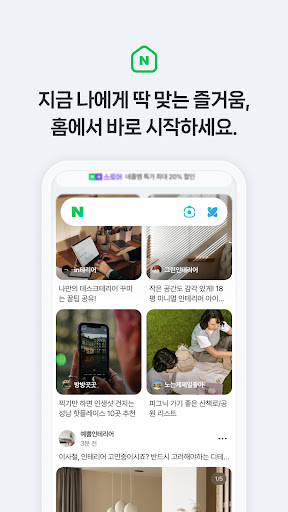
NAVER is South Korea’s dominant search and portal app, bundled into one package with news, a short-form video feed called Clip, a shopping platform (NAVER Plus Store), and a MY tab for payments, coupons, and identity verification. It’s essentially Korea’s answer to a Google-plus-TikTok-plus-Amazon super app. With over 122 million installs, most of that user base is in Korea, but the app is also used heavily by expats, Korean learners, travelers, and anyone who needs to interact with Korean websites, since many Korean services require NAVER login or NAVER Pay to function. If you have no connection to Korea, there’s little reason to install this.

The Map, Transit, and Real-Time Data Are Genuinely Strong

One reviewer specifically called out that ‘the details of the map itself and the real-time subway/bus information warrant 5 stars,’ and that lines up with what NAVER is known for locally: dependable, granular real-time transit info, weather, and stock data. The Wear OS integration extends this further, letting users check weather and stock prices and use Pay directly from a watch, plus quick-access tiles for frequently used tools. For daily practical use inside Korea, this backend data quality is the app’s clearest strength, and it’s not something competitors easily replicate outside the country.

Account Verification Is Where Everything Falls Apart

The most common and most damaging complaints are not about features, but about actually getting into the app. Multiple reviewers describe verification codes that never arrive, accounts suspended immediately after signup for being ‘mass generated,’ and repeated forced re-verification triggered by logging in from a ‘suspicious or abnormal location’ — a predictable problem for travelers or anyone using a VPN. One user reported this happening twice even after resolving it once. Another described being flagged as under 14 with no clear way to fix it, and being asked to submit a Korean phone number to verify identity, which is simply not possible for many foreign users. When customer service was contacted, one reviewer said the reply ‘made it seem they didn’t read’ the original inquiry. This isn’t a minor onboarding hiccup; for a meaningful slice of users, it’s a hard wall that blocks access to the app entirely.

The Disappearing English Option

A second recurring complaint concerns language support. One reviewer noted that after completing ‘real name’ verification paperwork for QR code access, they were pushed to a newer version that no longer had the English setting that used to be selectable from the logon page, with most content now untranslated. Another reviewer flagged that while the app itself may be fine, ‘the search engine optimization is awful for the English language version’ in practical use, meaning search results don’t behave the way English-speaking users expect. Some reviewers push back on this criticism, arguing the app was never meant to be a foreign-language product and that Google Translate via screenshot is a workable substitute — which is true, but it’s still a real usability gap for non-Korean speakers who make up a notable share of the install base.

Clip, Shopping, and the AI Search Tab

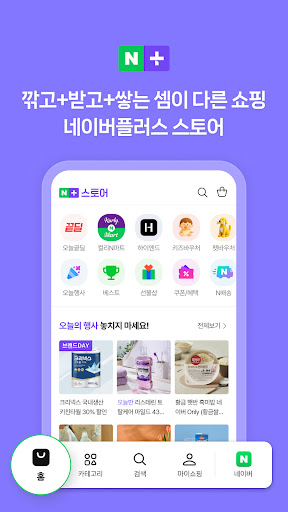
Clip functions as NAVER’s short-form video space for casual browsing and content creation, with a ‘My Clip Board’ for saving favorites, while NAVER Plus Store handles personalized shopping deals, discounts, and promotions. The newer AI tab in the search bar consolidates Lens image search, music search, voice search, and Around Me location search into one entry point, which is a sensible consolidation of tools that were previously scattered. None of these draw specific complaints in the reviews, but they also aren’t what people are talking about — the login and localization issues dominate the feedback, suggesting the core content features work reasonably well once you’re actually inside the app.

Verdict: Who Should Install This

NAVER is worth installing if you live in Korea, need NAVER Pay or NAVER-linked authentication for other Korean services, or want best-in-class Korean transit and real-time data. It’s a rockier proposition for foreign users, travelers, or Korean-language learners, given the documented verification failures, account suspensions tied to location changes, and shrinking English support in recent versions. Go in expecting to troubleshoot the signup process, and keep a Google Translate tab handy.


Pros

  • Strong real-time transit and map data
  • Useful Wear OS tile integration
  • Consolidated AI search tab tools
  • Personalized shopping deals via Plus Store
  • Short-form Clip content for quick browsing

Cons

  • Frequent account verification failures
  • Shrinking or missing English language support
  • Accounts suspended for location changes

What Real Users Say

Samantha 5/5

“To everyone who rated this 1 - 3 stars because of the language being korean, yall are dumb! You do know that the app your downloading is not a foreign app right? And, to those who have trouble logging/signing in, you can screenshot the main page/settings and let google translate it. Or simply don't download the app. Anyways, the app…”

👍 716 found this helpful
Jennifer Cote 2/5

“After submitting the paperwork to Naver for "real name" in support for QR code, I was updated to the latest version which does not have an English setting like the previous version (unless they are hiding it really well). It used to be on the logon page and most of the content was translated. Now, having to press the bird…”

👍 466 found this helpful
A Google user 2/5

“While the details of the map itself and the real-time subway/bus information warrant 5 stars, the search engine optimization is awful for the English language version of this app in my specific use case. This review is primarily for the English language version, although no matter if I write a location in English or hangul (the Korean alphabet), I keep…”

👍 254 found this helpful

Reviews sourced from Google Play, selected by helpfulness at the time of writing.

App Info & Permissions

Developer NAVER Corp.
Content rating Everyone
Contains ads No
Installs 122M+
Released 02/25/2010
Price Free

Permissions this app requests

📷 Camera Take pictures and videos
👥 Contacts Find accounts on the device; read your contacts; modify your contacts
🕘 Device & app history Retrieve running apps
📱 Device ID & call information Read phone status and identity
🪪 Identity Find accounts on the device; add or remove accounts
📍 Location Approximate location (network-based); precise location (GPS and network-based)
🎙️ Microphone Record audio
📞 Phone Read phone status and identity
🖼️ Photos/Media/Files Read the contents of your USB storage; modify or delete the contents of your USB storage
💾 Storage Read the contents of your USB storage; modify or delete the contents of your USB storage
📶 Wi-Fi connection information View Wi-Fi connections

Similar Apps

Frequently Asked Questions

1

What is 네이버 - NAVER?

NAVER is a South Korean super app combining search, news, short-form video (Clip), shopping (NAVER Plus Store), and a MY tab for payments and identity verification. It's developed by NAVER Corp. and serves as Korea's primary portal, similar to a blend of Google, TikTok, and Amazon. It also supports Wear OS for real-time weather, stock, and payment access.

2

Is 네이버 - NAVER free to use?

Yes, the app itself is free to download and install. Some features like NAVER Pay involve real transactions, and certain shopping deals or promotions are tied to the Plus Store, but there's no cost to install or browse the core app.

3

Does NAVER work well for non-Korean speakers?

It's inconsistent. Some reviewers report that a previous English setting on the logon page has disappeared in newer versions, leaving most content untranslated, and that English-language search results don't behave as expected. Many non-Korean users get by using screenshot translation tools, but it's not a smooth native experience.

4

Why do some users get their NAVER accounts suspended?

Multiple reviewers report suspensions triggered by logging in from what NAVER flags as a 'suspicious or abnormal location,' which commonly affects travelers or VPN users. Others describe accounts suspended immediately after signup for appearing 'mass generated,' with limited recourse through customer support. This appears to be one of the most frequently cited frustrations in user reviews.

5

Is NAVER worth downloading if I don't live in Korea?

It depends on your needs. If you require NAVER Pay or NAVER login for other Korean services, it's often necessary despite the friction. But if you're just curious or don't have a specific Korea-related use case, the verification hurdles and language limitations described by reviewers make it a harder sell.