
Google Messages

by Google LLC

4.3 43M+ reviews
11B+ Installs
11/12/2014 Released
Google Messages icon
Communication

Google Messages

by Google LLC

4.3 43M+ reviews
11B+ Installs
11/12/2014 Released
Google Messages screenshot 1
Google Messages screenshot 2
Google Messages screenshot 3
Google Messages screenshot 4
Google Messages screenshot 5
Google Messages screenshot 6

Google Messages has quietly become the default texting app for most Android phones, and after using it as a daily driver, it’s clear why. RCS support is the headline feature, and when it works, it genuinely closes the gap with iMessage: read receipts, typing indicators, high-res photo and video sharing, and reactions that show up as actual emoji instead of the dreaded “liked an image” text bomb. Chats with other RCS users, including iPhone friends on iOS 18 and later, feel modern in a way SMS never did.

The catch is that RCS still depends on carrier and region support, so results vary wildly. Some users get flawless encrypted RCS chats; others are stuck wondering why group texts with certain contacts still fall back to MMS with compressed, blurry photos. When it doesn’t work, there’s little the app itself can do to explain why, and troubleshooting carrier-level RCS issues is not something most people want to deal with.

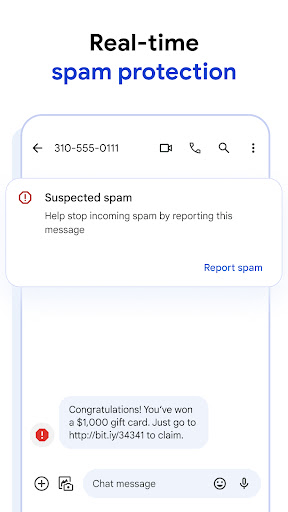
Spam filtering is genuinely useful, catching a solid chunk of the junk texts and phishing links that used to slip through on stock SMS apps. The Magic Compose AI suggestions are a nice-to-have but skippable; they’re fun for texting in a different tone but not something most people will use daily. Customization like chat bubble colors and themes adds a bit of personality without cluttering the interface, and the app stays fast and lightweight even with years of message history.

Cross-device sync via Messages for Web works well for basic use, though it’s not as seamless as Apple’s ecosystem integration, and occasionally requires re-pairing. End-to-end encryption for RCS chats between Google Messages users is a real privacy win, but it’s worth remembering that fallback SMS/MMS messages and RCS chats with non-encrypted clients don’t get the same protection. Overall it’s a competent, actively improving app that’s clearly the best default texting option for Android, but it’s still held back by RCS’s inconsistent rollout across carriers.


Pros

  • Encrypted RCS chats between users
  • Effective spam and phishing filtering
  • Works well with iPhone contacts
  • Customizable bubbles and themes
  • Cross-device sync via web app

Cons

  • RCS support varies by carrier
  • Fallback MMS photos look compressed
  • AI features feel optional, not essential

App Info & Permissions

Developer Google LLC
Contains ads No
Installs 11B+
Released 11/12/2014

Similar Apps

Frequently Asked Questions

1

What is Google Messages?

Google Messages is Google's official texting app for Android, supporting both traditional SMS/MMS and modern RCS messaging. It offers features like read receipts, typing indicators, high-res media sharing, and group chats that work across Android and iPhone. It's preinstalled on most Android phones as the default messaging app.

2

Is Google Messages free?

Yes, the app itself is free to download and use. However, RCS and SMS messaging may still use your carrier's data or texting plan, and standard messaging rates could apply depending on your plan. There are no separate premium tiers within the app.

3

Does Google Messages work with iPhone users?

Yes, as of recent updates, RCS messaging works between Google Messages and iPhones running iOS versions that support RCS. This means better photo quality, typing indicators, and reactions compared to standard SMS. However, full end-to-end encryption between Android and iPhone RCS chats is still limited.

4

Are messages in Google Messages encrypted?

RCS conversations between Google Messages users are end-to-end encrypted, meaning only the sender and recipient can read them. This does not apply to fallback SMS/MMS messages or chats where the other person isn't using an encrypted RCS-compatible client. Group chats also support encryption under certain conditions.

5

Why isn't RCS working for me in Google Messages?

RCS availability depends on your carrier, region, and device support, so it doesn't work universally for every user. Some carriers are slower to roll out full RCS support, causing messages to fall back to SMS or MMS. If RCS isn't working, checking carrier settings or app updates is usually the first troubleshooting step.

