
Gallery

by Google LLC

4.2 614K+ reviews
1.8B+ Installs
07/23/2019 Released
Gallery icon
Gallery icon
Photography

Gallery

by Google LLC

4.2 614K+ reviews
1.8B+ Installs
07/23/2019 Released
Gallery screenshot 1
Gallery screenshot 2
Gallery screenshot 3
Gallery screenshot 4

Ratings Breakdown

4.2 ★★★★★ 614K+ ratings
5 69%
4 9%
3 7%
2 4%
1 11%

Data from Google Play at the time of writing.

What Gallery Actually Does

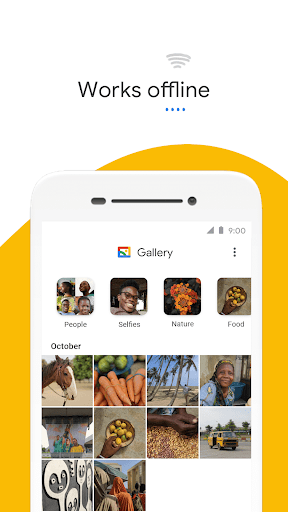
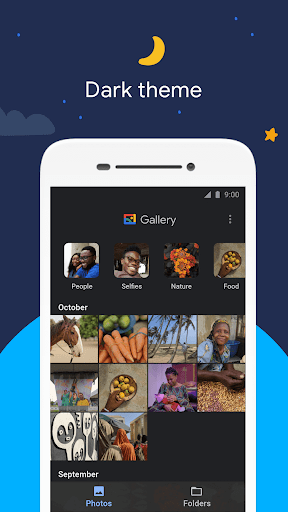
Gallery is Google’s stripped-down alternative to Google Photos, built for people who want a fast local photo and video manager without a mandatory cloud backup or a bloated interface. It sorts your existing photos into categories like People, Selfies, Nature, Animals, Documents, and Videos automatically overnight, and it supports folder browsing and SD card transfers, which makes it useful on budget Android phones with limited storage.

This is not an editing powerhouse or a Google Photos replacement with search and sharing baked in. It’s aimed at users who just want to see their photos organized by folder and category, offline, in a small app that won’t eat up phone resources.

Where It Genuinely Delivers

Users consistently point out that Gallery is simple in a way Google Photos isn’t. One reviewer said outright that ‘not everyone wants to deal with a complex app like Google Photo’ and that Gallery ‘is simple and easy.’ Another called it ‘the best gallery app I had so far’ thanks to its easy folder and album overview. For anyone who finds Google Photos overwhelming or is wary of automatic cloud uploads, that simplicity is the main draw, and it clearly resonates given how many people rely on it daily.

The offline-first design and small footprint also do what they promise. It doesn’t hog storage or memory, and SD card support is a real feature that plenty of budget-phone owners actually need, not just marketing copy.

The Back Button Bug That’s Frustrating Users

The most damaging recent issue, based on real feedback, is a broken navigation flow after an update. Multiple reviewers describe the exact same problem: tapping a photo to view it, then pressing the phone’s system back button, kicks you out of the app entirely instead of returning to the gallery grid. The app then keeps running in the background, and reopening it dumps you back on the last viewed photo rather than your folder view. One user had to resort to the on-screen back button just to navigate normally. This isn’t a minor annoyance — it breaks the core interaction of browsing photos, and it’s clearly a regression from a recent update rather than a long-standing quirk.

Customization and Reliability Gaps

Even setting the back-button bug aside, Gallery has some pointed limitations. The most upvoted complaint is the lack of grid customization — users want five rows of thumbnails instead of the fixed default of four, and there’s no setting to change it or to disable the recycle bin. It sounds minor, but for people managing thousands of photos, that rigidity matters.

Other users report that moving photos between folders triggers constant confirmation pop-ups, that photo ordering is sometimes wrong, and that compatibility with third-party apps like Lightroom and WhatsApp has gotten worse, with metadata handling causing photos to appear out of place. One reviewer also noted you can only move photos into folders from the thumbnail grid view, not while viewing an individual photo, which is an odd workflow gap for an app whose whole pitch is organization.

Who Should Actually Download This

Gallery is worth trying if you specifically want a lightweight, offline photo browser and have already decided Google Photos’ cloud-centric approach isn’t for you. It works well for basic organization, folder browsing, and SD card management on lower-end devices, and the auto-categorization is a genuine time-saver for casual browsing.

That said, go in with realistic expectations. The current navigation bug is a real usability problem that multiple users are hitting after updates, and the lack of view customization or bin control shows the app hasn’t evolved much despite its scale of use. If you need reliable back-button behavior right now, or you frequently move photos between third-party apps, you may want to wait for a fix or stick with an alternative until Google addresses these complaints. For basic, no-frills local photo storage, it still mostly gets the job done.


Pros

  • Simple, uncluttered alternative to Google Photos
  • Automatic photo categorization by type
  • Works fully offline without data use
  • Small app size, low memory usage
  • Supports folders and SD card transfers

Cons

  • Broken back-button navigation after update
  • No grid row customization or bin toggle
  • Worse compatibility with third-party apps

What Real Users Say

Mark Perry 3/5

“would be so much better if you could at LEAST modify the view settings and have 5 rows rather than the default 4. I know it sounds trivial but some of us like things in a precise way. And the lack of customisation on this app lets it down. Also no option to turn the bin off or give you…”

👍 964 found this helpful
Masta Haze 3/5

“Not everyone wants to deal with a complex app like Google Photo. Gallery is simple and easy. However, there are some aspects of the app that are a little annoying. For example the constant pop up requests when you wanna move pictures from one folder to another one. Lately, the app also developed a bug related to gesture navigation. If…”

👍 17 found this helpful
Lian Paul Gomes 1/5

“After the recent update it acts weird. If I click on a photo it opens but when I try to go back using my phone's default system, it kicks me out from the Gallery but it remains running in the background. When I open the app again, it takes me to the last opened photo. I have to press the…”

👍 17 found this helpful

Reviews sourced from Google Play, selected by helpfulness at the time of writing.

App Info & Permissions

Developer Google LLC
Content rating Everyone
Contains ads No
Installs 1.8B+
Released 07/23/2019
Price Free

Permissions this app requests

🖼️ Photos/Media/Files Read the contents of your USB storage; modify or delete the contents of your USB storage
💾 Storage Read the contents of your USB storage; modify or delete the contents of your USB storage

Similar Apps

Frequently Asked Questions

1

What is Gallery?

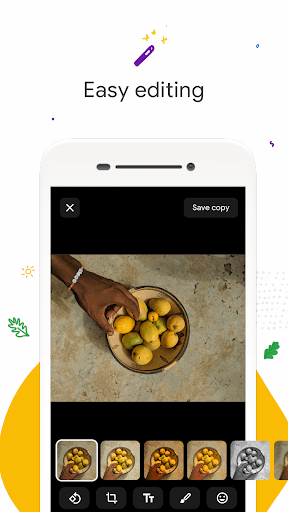
Gallery is a free photo and video management app made by Google that organizes your local photos into categories like People, Nature, and Videos automatically. It works offline, supports folders and SD card transfers, and includes basic editing tools like auto-enhance. It's designed as a lighter, simpler alternative to Google Photos for people who don't want cloud-based photo management.

2

Is Gallery free to use?

Yes, Gallery is free to download and use, with no subscription required for its core organizing and viewing features. It doesn't push cloud storage plans the way Google Photos does. All the organizing, folder management, and basic editing tools are included at no cost.

3

Does Gallery back up my photos to the cloud?

No, Gallery is built to work offline and focuses on managing photos already stored locally on your device or SD card. It does not handle cloud backup the way Google Photos does. If you need cloud backup, you'll need to use Google Photos or another backup service alongside Gallery.

4

Why does Gallery keep closing when I press back?

Multiple users report that a recent update broke the back-button behavior, causing the app to exit entirely instead of returning to the previous screen when viewing a photo. The app then keeps running in the background and reopens to the last viewed image. Using the on-screen back button within the app is currently the reported workaround.

5

Can I customize how photos are displayed in Gallery?

Customization is limited right now. Users have specifically asked for the ability to change the thumbnail grid from four rows to five, and to disable the recycle bin feature, but neither option currently exists. If tight control over the viewing layout matters to you, this is a known limitation.

