



Yahoo Mail

by Yahoo

4.1 ★ 8.7M+ reviews
349M+ Installs
06/22/2010 Released
Yahoo Mail icon
Yahoo Mail icon
Communication

Yahoo Mail

by Yahoo

4.1 ★ 8.7M+ reviews
349M+ Installs
06/22/2010 Released
Advertisements
Yahoo Mail screenshot 1
Yahoo Mail screenshot 2
Yahoo Mail screenshot 3
Yahoo Mail screenshot 4
Yahoo Mail screenshot 5
Yahoo Mail screenshot 6

Ratings Breakdown

4.1 ★★★★★ 8.7M+ ratings
5 ★ 67%
4 ★ 10%
3 ★ 5%
2 ★ 4%
1 ★ 14%

Data from Google Play at the time of writing.

What Yahoo Mail Is Trying To Be Today

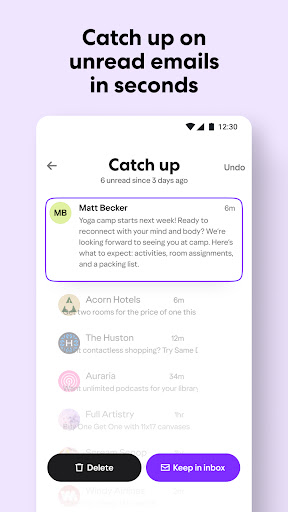
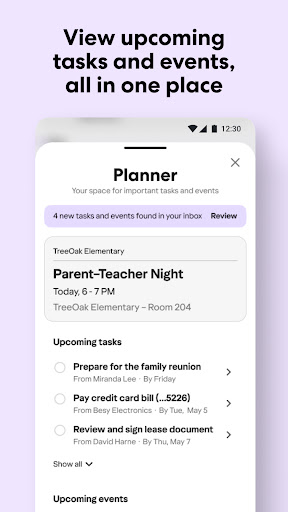
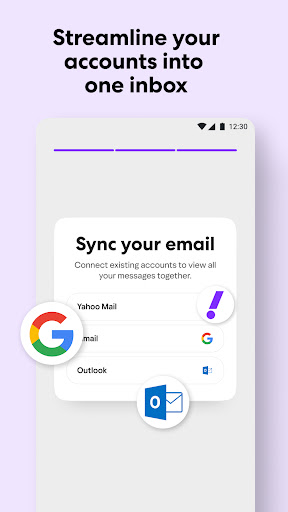
Yahoo Mail has moved well beyond simple email, positioning itself as a combined inbox, planner, and package tracker. The new Planner feature pulls flight confirmations, reservations, and bills into one view, while Orders Hub surfaces tracking numbers and receipts automatically. Add AI Summaries, AI Compose, and the ability to merge Gmail, Outlook, and AOL accounts into one unified inbox, and this is clearly aimed at people who live in their inbox and want everything else pulled into it too.

Where It Actually Delivers

The core appeal that has kept Yahoo Mail installed hundreds of millions of times still holds: 20 GB of free storage is generous, spam filtering is solid, and features like one-tap unsubscribe and delete-by-sender genuinely help claw back a messy inbox. Users who stick with it for years suggest the underlying service is dependable for basic email needs, and syncing multiple providers into one place is convenient if you juggle several accounts.

The UI Changes That Are Frustrating Long-Time Users

The most consistent complaint in real reviews is the interface overhaul. Multiple users report the app defaults to a ‘Priority’ or ‘Primary’ view instead of showing all emails, causing important messages to be missed entirely. One reviewer said they can no longer easily tell read from unread messages. Another said the option to select all emails from a specific day has disappeared, and sorting into folders now requires extra long-press steps that sometimes freeze or fail to scroll.

Bugs That Undercut The New Features

Beyond redesign complaints, there are functional bugs. Reviewers describe emails appearing out of order mid-scroll during bulk deletion, swipe gestures for delete or mark-as-read needing repeated attempts to register, and deleted emails still showing up in the inbox. One user noted syncing issues with the desktop version, where an email marked deleted on one platform persists on another. Even a reviewer who liked the AI-driven Newsletters/Primary/Offers sorting found it sometimes misfiles emails, making the inbox harder to scan rather than easier.

Who Should Actually Download This

Yahoo Mail still makes sense for anyone who wants a free, high-storage inbox that can also swallow their Gmail and Outlook accounts into a single feed, and who doesn’t mind a bit of AI clutter in exchange for automatic package tracking and bill reminders. It’s less suitable for people who rely on precise manual folder organization or who need a completely stable, unchanging interface, since recent updates have introduced real friction into basic tasks like bulk-deleting or distinguishing read from unread mail. If you’re patient with occasional glitches and want an all-in-one mailbox rather than a minimalist one, it’s worth trying; if reliability and a stable UI matter more than new features, expect some frustration until Yahoo irons out these complaints.


Pros

  • ✓20 GB of free email storage
  • ✓Unifies Gmail, Outlook, AOL inboxes
  • ✓Automatic package tracking via Orders Hub
  • ✓One-tap unsubscribe and delete-by-sender
  • ✓AI summaries for long emails

Cons

  • ✕Defaults to Priority, hides all emails
  • ✕Buggy swipe gestures and scrolling menus
  • ✕Deleted emails sometimes reappear

What Real Users Say

The Blue Faery ★ 1/5

“Horrible change to the UI. Can't tell which emails are read versus unread. It keeps defaulting to priority instead of all. I missed some really important emails thanks to this. Also, my email addresses are separate for a reason. Stop pestering me to view them all in the same inbox. Wish I could roll back to the old version like…”

👍 3,970 found this helpful
Paige Miller ★ 1/5

“This app is still absolutely. There are still extra steps to sort emails into folders (when I long press, and also when I'm in a specific email). Half of the time, when the menu comes up, it doesn't allow me to scroll, so I have to close the menu and try again. I have used Yahoo for a very long…”

👍 1,944 found this helpfulDeveloper responded
Aubrey Geller ★ 2/5

“whether I am in the unread or main folder any time I try and go through to delete emails, there always seems to be a glitch. emails pop up out of order, as all of a sudden, more recent emails pop up as I have already scrolled down to older ones. as I select emails for one bulk deletion, there's…”

👍 1,745 found this helpful

Reviews sourced from Google Play, selected by helpfulness at the time of writing.

App Info & Permissions

Developer Yahoo
Content rating Everyone
Contains ads Yes
In-app purchases $0.99 - $119.99 per item
Installs 349M+
Released 06/22/2010
Price Free

Permissions this app requests

📷 Camera Take pictures and videos
👥 Contacts Find accounts on the device; read your contacts
🪪 Identity Find accounts on the device; add or remove accounts
📍 Location Approximate location (network-based); precise location (GPS and network-based)
🖼️ Photos/Media/Files Read the contents of your USB storage; modify or delete the contents of your USB storage
💾 Storage Read the contents of your USB storage; modify or delete the contents of your USB storage
📶 Wi-Fi connection information View Wi-Fi connections

Similar Apps

Frequently Asked Questions

1

What is Yahoo Mail?

Yahoo Mail is a free email app from Yahoo that includes a smart inbox, spam filtering, and organizational tools like Planner and Orders Hub. It lets users manage their own Yahoo address plus connect Gmail, Outlook, and AOL accounts into one unified inbox. It also includes AI-powered features such as email summaries and compose assistance. It's built for both casual users and people managing high volumes of email.

2

Is Yahoo Mail free to use?

Yes, Yahoo Mail is free and comes with 20 GB of storage, which is described as industry-leading in the app's own listing. Core features like spam detection, one-tap unsubscribe, and Orders Hub package tracking are included at no cost. There's no indication in the store listing of a mandatory paid tier for basic use.

3

Does Yahoo Mail work with Gmail and Outlook accounts?

Yes, Yahoo Mail supports Universal Account Access, letting you sync Gmail, Outlook, and AOL accounts into a single unified inbox. This means you can view and manage messages from multiple providers without switching apps. Yahoo's organizational features, like package tracking, are applied across these connected accounts too.

4

Why do some users dislike the new Yahoo Mail interface?

Several real user reviews complain that the app now defaults to a 'Primary' or priority view instead of showing all emails, which has caused people to miss important messages. Others report that distinguishing read from unread emails is harder, and that sorting emails into folders now requires extra steps like long-pressing menus that can freeze or fail to scroll. These UI changes are the most cited source of frustration among long-time users.

5

Are there bugs in Yahoo Mail worth knowing about before downloading?

Yes, real user feedback highlights several bugs, including emails reordering unexpectedly during bulk deletion, swipe gestures for deleting or marking emails that require multiple attempts, and deleted emails that sometimes still appear in the inbox. Some users also report syncing problems between the mobile app and desktop version. These issues appear frequently enough in reviews that they're worth expecting rather than being surprised by.

