
XBrowser – Mini & Super fast

by byteman.su

4.4 ★ 96K+ reviews
48M+ Installs
09/29/2018 Released
XBrowser – Mini & Super fast icon
Communication

XBrowser – Mini & Super fast

by byteman.su

4.4 ★ 96K+ reviews
48M+ Installs
09/29/2018 Released
Advertisements
XBrowser – Mini & Super fast screenshot 1
XBrowser – Mini & Super fast screenshot 2
XBrowser – Mini & Super fast screenshot 3
XBrowser – Mini & Super fast screenshot 4
XBrowser – Mini & Super fast screenshot 5
XBrowser – Mini & Super fast screenshot 6

Ratings Breakdown

4.4 ★★★★★ 96K+ ratings
5 ★ 77%
4 ★ 8%
3 ★ 4%
2 ★ 4%
1 ★ 7%

Data from Google Play at the time of writing.

What XBrowser Is and Who It’s For

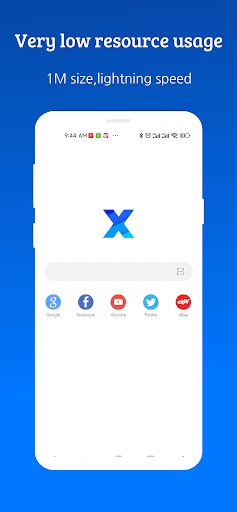
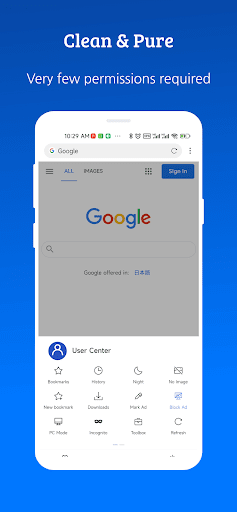
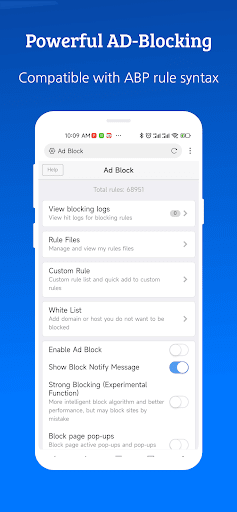
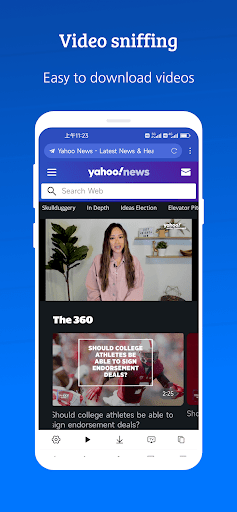
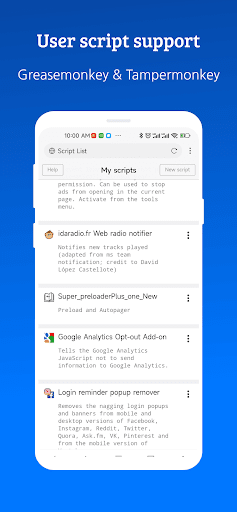
XBrowser is a lightweight Android browser that markets itself on being tiny (around 1MB) while still packing in ad blocking, video sniffing for saving online videos, user script support via GreaseMonkey and Tampermonkey, autofill, and heavy customization options for gestures and appearance. It’s aimed at users who want a fast, no-frills alternative to Chrome or Firefox, particularly people on older phones or limited storage who still want some power-user features like script injection and rule-based ad filtering.

Speed and Everyday Browsing Experience

The reviews consistently back up the speed claims. Multiple users say pages load faster than in other browsers they’ve tried, and one long-time Chrome, Firefox, Brave, Opera, and DuckDuckGo user says they keep coming back to XBrowser as their go-to. It also gets praise for low RAM usage and not draining battery, which lines up with the ‘1M size, minimal resources’ pitch. The one-touch cache and cookie cleanup is called out specifically as a convenient daily-use feature.

Customization, Reader Mode, and Script Support

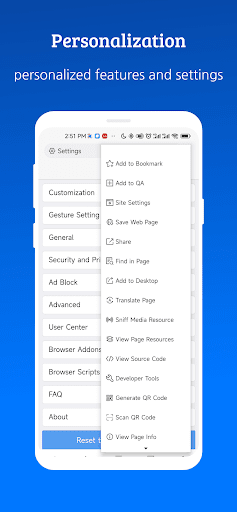
Gesture controls, UI personalization, and shortcut options get genuine praise, with one reviewer calling the customization and UI ‘nice’ outside of other complaints. Reader mode is also appreciated for its adjustable font sizes and background colors, though the same reviewer notes it fails to show full text on many websites, undercutting its usefulness. There’s no mention of the GreaseMonkey/Tampermonkey support working poorly, but also no strong evidence in reviews that it’s a major draw for most users, it seems to matter mostly to a smaller technical crowd.

Ad Blocking and Stability Problems

This is where the app loses points. One reviewer directly says the adblocker doesn’t work on many sites even after activating it in both available settings locations, and that pop-ups still open even after being disabled. The same review flags that desktop/PC mode doesn’t work properly and that pages actually load slowly compared to other browsers, contradicting the speed praise from other users, so results seem to vary by site or device. Tab management is another sore spot: one user reports that opening a new tab and searching closes all other open tabs, and another says the browser bogs down after about 20 open tabs and needs to be cleared out. A separate complaint mentions maps and location-based results not appearing in English.

Missing Basics That Frustrate Users

A few gaps stand out precisely because they seem like easy fixes. There’s no text size or font adjustment option outside of reader mode, which one reviewer flags as a real problem for anyone with eyesight issues. Another wants StartPage added as a search engine option. Someone also flagged a confusing dual-search-bar layout near the speed dial that isn’t clearly explained anywhere in the app.

Final Verdict

XBrowser delivers on being small and generally fast, and its customization, reader mode, and cache-clearing tools are legitimately useful day to day. But the ad blocker’s inconsistency, tab-closing bug, and lack of font scaling are the kind of issues that undercut a browser’s core job. It’s worth trying if you want a lightweight alternative with script support, but don’t expect it to be flawless.


Pros

  • ✓Very fast and lightweight on most devices
  • ✓Low RAM and battery usage
  • ✓Useful one-touch cache/cookie cleanup
  • ✓Strong gesture and UI customization
  • ✓Supports GreaseMonkey/Tampermonkey scripts

Cons

  • ✕Ad blocker fails on many sites
  • ✕New tabs sometimes close other tabs
  • ✕No text size adjustment outside reader mode

What Real Users Say

William Edward Brown ★ 5/5

“I really love this browser, but most browsers have their flaws, and X has a few minor issues with me. For instance, when I click on a website for directions in my town, the map is not in English. Another issue I have is that there are two searches. One is above my speed dial websites, plus there is a…”

👍 4,364 found this helpful
A Google user ★ 4/5

“Great browser with many customization and gesture options, as well as nice UI. Also, it does not seem to hog battery. Reader mode is nice with adjustable font sizes and background colors. But it does not show full text on many web sites, which limits its usefulness. Another problem is that the browser store passwords on some sites but not…”

👍 1,374 found this helpful
Truth Inside ★ 4/5

“There are quite a few things which must be fixed. First of all the adblocker don't work on many sites even after activating in both places, second pop-op also opens even after being deactivated. Second PC/Dekstop mode doesn't work properly. Third pages load slowly as compared to other browsers. Fourth VPN function should be added.”

👍 308 found this helpful

Reviews sourced from Google Play, selected by helpfulness at the time of writing.

App Info & Permissions

Developer byteman.su
Content rating Everyone
Contains ads No
Installs 48M+
Released 09/29/2018
Price Free

Permissions this app requests

📷 Camera Take pictures and videos
📍 Location Approximate location (network-based); precise location (GPS and network-based)
🎙️ Microphone Record audio
🖼️ Photos/Media/Files Read the contents of your USB storage; modify or delete the contents of your USB storage
💾 Storage Read the contents of your USB storage; modify or delete the contents of your USB storage
📶 Wi-Fi connection information View Wi-Fi connections

Similar Apps

Frequently Asked Questions

1

What is XBrowser - Mini & Super fast?

XBrowser is a lightweight Android web browser that emphasizes small app size, speed, and low resource usage. It includes ad blocking, video sniffing to save online videos, autofill, GreaseMonkey/Tampermonkey user script support, and extensive customization options for gestures and appearance. It's designed for users who want a fast, minimal alternative to mainstream browsers like Chrome or Firefox.

2

Is XBrowser free to use?

Yes, XBrowser is free to download and use from the Play Store. The store listing does not mention any subscription or premium tier, and reviewer feedback doesn't reference paywalls or forced purchases. All the features described, including ad blocking and script support, appear accessible without payment.

3

Does XBrowser actually block ads effectively?

Results are mixed according to real users. Several reviewers appreciate the ad blocking, but at least one detailed review reports that the adblocker doesn't work on many sites even after enabling it in both available settings areas, and that pop-ups still appear despite being turned off. Effectiveness may depend on the specific sites you visit.

4

Does XBrowser support browser extensions or scripts?

Yes, it has built-in support for GreaseMonkey and Tampermonkey user scripts, which lets advanced users add custom functionality to websites. This is a feature not commonly found in other lightweight mobile browsers. However, user reviews focus mostly on core browsing performance rather than script usage, so real-world script compatibility isn't heavily documented.

5

What are the biggest complaints from XBrowser users?

The most cited issues are an inconsistent ad blocker, a bug where opening a new tab closes other open tabs, and the browser slowing down once around 20 tabs are open. Some users also report desktop mode not working properly, slower-than-expected page loads on certain sites, and a lack of font size adjustment outside of reader mode.

