
WhatsApp Messenger

by WhatsApp LLC

4.6 238M+ reviews
12B+ Installs
10/18/2010 Released
WhatsApp Messenger icon
Communication

WhatsApp Messenger

by WhatsApp LLC

4.6 238M+ reviews
12B+ Installs
10/18/2010 Released
WhatsApp Messenger screenshot 1
WhatsApp Messenger screenshot 2
WhatsApp Messenger screenshot 3
WhatsApp Messenger screenshot 4
WhatsApp Messenger screenshot 5
WhatsApp Messenger screenshot 6

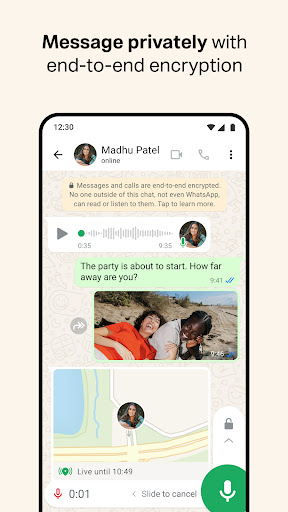
WhatsApp remains the default messaging app for a huge chunk of the world, and after using it daily for calls, group chats, and file sharing, it’s easy to see why. The end-to-end encryption is baked into everything by default, so you’re not fiddling with settings to keep conversations private, and setup is genuinely painless since it just uses your phone number instead of yet another username and password to remember. Voice and video calls hold up well even on mediocre connections, which matters if you’re talking to people overseas on spotty WiFi.

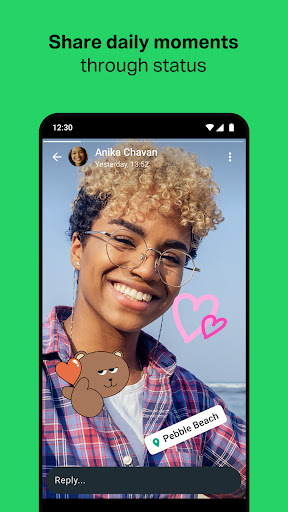
That said, it’s not without friction. Backups can be a hassle depending on how you’ve set up Google Drive or iCloud storage, and if you switch phones without checking your backup settings first, you can lose message history. The app has also grown heavier over the years — Status, Channels, Communities, and the Meta AI integration make the interface feel busier than the simple texting app it started as. If you just want to send messages, all the extra tabs can feel like clutter you’re forced to scroll past.

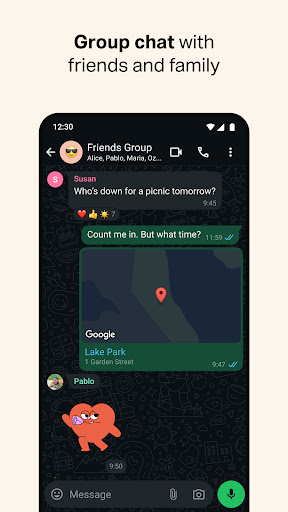
Group chats are reliable and support up to 32 people on calls, which is genuinely useful for families or teams, and sharing photos, videos, and documents across mobile and desktop works smoothly. The Wear OS support is a nice touch for anyone who wants to glance at messages without pulling out their phone, though it’s a minor feature most users won’t touch.

The elephant in the room is the Meta ownership. Even with encryption intact, some users remain uneasy about metadata sharing and how it ties into Meta’s broader ecosystem. WhatsApp is also entirely dependent on an internet connection — there’s no fallback to SMS if data drops, unlike some competitors. Still, for sheer reach and dependability across 180+ countries, it’s hard to argue with the numbers; nearly everyone you know is probably already on it, which is ultimately the app’s biggest selling point.


Pros

  • End-to-end encryption on by default
  • Works well on slow connections
  • Free voice and video calls
  • Massive global user base
  • Wear OS support for smartwatches

Cons

  • Backup and restore can be finicky
  • Interface feels cluttered with extra features
  • Fully dependent on internet connection

App Info & Permissions

Developer WhatsApp LLC
Contains ads No
Installs 12B+
Released 10/18/2010

Similar Apps

Frequently Asked Questions

1

What is WhatsApp Messenger?

WhatsApp is a free messaging and calling app from Meta used by billions of people worldwide. It lets you send texts, photos, videos, and documents, plus make voice and video calls, all protected by end-to-end encryption. It works using your phone number instead of a separate username, and syncs across mobile and desktop devices.

2

Is WhatsApp free to use?

Yes, WhatsApp is free to download and use with no subscription fees. It relies on your phone's internet connection, so standard mobile data charges from your carrier may still apply. In some regions it also uses SMS verification for account setup, which could incur a text messaging cost.

3

Is WhatsApp actually private and secure?

All personal messages and calls are end-to-end encrypted, meaning WhatsApp itself cannot read or listen to them. However, since Meta owns WhatsApp, some users remain concerned about metadata collection and how it connects to Meta's broader advertising ecosystem. The core message content itself, though, stays protected by encryption.

4

Can I use WhatsApp on multiple devices?

Yes, WhatsApp supports use across mobile and desktop simultaneously, and also works on Wear OS smartwatches for replying to messages and taking calls on the go. Your chats stay synced across devices linked to your account. This makes it convenient for people who switch between phone and computer throughout the day.

5

How many people can join a WhatsApp call?

WhatsApp supports free voice and video calls with up to 32 people at once. Calls run over your phone's internet connection, so quality depends on your network rather than a phone plan's calling minutes. This makes it a solid option for group calls with family or coworkers spread across different countries.

