

VITA – Video Editor & Maker

by SNOW Corporation

4.2 ★ 961K+ reviews
157M+ Installs
12/26/2019 Released
VITA – Video Editor & Maker icon
Video Players & Editors

VITA – Video Editor & Maker

by SNOW Corporation

4.2 ★ 961K+ reviews
157M+ Installs
12/26/2019 Released
Advertisements
VITA – Video Editor & Maker screenshot 1
VITA – Video Editor & Maker screenshot 2
VITA – Video Editor & Maker screenshot 3
VITA – Video Editor & Maker screenshot 4
VITA – Video Editor & Maker screenshot 5
VITA – Video Editor & Maker screenshot 6

Ratings Breakdown

4.2 ★★★★★ 961K+ ratings
5 ★ 66%
4 ★ 13%
3 ★ 7%
2 ★ 4%
1 ★ 10%

Data from Google Play at the time of writing.

What VITA Is and Who It’s For

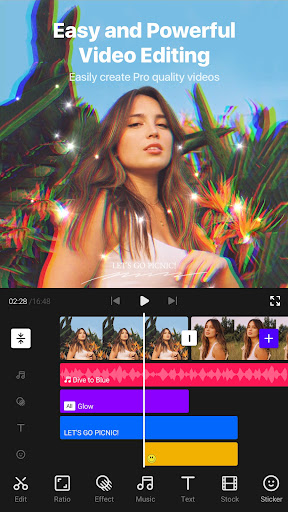
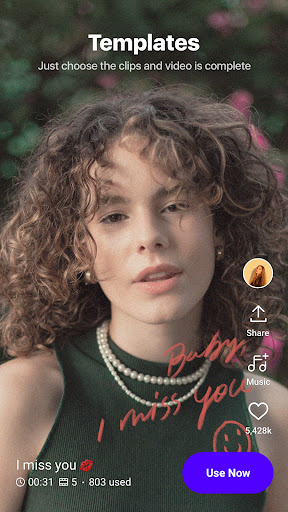
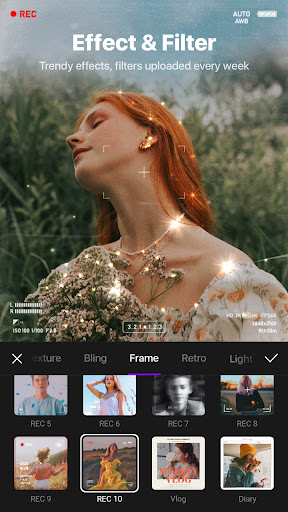
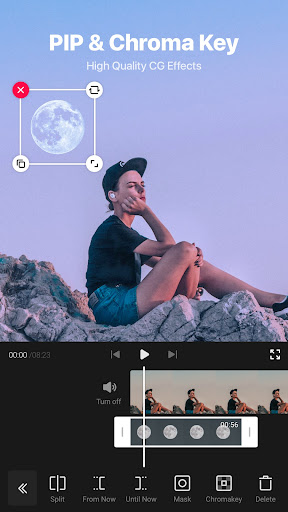
VITA is a mobile video editing app from SNOW Corporation aimed at short-form content creators, particularly people making YouTube videos, vlogs, and social clips. It packs in filters, transitions, speed controls, slow motion, glitch and glitter effects, text animation tools, and PIP overlay support for clone-style videos. The pitch is that it covers everything a casual or semi-serious video editor needs without the complexity of a desktop program, and based on real user feedback, it largely delivers on that for shorter projects.

It’s best suited to people editing clips in the range of a few minutes or less. Users repeatedly point out that anything longer starts to strain the app, so if your workflow revolves around quick social content rather than long-form video, VITA fits the use case it was designed for.

The Effects and Filters Are the Real Draw

Reviewers consistently praise the sheer amount of creative tools on offer. One long-time user called out the ‘great amount of effects, filters, and options for subtitles’ and noted that ads are minimal and most features don’t require payment, which is a meaningful selling point compared to apps that have pushed features behind paywalls. Another reviewer specifically mentioned turning to VITA after CapCut moved features to a pro tier, and found it gave ‘a lot of hope’ as a replacement, though they wanted more shake effects and keyframe options, and found the beat-marking tool too slow for fast-paced edits.

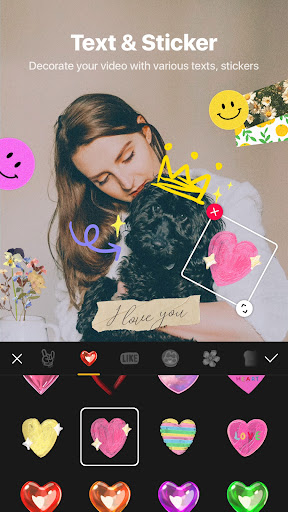
The sticker and text customization tools also get a nod, including Giphy integration for stickers, and one user highlighted the autosave feature as ‘wonderful,’ which matters a lot given the stability issues discussed below.

Export Times and Crashes Are the Biggest Complaints

The most frequent and severe complaint across reviews is export performance. Multiple users describe waiting extremely long stretches, in one case around 15 minutes, unable to leave the app while a video finishes exporting. This isn’t a minor gripe; it shows up across several of the most-upvoted reviews, with one user flatly stating they ‘wouldn’t use this for anything longer than three minutes’ because export times balloon with heavier edits.

Stability is the second major issue. One user reported the app crashing more than 30 times while animating a 2 minute 40 second video, forcing them to split the project into two parts just to get through it. Another described being completely unable to export a roughly 30-minute project after three weeks of work, despite breaking it into four sections specifically to avoid crashes. A separate review notes that files over roughly 325 MB frequently freeze and close the app entirely, sometimes without saving changes, and that audio fades and transitions between clips can glitch or stop working correctly. One user also reported that after updating, the app became buggy to the point where effects wouldn’t respond and force-closing was the only fix, and that searching for audio files from the device wasn’t reliably possible.

Should You Download VITA?

VITA works well as advertised for short clips: filters, effects, and text tools are abundant, ads are light, and most features are free to use, which is rare in this app category. But it has a real ceiling. Once projects get long, heavily layered, or large in file size, users report export times stretching on for many minutes and crashes becoming frequent enough to lose progress entirely. Autosave helps, but it hasn’t stopped multiple reviewers from losing significant work.

If you’re making short social clips, quick vlogs, or simple edited videos under a few minutes, VITA is a solid, low-friction option with a genuinely strong effects library. If your work involves longer videos, heavy overlays, or large file sizes, the export slowdowns and crash reports here suggest you should expect friction, and possibly lost work, before you commit a large project to it.


Pros

  • ✓Large library of filters and effects
  • ✓Minimal ads compared to competitors
  • ✓Most features free to use
  • ✓Useful text, subtitle, and sticker tools
  • ✓Autosave protects some progress

Cons

  • ✕Very slow exports on longer videos
  • ✕Frequent crashes with large projects
  • ✕Audio and transition glitches reported

What Real Users Say

Snowball tv ★ 4/5

“I love this app! I use it for my yt videos! It has so many filters and more! But my only problem with this app is that it takes like forever to export your video. You are not able to leave the app, so I was just sitting there for like, 15 minutes, waiting for my video to finish. Please…”

👍 4,216 found this helpful
Kriz Alvarez ★ 4/5

“so far, it's giving me a lot of hope that I've found a good editing app after capcut turned pro. Wish there was more shake effects, keyframes and be able to disable the milliseconds things because it's kinda annoying. Also the mark for beat button is NOT fast, which doesn't help when editing to very fast audio. Sometimes, even if…”

👍 3,074 found this helpful
Ami Hayashi ★ 4/5

“It has a great amount of effects, filters, and options for subtitles. The amount of ads are minimal, and you hardly have to pay for anything. The only negative about this app is that it takes a long time to export videos that are heavily edited. I wouldn't use this for anything longer than three minutes really. Cut any long…”

👍 1,552 found this helpful

Reviews sourced from Google Play, selected by helpfulness at the time of writing.

App Info & Permissions

Developer SNOW Corporation
Content rating Everyone
Contains ads No
Installs 157M+
Released 12/26/2019
Price Free

Permissions this app requests

🎙️ Microphone Record audio
🖼️ Photos/Media/Files Read the contents of your USB storage; modify or delete the contents of your USB storage
💾 Storage Read the contents of your USB storage; modify or delete the contents of your USB storage
📶 Wi-Fi connection information View Wi-Fi connections

Similar Apps

Frequently Asked Questions

1

What is VITA - Video Editor & Maker?

VITA is a mobile video editing app from SNOW Corporation that offers filters, transitions, slow motion, speed controls, text animation, stickers, and PIP overlay tools. It's designed for creating short-form videos like vlogs and social media clips directly on a phone. The app targets casual to semi-serious creators who want strong effects without a desktop editing program.

2

Is VITA free to use?

Yes, based on user reviews, most of VITA's core features are free and ads are described as minimal compared to other editing apps. Some users specifically switched to VITA after competitors like CapCut moved features behind a paywall. That said, the store listing doesn't rule out optional paid extras, so some premium content may still exist.

3

Does VITA crash often?

Multiple reviewers report significant crashing, especially on longer or more complex projects. One user described over 30 crashes while editing a under-three-minute video with overlays, and another couldn't export a roughly 30-minute project even after splitting it into sections. Files larger than about 325 MB are specifically flagged as prone to freezing and closing unexpectedly.

4

How long does it take to export videos in VITA?

Export times can be quite long for heavily edited or lengthy videos, with one user reporting a 15-minute wait during which they couldn't leave the app. Reviewers generally suggest keeping projects under a few minutes to avoid long export delays. This appears to be one of the app's most consistent complaints across reviews.

5

Is VITA good for editing long videos?

Not really, based on user experiences. Reviewers who tried editing videos around 30 minutes long ran into repeated crashes and were sometimes unable to export the finished project at all. VITA seems best suited to short clips of a few minutes rather than long-form content.

