
United Airlines

by United Airlines

4.7 ★ 1M+ reviews
29M+ Installs
08/23/2011 Released
United Airlines icon
Travel & Local

United Airlines

by United Airlines

4.7 ★ 1M+ reviews
29M+ Installs
08/23/2011 Released
Advertisements
United Airlines screenshot 1
United Airlines screenshot 2
United Airlines screenshot 3
United Airlines screenshot 4
United Airlines screenshot 5
United Airlines screenshot 6

Ratings Breakdown

4.7 ★★★★★ 1M+ ratings
5 ★ 84%
4 ★ 9%
3 ★ 2%
2 ★ 1%
1 ★ 3%

Data from Google Play at the time of writing.

What the United App Actually Offers

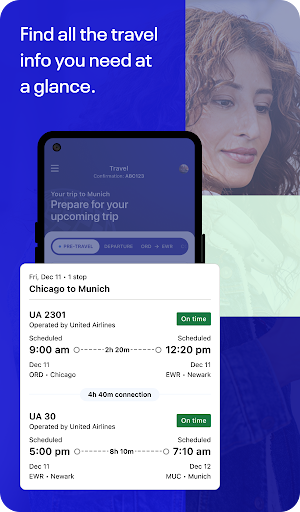
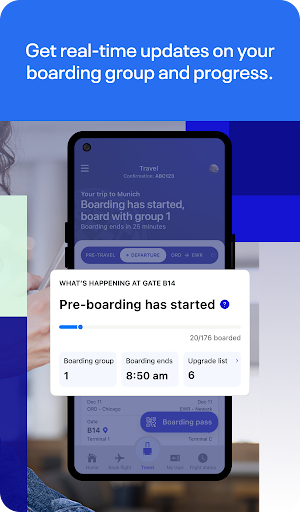
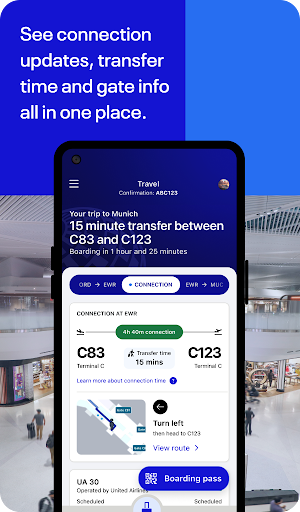
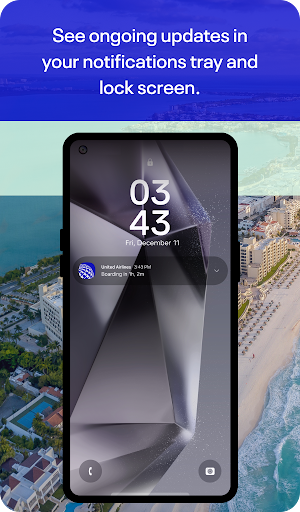
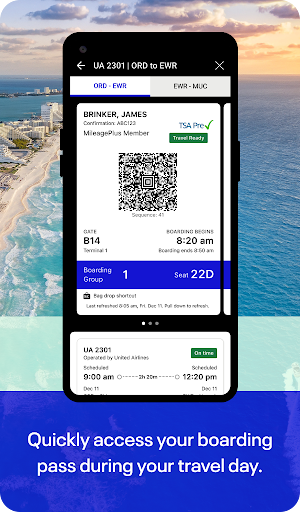
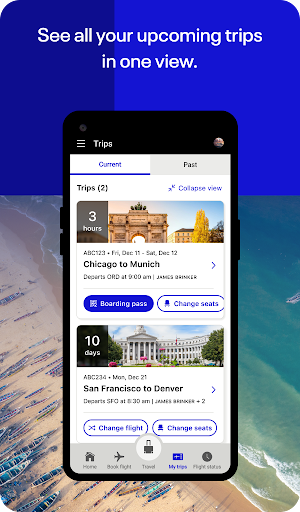
The United Airlines app is meant to be a one-stop shop for the entire travel process, from searching flights and booking to checking in, tracking bags, navigating the airport, and streaming entertainment once you’re in the air. It also handles MileagePlus account management and award booking, and it lets passengers connect with an agent through chat or video without waiting on hold. For anyone who flies United with any regularity, the pitch is convenience: one app for the whole trip instead of juggling a boarding pass, a bag tag receipt, and a gate board.

With over a million reviews and nearly 30 million installs, this is clearly a default tool for millions of travelers, not a niche product. That scale means its flaws affect a lot of people at once, especially on travel days when things go wrong.

Where It Performs Well

Several users note that navigation has improved and is more user friendly than in past versions, which matters for an app this widely used. The core day-of-travel features, mobile boarding passes, bag tracking, terminal maps, and inflight entertainment access, work as advertised often enough that they remain the main reason people keep the app installed rather than relying solely on the website. The addition of high-speed inflight Wi-Fi for MileagePlus members is a genuinely useful perk when it functions correctly.

Reliability Problems That Show Up Repeatedly

The most consistent complaint across reviews is instability: spinning wheels, ‘please wait’ messages, and generic ‘something went wrong’ errors, sometimes even on strong Wi-Fi. One reviewer described being unable to reschedule a flexible-fare flight due to a persistent processing error, despite trying different payment methods, browsers, and devices. Another got stuck on a ‘confirm you have a return ticket’ screen during international check-in with no way to proceed, forcing a switch to a laptop. These aren’t minor glitches; they block core functions like check-in and rebooking exactly when travelers need them most.

Design Choices That Frustrate Users

Multiple reviewers flagged confusing information architecture, particularly around basic economy carry-on rules that aren’t clearly tied to ticket type within the app. Another common annoyance is being asked to re-enter payment card details just to check in, even after a ticket and bags are already paid for, which feels intrusive and unnecessary. Code-share itineraries with partner airlines also don’t always display fully, leaving gaps in trip information that matter for connections.

Notification and Communication Gaps

At least one reviewer reported missing a flight because the app’s boarding notifications never updated to reflect actual boarding start, combined with gate staff calling names instead of using the PA system. In-flight and post-purchase Wi-Fi has also reportedly failed to work even after being paid for, with no clear path to a refund mentioned by the user.

Who Should Download This App

If you fly United regularly, the app is still worth having for boarding passes, bag tracking, and airport navigation, since those functions get consistent praise. But go in expecting occasional freezes, unclear fare rules, and potential trouble during rebooking or international check-in, and keep the website or an agent as backup for anything time-sensitive or high-stakes.


Pros

  • ✓Improved navigation and layout overall
  • ✓Mobile boarding passes and bag tracking work
  • ✓Useful terminal maps and airport guides
  • ✓Inflight entertainment and Wi-Fi access
  • ✓Chat and video support avoids phone hold

Cons

  • ✕Frequent errors and unresponsive loading screens
  • ✕Confusing basic economy fare rule display
  • ✕Requires re-entering payment info at check-in

What Real Users Say

Andria Gardella Henderson ★ 3/5

“Navigating through the app is more user friendly. However it still has problems linking code share flights - if a portion of your trip is with a partner airline, the app often doesn't show the full itinerary. My biggest issue (this applies to both the website and the app) is that there is no way to share an itinerary with…”

👍 74 found this helpful
GhostRyderID ★ 1/5

“App is nigh on to useless. 80% of what I've tried to do on it nets you a spinning wheel and a please wait and eventually a we're sorry something went wrong. And that's on full strength one gigabit per second Wi-Fi. I've updated the app, restarted the phone, but it doesn't make a difference. Nothing will work on this…”

👍 20 found this helpful
Jonas Vollmer ★ 1/5

“United basically just stole $1,000 from me: I booked my flight to be flexible, but when I try to reschedule it, I always get the same error, regardless of payment method, browser, or OS: "We are unable to process your request. Please try again later." 1-2 days later still same issue. So I instead cancelled the flight hoping for a…”

👍 17 found this helpful

Reviews sourced from Google Play, selected by helpfulness at the time of writing.

App Info & Permissions

Developer United Airlines
Content rating Everyone
Contains ads No
Installs 29M+
Released 08/23/2011
Price Free

Permissions this app requests

📅 Calendar Read calendar events plus confidential information; add or modify calendar events and send email to guests without owners' knowledge
📷 Camera Take pictures and videos
📱 Device ID & call information Read phone status and identity
📍 Location Approximate location (network-based); precise location (GPS and network-based)
🎙️ Microphone Record audio
📞 Phone Directly call phone numbers; read phone status and identity
🖼️ Photos/Media/Files Read the contents of your USB storage; modify or delete the contents of your USB storage
💾 Storage Read the contents of your USB storage; modify or delete the contents of your USB storage
📶 Wi-Fi connection information View Wi-Fi connections

Similar Apps

Frequently Asked Questions

1

What is United Airlines?

United Airlines is the official mobile app from United Airlines for booking, managing, and traveling on flights within its global network. It covers the full trip lifecycle, including flight search, booking, check-in, bag tracking, boarding updates, terminal navigation, and inflight entertainment. It also integrates MileagePlus loyalty account management and award travel booking. The app is available for both iOS and Android users in the Travel & Local category.

2

Is the United Airlines app free?

Yes, the app itself is free to download and use for booking, check-in, and tracking flights. Some in-app purchases exist, such as inflight Wi-Fi passes and onboard snacks or drinks, though Wi-Fi is offered free to MileagePlus members on select flights. Flight tickets and any fare changes are, of course, paid separately through the app.

3

Does the United app work reliably for check-in?

Most of the time it handles standard domestic check-in fine, but multiple reviewers reported getting stuck on specific screens, such as international return-ticket confirmation, with no way to proceed. Others experienced generic error messages when trying to check in or reschedule flights. If check-in fails repeatedly, switching to the website or a computer is a reasonable workaround based on user reports.

4

Can I track my baggage in the app?

Yes, bag tracking is one of the app's advertised features, letting users add bags, use bag drop shortcuts, and follow their bags through the journey. This is one of the features that doesn't draw significant complaints in user reviews, suggesting it generally works as intended.

5

Does the app show my full itinerary with partner airlines?

Not always. At least one detailed review noted that when part of a trip is booked on a partner or code-share airline, the app often fails to display the complete itinerary. This can make it harder to track connections or verify details for multi-airline trips, so it's worth double-checking partner segments directly with that airline.