Sound Amplifier

by Google LLC

3.6 91K+ reviews
425M+ Installs
02/04/2019 Released
Sound Amplifier icon
Communication

Sound Amplifier

by Google LLC

3.6 91K+ reviews
425M+ Installs
02/04/2019 Released
Sound Amplifier screenshot 1
Sound Amplifier screenshot 2
Sound Amplifier screenshot 3
Sound Amplifier screenshot 4
Sound Amplifier screenshot 5

Ratings Breakdown

3.6 ★★★★★ 91K+ ratings
5 53%
4 9%
3 8%
2 6%
1 23%

Data from Google Play at the time of writing.

What Sound Amplifier Actually Does

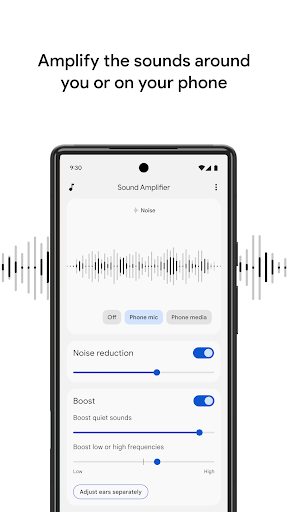
Sound Amplifier is a free accessibility app from Google that turns your Android phone into a makeshift hearing aid. Pair it with headphones, and the app uses your phone’s microphone to pick up nearby sounds, then filters and boosts them before sending the result to your ears. It’s aimed at people who are hard of hearing but don’t have or want traditional hearing aids, as well as anyone who struggles to follow conversations in noisy restaurants, lectures, or TV audio that’s too quiet or muddy. On Pixel 3 and later devices, there’s also a conversation mode meant to isolate a speaker’s voice from background clutter.

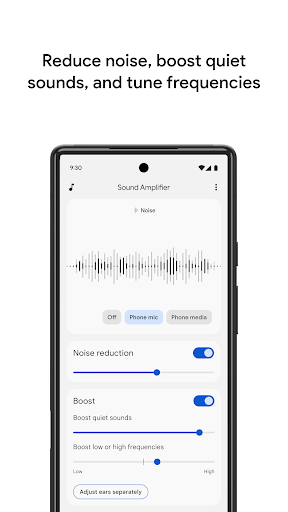
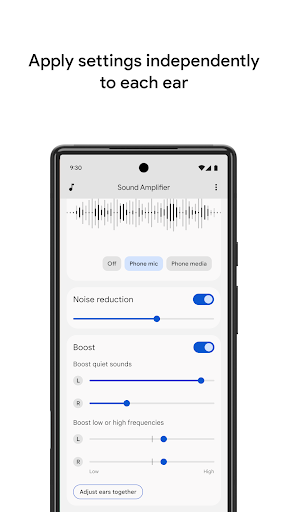
The core idea is simple and genuinely useful: instead of just cranking volume, you get sliders to reduce noise, boost low or high frequencies, or lift quiet sounds, with the option to tune each ear separately. That level of customization is rare in a free app and is clearly built with real accessibility needs in mind rather than as a gimmick.

Where It Genuinely Helps

When it works, users report it working really well. One reviewer with 1,409 helpful votes praised it outright, noting that complaints about background noise miss the point of what an amplifier is supposed to do. Another user said it brought out details in music through a Bluetooth Bose speaker that they’d never noticed before, calling the experience ‘amazing’ at first. For straightforward use cases, like boosting a conversation or amplifying TV dialogue through wired headphones, plenty of people find it does exactly what it promises, and it costs nothing to try.

The Bluetooth and Hardware Headaches

The most consistent complaint is around Bluetooth reliability. One user described the app working great initially with a Bluetooth Bose device, only for it to later refuse to recognize any headphones at all, wired or wireless. Others point out that the app was seemingly designed with wired headphones in mind, which feels dated on phones that increasingly ship without headphone jacks. That’s a real limitation in 2024-era usage, not just a minor gripe, since it pushes users toward extra dongles or adapters just to get the app functioning as advertised.

Delay is the other recurring theme. Multiple reviewers mention audio lag of one to two seconds, which is disorienting in live conversation and especially frustrating for musicians trying to isolate their own sound in an ensemble. The app’s own description even admits Bluetooth headphones might have delayed sound transmission, so this isn’t a surprise to Google, just an unresolved limitation.

Software Quirks That Undermine Trust

Several users report the app stopping abruptly when another app starts playing audio, which one reviewer attributes to Android’s audio focus system fighting with Sound Amplifier. That same reviewer noticed the microphone switching into what sounds like a phone-call mode, degrading audio quality unexpectedly. Another common frustration is settings sliders greyed out with no explanation and no response from Google on why. When a core promise of the app is personalized frequency tuning, having those controls locked without warning is a significant flaw, not a cosmetic one.

Missing Features Users Actually Wanted

A few reviewers wished for functionality the app doesn’t offer at all, like using it over a Bluetooth speaker in another room as a baby-monitor substitute, or selecting which of a phone’s multiple built-in microphones to use. One user also said they couldn’t get the app to meaningfully separate white noise from TV audio despite trying every setting, suggesting the noise-filtering algorithm has real limits in mixed-audio environments rather than just clean speech.

Who Should Actually Download This

Sound Amplifier is worth trying if you have a compatible wired headphone setup, realistic expectations about lag, and a specific use case like amplifying a single speaker or the TV in a quiet-ish room. It’s free, backed by Google, and clearly designed with genuine accessibility needs in mind, which counts for a lot. But if you rely primarily on Bluetooth headphones, need instant zero-lag audio, or want it to function like a dedicated hearing aid in loud, chaotic environments, the reliability issues and unexplained locked settings may leave you frustrated. Try it, but don’t throw away your backup hearing solution just yet.


Pros

  • Free accessibility tool from Google
  • Detailed per-ear frequency customization
  • Works well for many wired headphone users
  • Boosts quiet conversations and TV audio
  • Genuinely helps some users with hearing loss

Cons

  • Bluetooth headphone support is unreliable
  • Noticeable one to two second audio delay
  • Settings sometimes greyed out with no fix

What Real Users Say

David Bishop 5/5

“Works great! Do be mindful of the fact though, that it is a sound amplifier. I say this, because I see some comments complaining about background noise. Background noise is a sound though, and this is a sound amplifier, so guess what; background noise is also going to be amplified. If you don't like this, then either buy some headphones…”

👍 1,409 found this helpful
A Google user 3/5

“It would be extremely nice, if the app wouldn't just stop working because another app suddenly started playing audio. I suppose Android's audio focus is more of a curse than it is a blessing. Also, I don't know why, but the app switches the device mic into some kind of phone call mode as it sounds like I'm in a…”

👍 793 found this helpful
A Google user 3/5

“Love the idea, but all of the optional settings are greyed out and Google offers no answers. It would also be nice to be able to use it over a bluetooth speaker in another room, as sort of a baby monitor, instead of only being able to use it with wired headphones. Furthermore, I would love it if it could…”

👍 527 found this helpfulDeveloper responded

Reviews sourced from Google Play, selected by helpfulness at the time of writing.

App Info & Permissions

Developer Google LLC
Content rating Everyone
Contains ads No
Installs 425M+
Released 02/04/2019
Price Free

Permissions this app requests

📷 Camera Take pictures and videos
📱 Device ID & call information Read phone status and identity
🎙️ Microphone Record audio
📞 Phone Read phone status and identity

Similar Apps

Frequently Asked Questions

1

What is Sound Amplifier?

Sound Amplifier is a free Android app from Google that uses your phone's microphone and a pair of headphones to amplify and filter nearby sounds. It's designed for people who are hard of hearing, letting them boost conversations, TV audio, or lectures while reducing background noise. It includes adjustable settings for frequency boosting and per-ear customization, and on Pixel 3 and later devices offers a conversation mode to isolate a speaker's voice.

2

Is Sound Amplifier free to use?

Yes, Sound Amplifier is completely free to download and use, with no in-app purchases mentioned in its listing. It's offered by Google as an accessibility tool rather than a commercial product. There's no premium tier or subscription required to access its noise filtering or frequency adjustment features.

3

Does Sound Amplifier work with Bluetooth headphones?

It's supposed to, but multiple reviewers report inconsistent results, with one user saying the app worked great with their Bluetooth Bose device initially and then simply stopped detecting any headphones at all. Google's own description also warns that Bluetooth headphones might introduce delayed sound transmission. Wired headphones appear to offer more consistent performance based on user feedback.

4

Is there a delay when using Sound Amplifier?

Yes, a noticeable delay of about one to two seconds is a common complaint among users, particularly with Bluetooth connections. This lag can make live conversations feel disorienting and makes the app less suitable for musicians or anyone needing real-time audio feedback. Wired connections may reduce but not eliminate this issue.

5

Who is Sound Amplifier best suited for?

It's best suited for people with mild hearing difficulty who want a free, simple way to boost conversations or TV audio using wired headphones in relatively controlled environments. It may not be reliable enough for people who depend heavily on Bluetooth audio or need lag-free, real-time sound in noisy, chaotic settings. Users with more severe hearing needs should treat it as a supplement rather than a replacement for dedicated hearing aids.

