Draw Cartoon – AR Drawing App

by Braly JSC

4.5 82K+ reviews
23M+ Installs
01/08/2025 Released
Draw Cartoon – AR Drawing App icon
Art & Design

Draw Cartoon – AR Drawing App

by Braly JSC

4.5 82K+ reviews
23M+ Installs
01/08/2025 Released
Draw Cartoon – AR Drawing App screenshot 1
Draw Cartoon – AR Drawing App screenshot 2
Draw Cartoon – AR Drawing App screenshot 3
Draw Cartoon – AR Drawing App screenshot 4
Draw Cartoon – AR Drawing App screenshot 5
Draw Cartoon – AR Drawing App screenshot 6

Ratings Breakdown

4.5 ★★★★★ 82K+ ratings
5 82%
4 5%
3 4%
2 3%
1 6%

Data from Google Play at the time of writing.

What This AR Tracing App Actually Does

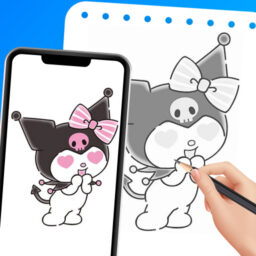
Draw Cartoon – AR Drawing App uses your phone’s camera to project a chosen image onto a surface so you can trace it by hand, a technique often called AR sketching. You prop your phone on a cup or stand, pick a template or your own photo, and the app inverts and overlays the image so you can copy its lines onto paper below. It’s aimed at beginner and intermediate artists who want help with proportions and details, rather than professional illustrators who already draw freehand.

The library leans heavily on cartoon and pop culture characters, with themes like Pikachu, Scooby-Doo, and Freddy mentioned in the store listing, and users can also import their own reference photos. Basic controls include opacity adjustment, flashlight toggle, image lock, zoom, and reset, plus the ability to save a photo or record video of your drawing session.

Where the App Genuinely Helps Beginners

Reviewers consistently say the core tracing mechanic works as promised. One user specifically praised being able to move the image, zoom in and out, adjust hardness, and import personal photos alongside built-in templates. Another said it helped them memorize drawing techniques and get ‘addicted to drawing,’ which suggests the app succeeds at its main goal of building confidence through repetition and guided tracing.

A three-star reviewer also noted that, compared to competing apps, the image stays in focus rather than blurring out during use, which matters a lot for an app whose entire value depends on a clear, stable overlay.

The Ad Situation Is a Recurring Complaint

The most frequent and highest-voted criticism across reviews is ad frequency. A 662-vote review called the app ‘well-designed’ but said ads are ‘quite overwhelming’ and asked for a paid ad-free option. Another user mentioned long ads specifically at startup, and a one-star review claimed that even after the app loads, ads ‘take over.’ This is clearly the app’s biggest friction point, and it’s inconsistent enough that some users report no ads at all while others find them disruptive, suggesting ad load may vary by region or session.

Small Bugs and Loading Problems

Beyond ads, complaints are relatively minor but real. One reviewer pointed out an obvious translation error, the app displays ‘drawing now’ instead of ‘draw now,’ which signals rougher localization polish. A separate one-star review described the app failing to load entirely despite a stable connection, though this doesn’t appear to be a widespread pattern based on the overall review set.

Who Should Actually Download This

If you’re a beginner artist who wants a low-cost way to practice proportions by tracing cartoons or your own photos, this app does what it says, and the AR overlay mechanic genuinely works according to hands-on users. If you’re easily annoyed by ads or expect a fully polished, typo-free interface, temper expectations, since that’s the most cited downside. It’s not a professional illustration tool, but as a practice aid for hobbyists it delivers on its core promise.

Pros

  • AR tracing overlay works as advertised
  • Lets you import your own reference photos
  • Adjustable opacity, zoom, and image lock
  • Helps beginners build drawing confidence
  • Image stays in focus during tracing

Cons

  • Ad frequency frustrates many users
  • Occasional loading failures reported
  • Minor translation errors in the interface

What Real Users Say

Taniya 4/5

“"I really enjoy using this app! The features are well-designed, and it’s been very helpful. However, the number of ads is quite overwhelming, which sometimes makes it frustrating to use. It would be great if the ad frequency was reduced or if there were an affordable ad-free option. I hope the developers take this into account because otherwise, it’s a…”

👍 662 found this helpful
Chanté Smit 5/5

“This app is very helpful. I'm a sketcher, so I only use it when I struggle with small details. You can move the image, zoom in and out, adjust the hardness of the image, and there are language options. You can import your own images, and there are already options on the app.”

👍 586 found this helpful
Micha Rogers 5/5

“I really love the app tbh because it contains no ads for me everytime I press something which is good because it helps me focus more and this really helped me I gotten addicted to drawing now and I memorized the drawing my scratch! 10/10 drawing app but I really recommend they add hello kitty and some more anime characters!”

👍 526 found this helpful

Reviews sourced from Google Play, selected by helpfulness at the time of writing.

App Info & Permissions

Developer Braly JSC
Content rating Everyone
Contains ads Yes
Installs 23M+
Released 01/08/2025
Price Free

Permissions this app requests

📷 Camera Take pictures and videos
📍 Location Approximate location (network-based); precise location (GPS and network-based)
🖼️ Photos/Media/Files Read the contents of your USB storage; modify or delete the contents of your USB storage
💾 Storage Read the contents of your USB storage; modify or delete the contents of your USB storage
📶 Wi-Fi connection information View Wi-Fi connections

Similar Apps

Frequently Asked Questions

1

What is Draw Cartoon - AR Drawing App?

It's an augmented reality tracing app that overlays a chosen image, cartoon template, or your own photo onto your camera view so you can trace it on paper below. You prop your phone up to keep it steady, then use controls like opacity, zoom, and lock to trace accurately. It's designed for beginner and hobbyist artists who want help practicing proportions and details.

2

Is Draw Cartoon - AR Drawing App free?

Yes, the app is free to download and use, with free sample templates included for tracing. However, it is supported by ads, and multiple reviewers note that ad frequency can be heavy, including longer ads at startup. There's no confirmed ad-free paid tier mentioned in the app's own description, though users have requested one.

3

Does the AR tracing feature actually work well?

Based on user reviews, yes, multiple reviewers confirm the image overlay stays in focus and lets you move, zoom, and adjust the traced image effectively. One reviewer specifically compared it favorably to other tracing apps that suffer from blurry or unfocused overlays. Setting your phone on a stable surface like a cup, as the app recommends, helps keep the tracing steady.

4

What cartoon templates and themes are included?

The app includes free sample templates covering various cartoon themes, with characters like Pikachu, Scooby-Doo, and Freddy mentioned in its official description. Users can also import their own images to trace instead of relying only on built-in templates. At least one reviewer suggested adding more character options, such as Hello Kitty, indicating the library is appreciated but not exhaustive.

5

What are the biggest complaints about this app?

The top complaint by far is the volume of ads, which one highly-voted review described as overwhelming despite otherwise enjoying the app. Other users mentioned minor translation errors in the interface text and occasional trouble getting the app to load. Experiences with ads seem inconsistent, since some reviewers report seeing very few while others find them intrusive.