
DMSS

by Hangzhou Dong Bin Information Technology Co., Ltd.

4.3 ★ 398K+ reviews
46M+ Installs
01/03/2020 Released
DMSS icon
DMSS icon
Lifestyle

DMSS

by Hangzhou Dong Bin Information Technology Co., Ltd.

4.3 ★ 398K+ reviews
46M+ Installs
01/03/2020 Released
Advertisements
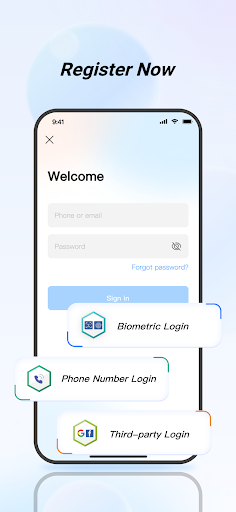
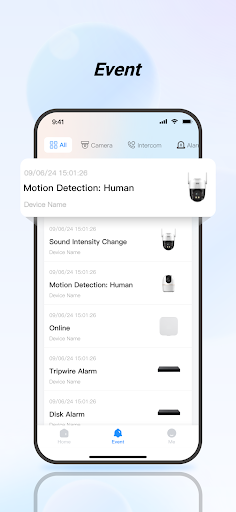
DMSS screenshot 1
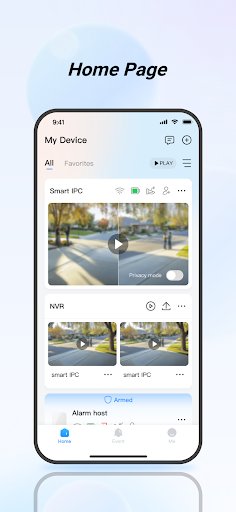
DMSS screenshot 2
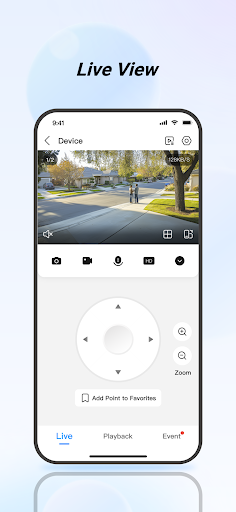
DMSS screenshot 3
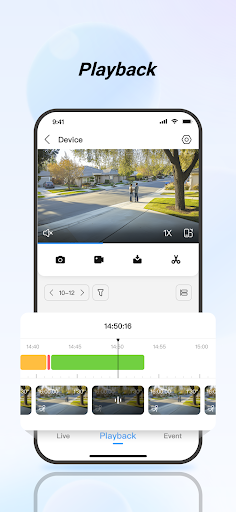
DMSS screenshot 4
DMSS screenshot 5

Ratings Breakdown

4.3 ★★★★★ 398K+ ratings
5 ★ 75%
4 ★ 8%
3 ★ 3%
2 ★ 3%
1 ★ 10%

Data from Google Play at the time of writing.

What DMSS Actually Does and Who Needs It

DMSS is a surveillance management app made by Hangzhou Dong Bin Information Technology Co., Ltd. It’s designed to connect to security cameras, alarm hubs, video intercoms, and access control devices so you can watch live feeds, review recorded footage, and get alarm notifications from your phone. This isn’t a consumer camera app tied to one brand of doorbell camera; it’s a broader hub for people who have installed NVR or DVR based CCTV systems, alarm sensors, or door access hardware and need one app to manage all of it. It’s aimed at homeowners with multi-camera setups as well as small business owners monitoring a property, not casual users who just want a single indoor camera feed.

Live View and Playback in Daily Use

The core promise of DMSS, real-time live view and video playback, works when conditions are right, but reviewers report it frequently isn’t. Multiple users describe seeing a ‘click to reload video’ error on real-time streams, sometimes requiring a phone reboot to fix, even when standing next to the router. Playback has its own problems: the timeline is described as hard to work with, and synchronizing footage from several cameras at once during playback is a persistent frustration. One reviewer also noted that recorded video will load quickly to 90 percent and then stall for a long time before finishing, which undercuts the ‘anytime, anywhere’ promise in the store listing.

Notifications and Alarm Handling Fall Short

Instant alarm notifications are a headline feature, but this is where some of the harshest complaints land. One user reported no push notifications at all since March, something that persisted after an update and apparently went unresolved even after contacting support. Another complaint is the lack of a proper snooze function: motion alerts kept firing for an hour while a gardener worked outside, and the built-in snooze options didn’t actually stop them. For a security app, unreliable or unstoppable alerts is a serious functional gap, not just an annoyance.

Interface Quirks That Add Friction

Several smaller design issues compound the bigger problems. The main screen shows options like ‘door’ even for users who don’t have that hardware, cluttering the interface with non-functional buttons. Tips pop up repeatedly on every screen with no way to permanently dismiss them. Camera ordering is another sore point: even after building a ‘Favorite’ list, the app reportedly re-sorts cameras regardless of the order or names you assigned. On top of this, some users have been hit with repeated forced logins and a privacy agreement prompt that wouldn’t close, blocking access to the app entirely until reinstalling.

Who Should Actually Download DMSS

DMSS fits people who already own compatible NVR, alarm hub, intercom, or access control hardware and need a companion app rather than those shopping for a polished standalone camera experience. If your priority is dependable push notifications or smooth multi-camera playback, be aware that a meaningful share of reviewers say those exact features are currently unreliable. It’s a functional but rough tool: install it because your hardware requires it, not because the app experience itself is a selling point.


Pros

  • ✓Supports cameras, alarms, intercoms, and access control
  • ✓Lets you share device access with family
  • ✓Subscribe to specific alarm event types
  • ✓Remote unlocking for access control devices
  • ✓Wide install base with many active users

Cons

  • ✕Unreliable push notifications for some users
  • ✕Live view often fails to load
  • ✕Cannot reorder or reliably favorite cameras

What Real Users Say

Mohammad ★ 2/5

“Video playback facilities are very poor. Video timelines are hard to work with. During playback, it is difficult to synchronize the video of several cameras. On the main page, there are non-functional options such as door. It shouldn't exist for me as I don't use this option. "superlive plus" is much easier to play video. Please improve the app.”

👍 269 found this helpful
Ryan ★ 1/5

“The latest update is a fantastic improvement overall but unfortunately lacks the option to rearrange the camera order. Even if you create a "Favorite" it still re-orders them regardless of name or order in which they were added. I've created a favorite, clicked on details, then clicked sort, rearranged them how I want, then click save. But unfortunately when you…”

👍 180 found this helpful
Iain Walker ★ 1/5

“Struggles to load video stream (even when standing next to the router). I see we're back to asking me to log in every time I open the app. Time for legislation for companies that fail to maintain their software.”

👍 142 found this helpful

Reviews sourced from Google Play, selected by helpfulness at the time of writing.

App Info & Permissions

Developer Hangzhou Dong Bin Information Technology Co., Ltd.
Content rating Everyone
Contains ads No
In-app purchases $0.49 - $349.99 per item
Installs 46M+
Released 01/03/2020
Price Free

Permissions this app requests

📷 Camera Take pictures and videos
📱 Device ID & call information Read phone status and identity
📍 Location Approximate location (network-based); precise location (GPS and network-based)
🎙️ Microphone Record audio
📞 Phone Read phone status and identity
🖼️ Photos/Media/Files Access USB storage filesystem; read the contents of your USB storage; modify or delete the contents of your USB storage
💾 Storage Read the contents of your USB storage; modify or delete the contents of your USB storage
📶 Wi-Fi connection information View Wi-Fi connections

Similar Apps

Frequently Asked Questions

1

What is DMSS?

DMSS is a security management app that lets you view live camera feeds, play back recorded footage, and receive alarm notifications from connected surveillance devices. It also supports device sharing, visual intercoms, and access control systems like door locks. It's built for users who already own compatible security hardware such as NVRs, alarm hubs, or intercom systems rather than as a standalone camera product.

2

Is DMSS free to use?

The app itself is free to download and install from the store. However, its functionality depends on owning compatible security hardware such as cameras, alarm hubs, or access control devices, which are purchased separately. There's no indication in the listing of a required subscription for basic live view and playback, but costs may depend on your specific hardware setup.

3

Does DMSS work well for monitoring multiple cameras at once?

Based on user feedback, this is one of the weaker areas of the app. Reviewers specifically mention difficulty synchronizing video playback across several cameras and issues with reordering cameras even after marking them as favorites. If multi-camera monitoring is your main use case, expect some friction.

4

Are DMSS push notifications reliable?

Several users report significant problems here, including one case of no push notifications at all for months after an update. Others mention being unable to properly snooze motion alerts, causing repeated unwanted notifications. If real-time alerting is critical for your security setup, this is worth testing carefully before relying on it.

5

What devices and systems does DMSS support?

DMSS supports live view and playback for surveillance cameras, alarm hubs with peripheral accessories for theft, intrusion, fire, and water damage detection, visual intercom devices for video calls and door unlocking, and access control devices for checking door status and remote unlocking. It requires Android 5.0 or above. The app is designed to centralize management of these different device types in one place.