Color Call Theme, Call Screen

by Prop studio

4.7 ★ 101K+ reviews
13M+ Installs
05/22/2024 Released
Color Call Theme, Call Screen icon
Personalization

Color Call Theme, Call Screen

by Prop studio

4.7 ★ 101K+ reviews
13M+ Installs
05/22/2024 Released
Advertisements
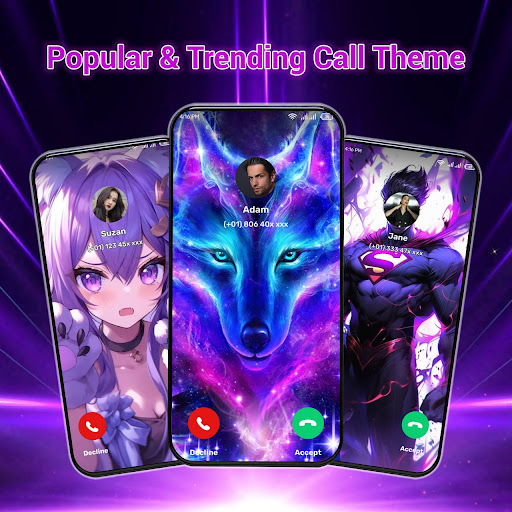
Color Call Theme, Call Screen screenshot 1
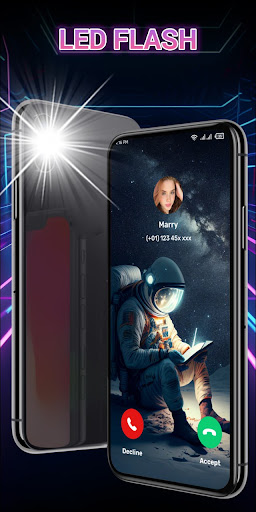
Color Call Theme, Call Screen screenshot 2
Color Call Theme, Call Screen screenshot 3
Color Call Theme, Call Screen screenshot 4

Ratings Breakdown

4.7 ★★★★★ 101K+ ratings
5 ★ 82%
4 ★ 11%
3 ★ 2%
2 ★ 1%
1 ★ 4%

Data from Google Play at the time of writing.

What This Call Screen App Promises

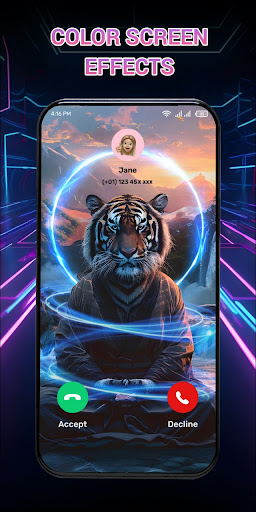
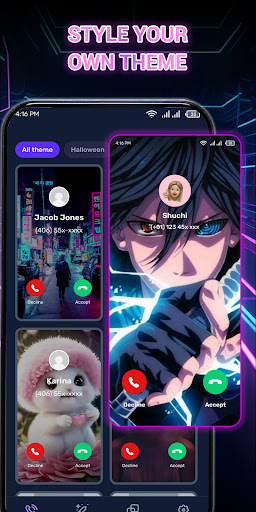
Color Call Theme, Call Screen is a personalization app that replaces your default incoming call screen with colorful themes, custom accept/decline buttons, and a flash alert feature that flashes the LED for incoming calls. It’s aimed at users who want to jazz up a fairly boring part of the phone interface, the call screen, with photos, avatars, and DIY color schemes. With over 13 million installs, it clearly appeals to a wide audience looking for cheap, easy phone customization.

The Setup Process Is Where Trouble Starts

Multiple users report that the app won’t let you proceed past the initial tutorial unless you grant broad permissions to control things on your phone. One reviewer said flatly that ‘if you don’t select it to be able to control everything in your phone, you cannot go any further in the setup process.’ Another described being unable to choose which data to share, saying the accept button kept reappearing until all options were agreed to, and claimed the app sells data to other companies. That’s a serious red flag for a personalization app that has no real reason to need this level of access.

Ads Are the Single Biggest Complaint

Nearly every negative review centers on advertising. Users call it ‘riddled with ads,’ describe ‘unlimited ads and nothing else,’ and say the ad volume made the app essentially unusable, with one person unable to even get past the opening tutorial because of them. This isn’t a minor annoyance mentioned in passing, it’s the dominant theme across the most helpful reviews, suggesting the ad experience is aggressive enough to overwhelm whatever customization value the app offers.

The Advertised Features Don’t Match Reality

Several reviewers say the app’s own promotional material oversells what you actually get. One user said the ad showed a live wallpaper that turned out to be a static image, calling it ‘completely trash.’ Another said the specific themes shown in the advertisement that convinced them to download couldn’t even be found inside the app, on top of choices being ‘very limited.’ This bait-and-switch pattern between marketing and actual content is a recurring frustration.

Stability and Mixed Experiences

Not every review is negative. One five-star reviewer liked the app but noted their system became unstable the day after installing it, requiring a reset. This suggests that even among users who enjoy the visual customization, there can be technical side effects worth watching out for, particularly around system stability.

Who Should Actually Download This

Given the volume and consistency of complaints about permission demands, data-sharing concerns, misleading ads, and an overwhelming amount of in-app advertising, this app is hard to recommend. If you’re only after a quick cosmetic change to your call screen, the aggressive permission requests and ad load make the tradeoff questionable. Users who are highly sensitive to app permissions or data privacy should skip it entirely. If you still want to try it, go in expecting heavy ads, be deliberate about reviewing every permission prompt during setup, and don’t expect the exact themes shown in the app’s own advertising to be available once you’re inside.


Pros

  • ✓Lets you customize call screen visuals
  • ✓Flash alert feature for incoming calls
  • ✓DIY theme option with preview
  • ✓Large install base shows wide appeal
  • ✓Simple concept for basic personalization

Cons

  • ✕Overwhelming amount of intrusive ads
  • ✕Demands broad permissions to proceed
  • ✕Advertised themes often missing in-app

What Real Users Say

King Of the world ★ 1/5

“It is the worst app I have ever seen it's just a waste of time nothing else. please don't install it because it has unlimited ads and nothing else”

👍 233 found this helpful
Will McCreary ★ 1/5

“fake ads to trick you into installing, and then allowing them to have full access to your info. if you don't select it to be able to control everything in your phone, you cannot go any further in the setup process. not worth your time.”

👍 90 found this helpful
Jonesy974 ★ 1/5

“Scam app. Do not install. Absolutely riddled with ads. Wants to get permissions in your phone to use the app that it definitely shouldn't have access too. At best it'll just start injecting your lock screen and call screen with ads. Worst case it's probably scraping data off your phone. Do not install and report to the Google play store.”

👍 72 found this helpful

Reviews sourced from Google Play, selected by helpfulness at the time of writing.

App Info & Permissions

Developer Prop studio
Content rating Everyone
Contains ads Yes
Installs 13M+
Released 05/22/2024
Price Free

Permissions this app requests

👥 Contacts Read your contacts
📱 Device ID & call information Read phone status and identity
📞 Phone Directly call phone numbers; read phone status and identity
📶 Wi-Fi connection information View Wi-Fi connections

Similar Apps

Frequently Asked Questions

1

What is Color Call Theme, Call Screen?

It's a personalization app that changes your phone's incoming call screen with colorful themes, custom buttons, and contact avatars. It also includes a flash alert feature that uses your LED to notify you of calls. The app is developed by Prop studio and falls under the personalization category on app stores.

2

Is Color Call Theme, Call Screen free to use?

The app is free to download and install, but user reviews consistently describe it as being heavily supported by ads. Several reviewers say the ad volume is excessive enough to interfere with actually using the app's features. There's no mention in the available reviews of a paid ad-free tier.

3

Does the app require a lot of permissions?

Yes, multiple reviewers report that the setup process blocks further progress unless you agree to give the app broad control over your phone. One reviewer specifically mentioned being unable to select limited data sharing, as the app kept prompting for full acceptance. This has raised privacy concerns among users.

4

Do the in-app themes match what's shown in ads?

According to user reviews, not always. One reviewer said the specific theme shown in the app's advertisement wasn't available inside the app itself, and another said a promoted 'live wallpaper' turned out to be a plain static image. This mismatch between marketing and actual content is a recurring complaint.

5

Is this app safe for privacy-conscious users?

Based on reviews, privacy-conscious users should be cautious. Complaints include forced acceptance of data-sharing permissions and claims that user data may be sold to other companies. If you're concerned about app permissions and data handling, it's worth thinking carefully before installing.