
Microsoft Launcher

by Microsoft Corporation

4.7 1.7M+ reviews
69M+ Installs
10/28/2015 Released
Microsoft Launcher icon
Personalization

Microsoft Launcher

by Microsoft Corporation

4.7 1.7M+ reviews
69M+ Installs
10/28/2015 Released
Microsoft Launcher screenshot 1
Microsoft Launcher screenshot 2
Microsoft Launcher screenshot 3
Microsoft Launcher screenshot 4
Microsoft Launcher screenshot 5

Ratings Breakdown

4.7 ★★★★★ 1.7M+ ratings
5 83%
4 10%
3 3%
2 1%
1 3%

Data from Google Play at the time of writing.

What Microsoft Launcher Actually Does

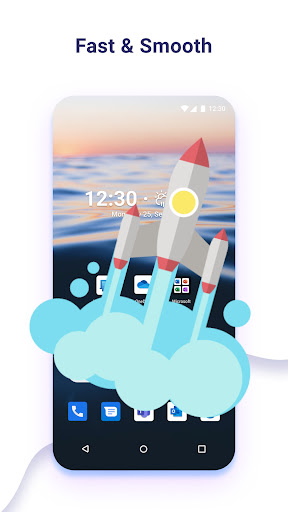
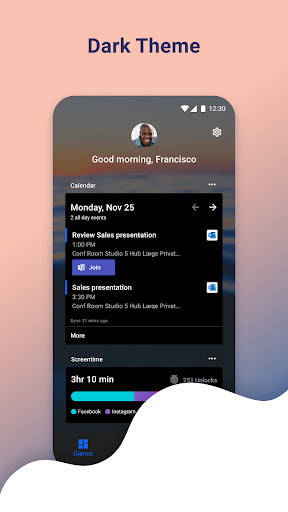
Microsoft Launcher replaces your Android home screen with a more customizable, productivity-focused setup. It lets you swap icon packs, pull in Bing wallpapers, run a dark theme, and back up your layout to the cloud. The standout piece is the left-side feed, which surfaces your calendar, to-do list, Sticky Notes, and recent contacts in one scrollable panel, essentially bringing a Windows-widget feel to Android. It’s aimed squarely at people already living inside the Microsoft ecosystem: Outlook, To Do, OneDrive, and Microsoft 365 users who want their phone to talk to their PC.

Where It Genuinely Impresses

Users consistently praise the depth of customization. One reviewer called it a ‘game changer’ after switching from a clunky stock Samsung interface, and others highlight the ability to run three dock rows, scroll into an app library instead of swiping sideways, and fine-tune gestures. For anyone juggling personal and work apps, the separation and organization options get specific praise, as does the left home screen feed, which one user says ‘beats Google Now’ for a day-at-a-glance view of reminders, schedule, and recent calls. People who already use Microsoft 365 for work seem to get the most mileage out of it.

The Bugs That Undercut the Experience

The recurring complaint is stability. Multiple reviewers describe the launcher randomly freezing or locking up, sometimes only recovering after several minutes, and this shows up across different phones and hardware tiers, including lower-end devices where it otherwise runs smoothly. One user resolved a loading problem by discovering the app had silently set mobile data to ‘restricted’ on install, which is a strange default and not something most people would think to check. Notification issues also show up, with one long-time user reporting that notification bubbles on widgets stopped working correctly after switching to a Google Pixel, despite trying every settings combination.

The Permissions List Is Long, But Optional

The permission list here is extensive: microphone, photos, contacts, location, phone, camera, and calendar. Microsoft is upfront that each ties to a specific feature (Bing Search, the Weather widget, Sticky Notes image capture, calling contacts by swipe) and that the launcher still works if you decline them. That transparency is appreciated, but it’s still a lot to grant to a home screen replacement, and privacy-conscious users should expect to selectively deny several of these without losing core functionality.

Who Should Actually Install This

If you’re already tied into Outlook, Microsoft 365, or OneDrive, this launcher’s feed and Sticky Notes integration genuinely earn their keep, and the customization depth is hard to match among mainstream launchers. If you’re not in that ecosystem, or if you’re on a phone where stability issues have been reported, the appeal shrinks fast since you’re taking on freezing risks and a long permissions list for features you may never touch. It’s worth trying since you can always switch back to your previous launcher, but go in expecting to troubleshoot occasional freezes rather than a flawless experience.

Pros

  • Extensive icon and layout customization
  • Useful calendar and to-do feed panel
  • Strong integration with Microsoft 365 apps
  • Cloud backup and restore for setups
  • Works well even on lower-end hardware

Cons

  • Random freezing and lockups reported
  • Notification bubbles fail on some devices
  • Long list of requested permissions

What Real Users Say

Joe Kilbreth 5/5

“This was an absolute game changer for me. My old phone broke, and I had to use an old Samsung phone with an interface that I didn't particularly like. When I discovered this app, I was a little skeptical at first, but then I was pleasantly surprised with how well you can customize all of the options and layout. It…”

👍 821 found this helpful
TheMinecraftMaster YT 5/5

“Amazing! I've always liked Microsoft devices, sadly there's only a computer OS, that of course doesn't run on Android, due to it requiring an average computer GPU and CPU, which a phone can't have, and the obvious, like mouse and keyboard. This is a great alternative, supporting things like widgets and more. A major upgrade if you ask me. I've…”

👍 142 found this helpful
Joshua M 5/5

“Underrated. Their left home screen is what takes the cake. It shows everything I want and need. Reminders are always there. My entire schedule is there. The people I called and talk to are there. It beats Google Now which is useful for news, but not so much for a days view at a glance. The app runs smooth and…”

👍 37 found this helpful

Reviews sourced from Google Play, selected by helpfulness at the time of writing.

App Info & Permissions

Developer Microsoft Corporation
Content rating Everyone
Contains ads No
Installs 69M+
Released 10/28/2015
Price Free

Permissions this app requests

📅 Calendar Read calendar events plus confidential information
📷 Camera Take pictures and videos
👥 Contacts Find accounts on the device; read your contacts
📱 Device ID & call information Read phone status and identity
🪪 Identity Find accounts on the device; add or remove accounts
📍 Location Approximate location (network-based); precise location (GPS and network-based)
🎙️ Microphone Record audio
📞 Phone Directly call phone numbers; read phone status and identity
🖼️ Photos/Media/Files Read the contents of your USB storage; modify or delete the contents of your USB storage
💾 Storage Read the contents of your USB storage; modify or delete the contents of your USB storage
📶 Wi-Fi connection information View Wi-Fi connections

Similar Apps

Frequently Asked Questions

1

What is Microsoft Launcher?

Microsoft Launcher is an Android home screen replacement app made by Microsoft that lets you customize icons, wallpapers, gestures, and layouts. It also adds a feed panel showing your calendar, to-do list, and Sticky Notes for quick access. It's designed to integrate with Microsoft services like Outlook and Microsoft 365. You can switch back to your original launcher at any time.

2

Is Microsoft Launcher free?

Yes, Microsoft Launcher is free to download and use from the Google Play Store. There are no mentions of subscription fees or paid tiers in the app's listing. All customization features, including icon packs and dark theme, are included at no cost. Optional permissions can be declined without paying anything, though some features may be limited.

3

Does Microsoft Launcher work without a Microsoft account?

The app can be used as a general launcher without deep Microsoft account integration, but its standout features, like the calendar feed, Sticky Notes, and cloud backup, work best when signed into a Microsoft account. Without one, you'll mainly get the customization and visual features. Users deep in the Microsoft ecosystem get the most value from signing in.

4

Why does Microsoft Launcher freeze or crash?

Several users report random freezing or lockups that can last several minutes before the launcher responds again, and this has been reported across different phone models. One user traced a related loading issue to the app automatically restricting mobile data on install. There's no single confirmed fix mentioned by users, so results seem to vary by device.

5

Is Microsoft Launcher safe to use given all its permissions?

The app requests permissions like microphone, camera, contacts, location, and calendar access, but Microsoft states each is tied to a specific optional feature, such as Bing Search or the Weather widget. You can decline any of these permissions and still use the core launcher functionality. Privacy-conscious users can selectively deny permissions they don't want to grant.