
AT&T Visual Voicemail

by AT&T Services, Inc.

3.2 ★ 22K+ reviews
35M+ Installs
10/13/2011 Released
AT&T Visual Voicemail icon
Communication

AT&T Visual Voicemail

by AT&T Services, Inc.

3.2 ★ 22K+ reviews
35M+ Installs
10/13/2011 Released
Advertisements
AT&T Visual Voicemail screenshot 1
AT&T Visual Voicemail screenshot 2
AT&T Visual Voicemail screenshot 3
AT&T Visual Voicemail screenshot 4
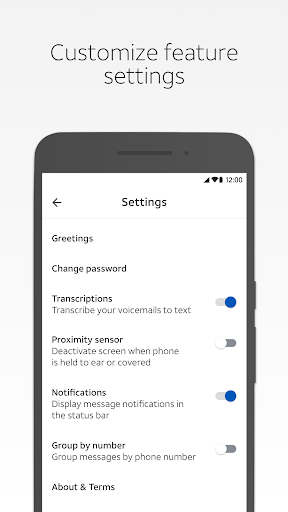
AT&T Visual Voicemail screenshot 5

Ratings Breakdown

3.2 ★★★★★ 22K+ ratings
5 ★ 46%
4 ★ 7%
3 ★ 6%
2 ★ 6%
1 ★ 35%

Data from Google Play at the time of writing.

What This App Is Supposed to Do

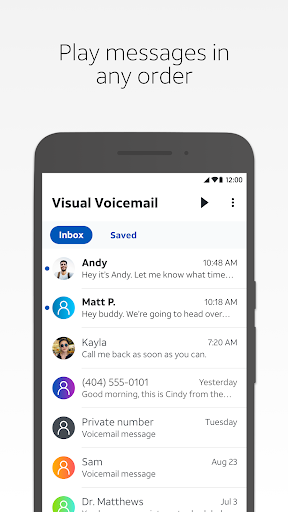
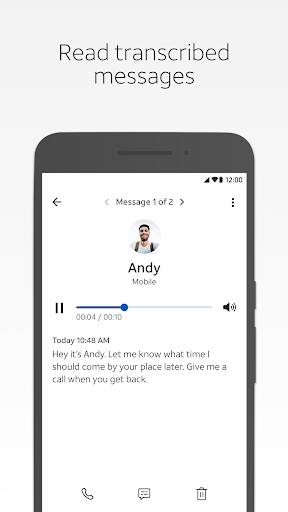
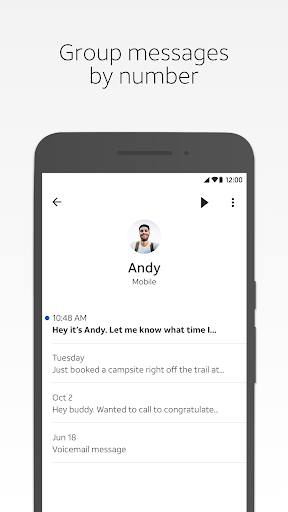
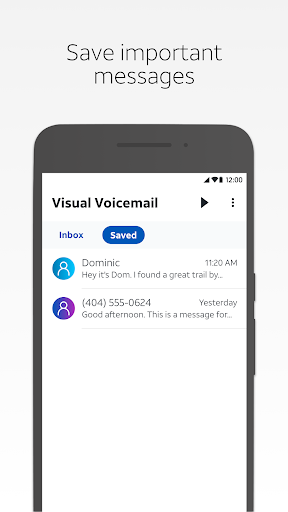
AT&T Visual Voicemail is a carrier-provided app that lets AT&T customers on Android see their voicemails as a list, play them in any order, read text transcriptions, save messages, and share them via email, text, or cloud storage. It replaces the old-school method of dialing into a mailbox and listening to messages in sequence. It’s aimed squarely at AT&T subscribers whose phones don’t already include a native visual voicemail feature, since AT&T requires many devices to use this app instead. It needs a data or Wi-Fi Calling connection to function, and it won’t work on Wi-Fi only.

Where It Actually Delivers

When it works, the core concept is sound: you get a visual list of voicemails instead of navigating a phone tree, and you can jump straight to the message you care about. The idea of transcriptions and cloud sharing is genuinely useful on paper, and for users whose setup goes smoothly, the basic play-and-manage workflow does what’s promised. Unfortunately, based on the volume of user complaints, this smooth experience seems to be the exception rather than the rule.

The Setup and Reliability Problems Users Keep Reporting

The most damning feedback centers on setup itself. One reviewer described spending over two hours stuck on a spinning ‘Setting up your account’ screen with no resolution, and reported the same failure a year later. Beyond setup, multiple users describe voicemails arriving days late, or not being delivered at all until a sudden flood of notifications appears at odd hours for messages that are months old. Another common complaint is that the app only pulls through a small fraction of actual voicemails, forcing people back to the old dial-in system they were trying to avoid.

Transcriptions and Notifications Are Widely Criticized

Text transcription, one of the headline features, is repeatedly called out as inaccurate to the point of being useless, with reviewers noting misspelled words and nonsensical output that requires listening to the original message anyway. Notifications are also inconsistent in the opposite direction: some users report never being notified of new voicemails without rebooting their phone, while others say the app fires repeated, excessive notifications even while they’re actively listening to a message. Neither behavior is what you want from a utility app meant to simplify voicemail management.

Who Should Actually Install This

If your AT&T Android phone blocks native visual voicemail and forces you into this app, you may not have much choice, and it’s worth trying since results seem to vary by device and account setup. But given the consistent, high-volume complaints about failed setups, delayed or missing messages, and unreliable transcriptions, this isn’t an app to install expecting a polished experience. Users who rely on timely voicemail alerts for work or personal reasons should have a backup plan, such as checking the traditional dial-in mailbox periodically, since this app has a track record of dropping messages or delivering them well after the fact.


Pros

  • ✓Simple visual list replaces dial-in mailbox
  • ✓Lets you play messages in any order
  • ✓Offers sharing via email, text, cloud
  • ✓Text transcription feature included
  • ✓Doesn't count against data on AT&T network

Cons

  • ✕Setup frequently fails for many users
  • ✕Transcriptions often inaccurate or nonsensical
  • ✕Notifications delayed, missing, or excessive

What Real Users Say

James Cane-Carrasco ★ 1/5

“After several attempts and over two hours of the spinning ball and "Setting up your account" message, I gave up. Yet another example that ATT really doesn't care in the least if their stuff actually works. It really is amazing. One year later: still can't get it to do something basic as setup, so I have no idea about the…”

👍 452 found this helpful
Sabby Sprinx ★ 1/5

“This is the worst voicemail app I've ever experienced. I don't get my messages for days I simply don't get them at all. Then all of a sudden at 5am my phone will go off with tons of notifications telling me I have a bunch of vm's (terrifying) When I check, they are from months ago! Today I keep getting…”

👍 165 found this helpful
Paul Quinn ★ 1/5

“Terrible transcription, sometimes completely useless, forcing me to go listen to the message. Rarely notifies me of messages properly unless I reboot my phone (???). The app is so basic. I would have continued to use YouMail but it suddenly stopped working with AT&T (suspicious). If they don't have the resources to make a useful, accurate visual voicemail app, they…”

👍 134 found this helpful

Reviews sourced from Google Play, selected by helpfulness at the time of writing.

App Info & Permissions

Developer AT&T Services, Inc.
Content rating Everyone
Contains ads No
Installs 35M+
Released 10/13/2011
Price Free

Permissions this app requests

👥 Contacts Read your contacts; modify your contacts
📱 Device ID & call information Read phone status and identity
🎙️ Microphone Record audio
📞 Phone Directly call phone numbers; read phone status and identity
💬 SMS Receive text messages (SMS); send SMS messages
📶 Wi-Fi connection information View Wi-Fi connections

Similar Apps

Frequently Asked Questions

1

What is AT&T Visual Voicemail?

It's a carrier app from AT&T Services that lets Android users view, play, and manage voicemails visually instead of dialing into a traditional mailbox. It includes text transcriptions, message saving, and sharing via email, text, or cloud drive. It's required on many AT&T Android devices that don't ship with a native visual voicemail feature. It needs a cellular data or Wi-Fi Calling connection to function.

2

Is AT&T Visual Voicemail free?

The app itself is free to download, and receiving voicemail through it doesn't count against your data plan while on the AT&T network. However, you need an AT&T data plan that includes Visual Voicemail service, and replying to or forwarding messages via SMS, MMS, or email does count against your messaging and data allowances. International roaming charges also apply when receiving or replying to voicemails abroad.

3

Why won't AT&T Visual Voicemail finish setting up my account?

Many users report getting stuck on a spinning 'Setting up your account' screen for hours with no resolution, sometimes persisting even after a year. This is one of the most frequently reported issues with the app. If this happens, AT&T recommends confirming your plan includes Visual Voicemail via att.com or the myAT&T app, though this doesn't fix the problem for everyone.

4

Are the voicemail transcriptions accurate?

Based on user feedback, transcription accuracy is a significant weak point, with many reviewers describing the text as riddled with misspellings and nonsensical phrasing. Several users say they end up having to listen to the original audio anyway because the transcription doesn't reflect what was actually said. This makes the transcription feature unreliable for quickly scanning message content without playback.

5

Does the app work over Wi-Fi only?

No, AT&T Visual Voicemail requires either a cellular data connection or Wi-Fi Calling to function; it does not work on a Wi-Fi only connection without Wi-Fi Calling enabled. This is an important limitation for users without active cellular service. Keep this in mind if you're relying on the app while your phone has no SIM or cellular plan active.

