Launcher iOS 19

by LuuTinh Developer

4.7 ★ 272K+ reviews
16M+ Installs
12/27/2022 Released
Launcher iOS 19 icon
Personalization

Launcher iOS 19

by LuuTinh Developer

4.7 ★ 272K+ reviews
16M+ Installs
12/27/2022 Released
Advertisements
Launcher iOS 19 screenshot 1
Launcher iOS 19 screenshot 2
Launcher iOS 19 screenshot 3
Launcher iOS 19 screenshot 4
Launcher iOS 19 screenshot 5
Launcher iOS 19 screenshot 6

Ratings Breakdown

4.7 ★★★★★ 272K+ ratings
5 ★ 87%
4 ★ 6%
3 ★ 2%
2 ★ 1%
1 ★ 5%

Data from Google Play at the time of writing.

What This Launcher Actually Does

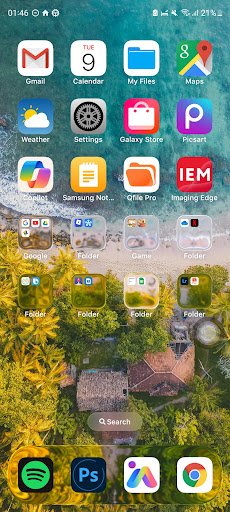
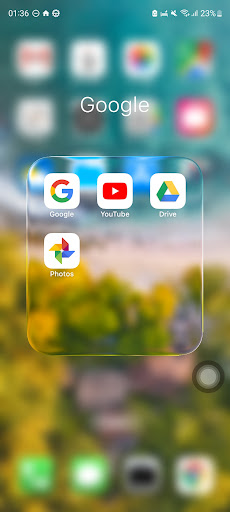
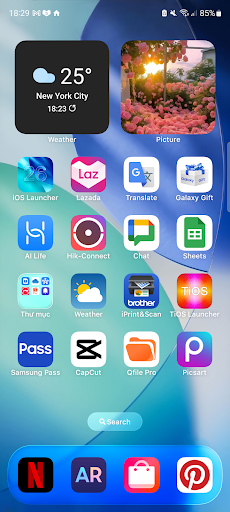
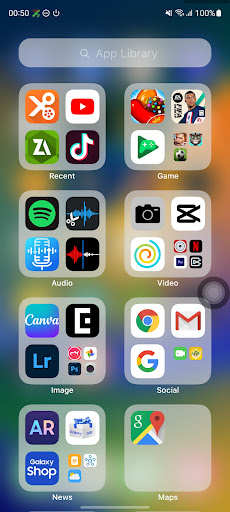
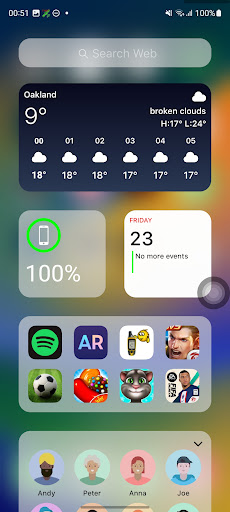
Launcher iOS 19 (marketed in-app as iOS 26) is an Android home screen replacement built for people who want their phone to look and feel like an iPhone without switching hardware. It reskins your home screen, app icons, and wallpaper handling to mimic Apple’s design language, and adds iPhone-style extras like a Control Center and an AssistiveTouch-inspired quick access button. It’s aimed squarely at Android users who like the iOS aesthetic, or who switched from iPhone and miss the layout.

Where It Genuinely Delivers

Reviewers consistently say the core promise holds up: the launcher does make an Android phone look like a real iPhone, with liquid glass icon effects, widgets, and animated wallpapers cited as standout touches. Users who’ve tried multiple iOS-style launchers say this one nails the interface better than competitors, and several longtime users of earlier versions (iOS 16 and similar) say each iteration keeps improving, with one user specifically praising the added convenience and visual polish over past releases.

The Ad Situation Is a Real Problem for Some

The most damning complaint comes from a user who says literally every tap triggers an advertisement pop-up, including inside the general menu, making the app nearly unusable within minutes; they deleted it after only 3 minutes and 15 ads without ever reaching a menu item. On the flip side, other reviewers are more forgiving, acknowledging ads are how a free app stays funded and crediting this launcher with placing them less intrusively than rival iOS launchers that clutter the search menu or home screen. Your experience with ads may vary significantly depending on which version or device you’re running.

Weather Accuracy and Update Stability Issues

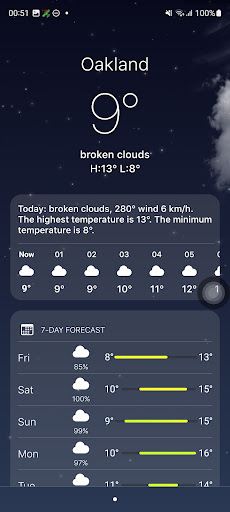
Beyond ads, there are two recurring technical gripes. One reviewer found the built-in weather feature off by 10 degrees compared to their computer’s forecast, and noted the color temperature bar display stays solid red regardless of actual conditions. Another user lost hours of custom icon work after updating to the latest version, finding their painstakingly arranged holiday home screen reverted to default icons (though widgets survived the reset), which is a frustrating trade-off for anyone who invests real time customizing their layout.

Missing Pieces You’ll Need to Fill In

Multiple users note the app isn’t a complete package on its own. One reviewer bluntly says you’ll need separate apps for a proper control panel and extra widgets, and describes the icon set as ‘a bit wacky’ out of the box, though customizable. Another mentions a simple Android navigation settings tweak (switching to swipe gesture navigation) that helps sell the iPhone illusion further, suggesting the launcher alone doesn’t fully replicate the experience without extra setup.

Who Should Actually Download This

If you want a free, visually convincing iPhone-style home screen and don’t mind occasional ads or pairing it with other widget and control-panel apps, this launcher delivers on its core visual promise better than many alternatives, according to repeat users. If you’re ad-averse or rely on stable icon customization across updates, weigh the update-wiping and ad-frequency complaints carefully before committing time to a custom setup.

Pros

  • ✓Convincingly authentic iPhone-style interface
  • ✓Liquid glass icons and animated wallpapers
  • ✓Better ad placement than rival launchers
  • ✓Customizable wallpaper and icon options
  • ✓Continually improved across versions

Cons

  • ✕Ads can pop up on nearly every tap
  • ✕Updates sometimes reset custom icon layouts
  • ✕Weather feature reported as inaccurate

What Real Users Say

Kristina Curbi ★ 5/5

“This app is simply amazing! In addition to having some fantastic features like working liquid glass icons, widgets, active wallpapers, and more, the iOS launcher does make it appear to be an actual iPhone running iOS 26. However, there is a single issue: The liquid glass disappears when i enable Wallpaper Animations. I'm really upset about it. Overall, though, it's…”

👍 338 found this helpfulDeveloper responded
Anonymous ★ 5/5

“Great app! Would be nice if you could update the Weather feature! It's a off a lot. For example, I checked the weather on my computer (I use Farenheight) and it showed a high of 96 degrees. Your launcher showed 106 degrees, 10 degrees off. Also, the color temperature bars are always solid red. (in the summer time) Maybe add…”

👍 323 found this helpfulDeveloper responded
Raisa Zaria ★ 5/5

“An honest 10/5 . I'll tell you its far from perfection , you'll need another app for the control panel , ads , extra widget app etc . But it played out best in what its supposed to do , iphone interface . Its great! Though the icons were a bit wacky , still happy cuz you could change it…”

👍 210 found this helpfulDeveloper responded

Reviews sourced from Google Play, selected by helpfulness at the time of writing.

App Info & Permissions

Developer LuuTinh Developer
Content rating Everyone
Contains ads Yes
Installs 16M+
Released 12/27/2022
Price Free

Permissions this app requests

📅 Calendar Read calendar events plus confidential information
👥 Contacts Read your contacts
📍 Location Approximate location (network-based); precise location (GPS and network-based)
📞 Phone Directly call phone numbers
🖼️ Photos/Media/Files Read the contents of your USB storage; modify or delete the contents of your USB storage
💾 Storage Read the contents of your USB storage; modify or delete the contents of your USB storage

Similar Apps

Frequently Asked Questions

1

What is Launcher iOS 19?

It's an Android launcher app by LuuTinh Developer that redesigns your home screen, icons, and wallpaper to resemble Apple's iOS interface, marketed in-store as iOS 26. It also adds iPhone-inspired features like a Control Center and an AssistiveTouch-style quick access button. It's built for Android users who want an iPhone-like look and feel without switching devices.

2

Is Launcher iOS 19 free to use?

Yes, it's free to download and install, but it's ad-supported. Some users report ads appearing frequently, including inside menus, while others say this launcher handles ad placement better than competing iOS-style launchers. Expect to see ads regularly during use.

3

Does Launcher iOS 19 fully replace the need for other apps?

Not entirely. Some reviewers note you'll still want separate apps for a fuller control panel experience and additional widgets. Pairing it with Android's swipe-based navigation gesture setting is also recommended by users to strengthen the iPhone illusion.

4

Will updating the app affect my custom home screen setup?

It can. At least one user reported that after updating to the latest version, their custom app icons were reset to default, though their widgets remained intact. If you've spent time customizing your layout, consider backing up your setup or being cautious with updates.

5

Is the weather widget in Launcher iOS 19 accurate?

Not always, according to user feedback. One reviewer found the in-app weather reading was 10 degrees higher than their computer's forecast, and noted the temperature color bar display didn't seem to update correctly. Treat the weather feature as approximate rather than precise.