
Nintendo Switch Parental Cont…

by Nintendo Co., Ltd.

4.7 ★ 156K+ reviews
14M+ Installs
03/01/2017 Released
Nintendo Switch Parental Cont… icon
Lifestyle

Nintendo Switch Parental Cont…

by Nintendo Co., Ltd.

4.7 ★ 156K+ reviews
14M+ Installs
03/01/2017 Released
Advertisements
Nintendo Switch Parental Cont… screenshot 1
Nintendo Switch Parental Cont… screenshot 2
Nintendo Switch Parental Cont… screenshot 3
Nintendo Switch Parental Cont… screenshot 4
Nintendo Switch Parental Cont… screenshot 5
Nintendo Switch Parental Cont… screenshot 6

Ratings Breakdown

4.7 ★★★★★ 156K+ ratings
5 ★ 81%
4 ★ 12%
3 ★ 3%
2 ★ 2%
1 ★ 3%

Data from Google Play at the time of writing.

What This App Does and Who It’s For

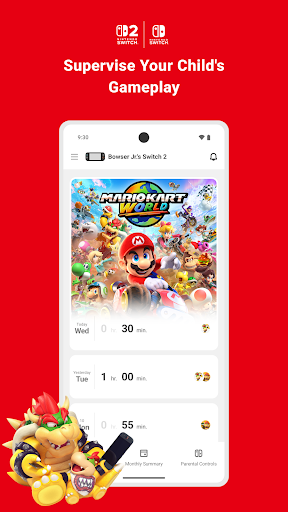
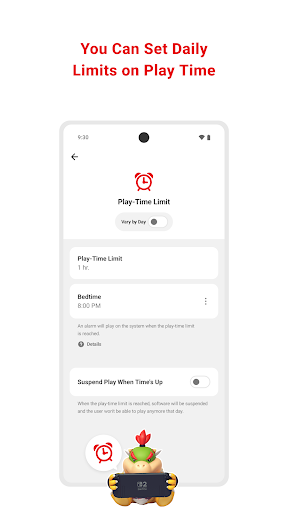
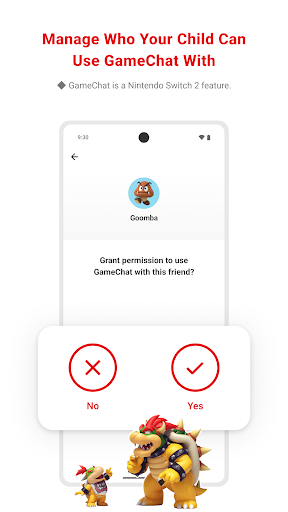
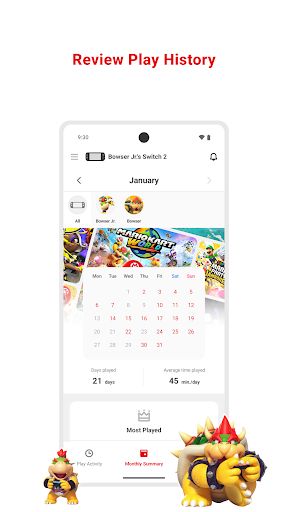
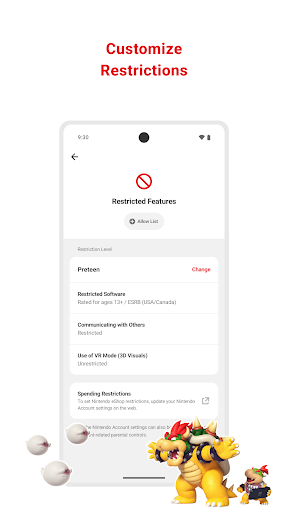
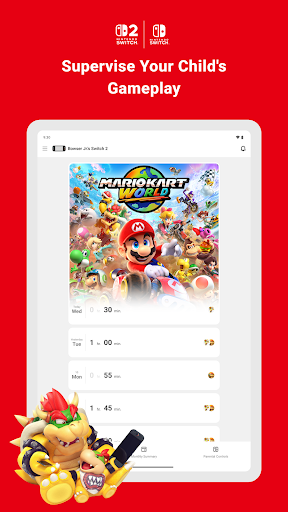
Nintendo Switch Parental Controls is a free companion app from Nintendo Co., Ltd. that pairs with a Nintendo Switch or Switch 2 console so parents can monitor and manage a child’s gameplay from their phone. It covers the basics you’d expect: daily play-time limits that can vary by day of the week, a bedtime alarm, age-based content restrictions, GameChat friend approval on Switch 2, and a monthly summary of what games were played and for how long. It’s aimed squarely at parents who want a lightweight way to keep tabs on console use without hovering over the TV every night.

Where It Actually Delivers

For straightforward oversight, the app does what it promises. Setting an hourly limit or a bedtime cutoff takes just a few taps, and the play activity view gives a reasonably clear picture of which games your child spent time on. Reviewers note the interface is ‘nice and simple,’ and for parents who just want a rough ceiling on screen time and a bird’s-eye view of gameplay history, it gets the job done without much setup hassle.

The Per-Profile Problem That Frustrates Parents

The most repeated complaint by far is that restrictions apply to the console as a whole, not to individual user profiles. If multiple kids—or a parent—share the same Switch, everyone’s time gets lumped into one shared timer. One reviewer put it bluntly: ‘just because I don’t want my kid staying up playing till all hours of the night doesn’t mean I’m not going to.’ Another wanted their daughter’s account tracked and limited separately from their own, but found no way to do it. This design choice undercuts the app’s core purpose for any household where the console isn’t used by just one child.

Missing Controls Parents Expect

Beyond the profile issue, several practical gaps show up repeatedly in feedback. There’s no way to instantly lock the console remotely if it’s lost or if it’s simply time to stop playing right now. Bedtime restrictions can be set, but there’s no matching ‘wake up’ time, so you can’t confine play to a specific window like 1pm to 7pm. Bonus time as a reward for chores isn’t supported either, forcing parents to manually adjust limits instead. One user also noted uncertainty about whether the bedtime setting was even working correctly when checking logs against the set time. There’s also no password lock for the system or specific games, and no Bluetooth option for when the console isn’t connected to Wi-Fi.

Final Verdict: Who Should Install This

This app is worth having if you have one child on a single Switch and just want basic daily time limits and a activity snapshot — for that use case it’s functional and easy to use. But if your household has multiple kids sharing one console, or you want granular scheduling, remote locking, or reward-based bonus time, you’ll likely find the feature set thin. Given how many long-time reviewers flag the same missing features, don’t expect a robust parental control suite here — treat it as a basic starting point, not a complete solution.


Pros

  • ✓Simple, easy-to-navigate interface
  • ✓Quick daily play-time limit setup
  • ✓Monthly play activity overview included
  • ✓Age-based content restriction options
  • ✓Free companion app for Switch consoles

Cons

  • ✕No per-profile time limit controls
  • ✕Can't remotely lock console instantly
  • ✕No bonus time or wake-up scheduling

What Real Users Say

Car Co ★ 3/5

“This app is ok. I think it could use some upgrades. The main one being lock console immediately. If you lose the system or if it dinner time, bed time, you should be able to lock the gaming system. It could also use a Bluetooth connection options for when unit is not connected to a network you can connect through…”

👍 107 found this helpful
Hamzah Mughal ★ 3/5

“Great, but needs to be individualized by account. The app enables you to control the WHOLE switch. It counts the time the console was active, not a given account. I want my daughters time on the console on her account to be tracked and limited. not mine. Unfortunately, there's no way to discriminate between us (unless I clearly missed it).…”

👍 69 found this helpful
Christopher Galan ★ 3/5

“This app works great for setting a time limit for my kid's switches, HOWEVER, I wish there was an option to add bonus time to their limit for the day. I don't want to have to always change limits. Bonus time works great for rewarding them for chores and other things. I also wish I was able to select a…”

👍 68 found this helpful

Reviews sourced from Google Play, selected by helpfulness at the time of writing.

App Info & Permissions

Developer Nintendo Co., Ltd.
Content rating Everyone
Contains ads No
Installs 14M+
Released 03/01/2017
Price Free

Similar Apps

Frequently Asked Questions

1

What is Nintendo Switch Parental Cont…?

It's an official Nintendo app that lets parents monitor and manage a child's use of a Nintendo Switch or Switch 2 console from their phone. Features include daily play-time limits, bedtime alarms, age-based restrictions, GameChat management, and monthly play activity reports. It requires a linked Nintendo Switch system and a Nintendo Account for the parent.

2

Is Nintendo Switch Parental Controls free?

Yes, the app itself is free to download and use. You do need a Nintendo Switch or Switch 2 console and a Nintendo Account to set it up, and some purchasing restrictions are managed separately through Nintendo Account settings rather than the app itself.

3

Can I set different time limits for each of my kids?

Not really — this is the app's most criticized limitation. Time limits and restrictions apply to the console as a whole rather than to individual user profiles, so if siblings or parents share one Switch, everyone's play time is tracked and limited together. Multiple reviewers specifically asked for per-account controls that currently don't exist.

4

Can I lock the console immediately if needed?

No, there's no instant remote lock feature. Reviewers have asked for the ability to suspend the console right away, for example if it's bedtime or the system is lost, but currently you can only set scheduled limits and bedtime alarms in advance.

5

Does the app support GameChat monitoring?

Yes, on Nintendo Switch 2 systems you can manage which friends your child is approved to chat with and control when video chat is available. This GameChat management feature is not available on the original Switch console. Additional GameChat details are available through Nintendo's support site.