EDGE Lighting -LED Borderlight

by Pixel Kraft Studios

4.7 ★ 184K+ reviews
32M+ Installs
04/11/2022 Released
EDGE Lighting -LED Borderlight icon
Personalization

EDGE Lighting -LED Borderlight

by Pixel Kraft Studios

4.7 ★ 184K+ reviews
32M+ Installs
04/11/2022 Released
Advertisements
EDGE Lighting -LED Borderlight screenshot 1
EDGE Lighting -LED Borderlight screenshot 2
EDGE Lighting -LED Borderlight screenshot 3
EDGE Lighting -LED Borderlight screenshot 4
EDGE Lighting -LED Borderlight screenshot 5
EDGE Lighting -LED Borderlight screenshot 6

Ratings Breakdown

4.7 ★★★★★ 184K+ ratings
5 ★ 81%
4 ★ 13%
3 ★ 3%
2 ★ 1%
1 ★ 3%

Data from Google Play at the time of writing.

What This App Actually Does

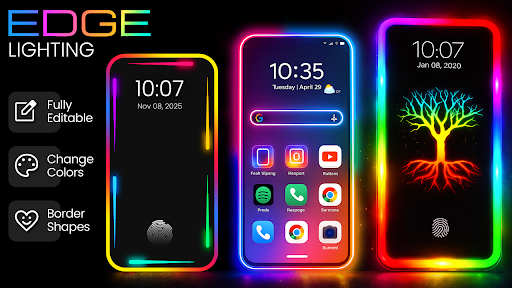
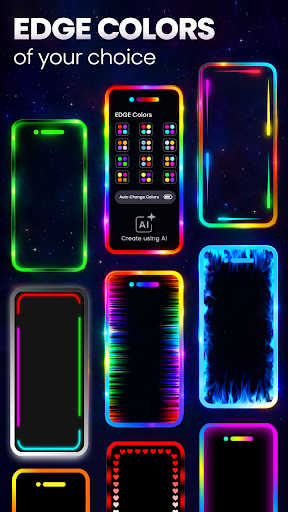
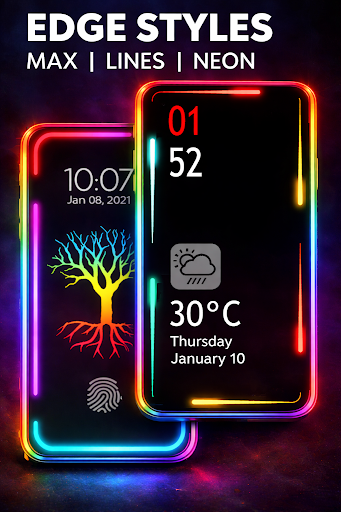
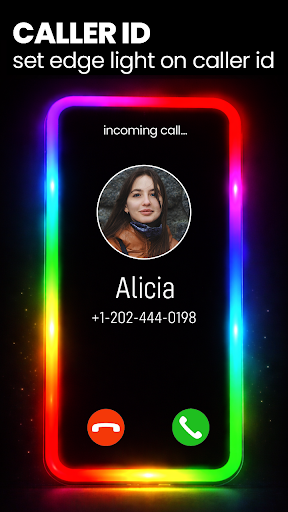
EDGE Lighting – LED Borderlight is a personalization app that wraps your Android phone’s screen edges in animated RGB light, showing up on the home screen, lock screen, and even the caller ID screen when someone rings you. It’s built for people who like customizing how their phone looks and feels, especially fans of the RGB gaming-peripheral aesthetic. You pick from dozens of gradient color combinations, shapes like hearts or stars, and 4K backgrounds, then layer the animated border on top.

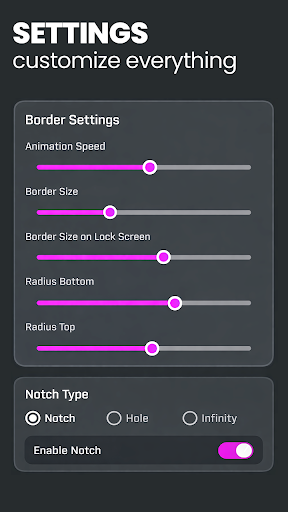
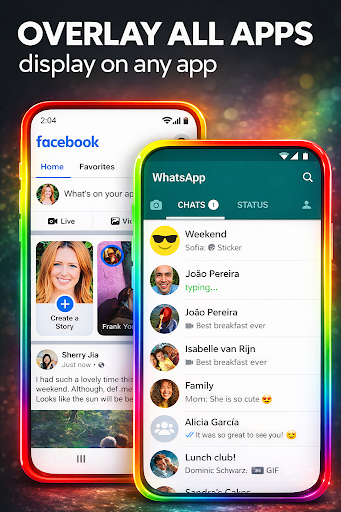
It also supports an always-on-display style overlay so the border shows up while you’re in other apps like Facebook or your messenger, and it tries to account for whatever notch or camera cutout your specific phone has, whether that’s a Samsung Galaxy S-series punch hole or a standard notch.

Where It Delivers

Real users consistently praise the sheer amount of customization on offer. One reviewer highlighted the range of wallpapers (both built-in and your own photos), corner radius adjustment, color thickness, number of colors, animation speed, and direction options, plus notch cutout settings. Another user called out the caller ID lighting specifically, noting you can extend permissions so it also triggers on notifications, which they described as ‘totally sweet.’ The home and lock screen backgrounds also get singled out as a nice touch beyond just the border effect itself.

The Annoyances That Come Up Repeatedly

Ads are the most common complaint, though most reviewers acknowledge the app is free and seem to accept ads as the tradeoff. A more functional gripe is that the app sometimes needs to be manually restarted or reset after plugging in your phone or rebooting it, which one user flagged directly and suggested a widget could fix. Another reviewer pointed out that the ‘custom’ color option is misleadingly limited, letting you pick from only 3 colors rather than truly matching your own wallpaper. There’s also a request for more scrolling word/text options, since currently there are only a couple of text-based border styles versus many symbol-based ones.

Battery Life Is a Lingering Question Mark

At least one user raised concerns about whether running an animated always-on border would drain their battery faster, and didn’t seem fully confident either way. Given that this app is essentially running a live wallpaper plus an overlay service on top of other apps, it’s a reasonable concern for anyone with an older device or smaller battery, and it’s worth testing cautiously rather than assuming it’s negligible.

Who Should Actually Download This

If you’re someone who enjoys tinkering with how your phone looks and doesn’t mind a few ads in exchange for a free tool, this app delivers a lot of visual customization for very little cost. The caller ID lighting and notch-matching features in particular seem to land well with users who tried them. If you’re expecting truly precise custom color matching to your exact wallpaper, or you’re on a phone where battery anxiety is already a problem, temper your expectations and keep an eye on battery stats after installing.


Pros

  • ✓Extensive color, shape, and animation customization
  • ✓Caller ID and notification lighting works well
  • ✓Supports custom photos as backgrounds
  • ✓Adjustable for various phone notch types
  • ✓Free to use with optional ad tradeoff

Cons

  • ✕App sometimes needs manual restart after reboot
  • ✕'Custom' color option is quite limited
  • ✕Possible battery drain with always-on overlay

What Real Users Say

Rachel Anne Joan Boulis ★ 4/5

“I dig this app! Only suggestion, if there were more backgrounds that are black and green, it would be awesomely amazing! A widget would be great because sometimes, when I plug my phone in or after I turn the power of my phone back on, the app needs to be restarted/reset. I think having a widget would be so much…”

👍 2,492 found this helpful
Gillian Wallace ★ 5/5

“I love this edge light app! There are ads, but the app is free. There are so many options for wallpapers (either theirs or use your own like I did), corner radius, thickness, number of colors and specific colors you want, speed and direction(s) the colors shift in, and even a camera cutout/notch option. The border can be just a…”

👍 1,429 found this helpful
C. F. ★ 5/5

“🤩 I just downloaded this app, and I'm already quite impressed. It's a really cool app. I'm so glad I came across it! It also has some epic home screen & lock screen backgrounds to choose from, along with the option to use your own pics. P.S. To quickly figure out what the edge settings do, just slide each one…”

👍 1,109 found this helpful

Reviews sourced from Google Play, selected by helpfulness at the time of writing.

App Info & Permissions

Developer Pixel Kraft Studios
Content rating Everyone
Contains ads Yes
Installs 32M+
Released 04/11/2022
Price Free

Permissions this app requests

📱 Device ID & call information Read phone status and identity
📞 Phone Read phone status and identity
🖼️ Photos/Media/Files Access USB storage filesystem; read the contents of your USB storage
💾 Storage Read the contents of your USB storage
📶 Wi-Fi connection information View Wi-Fi connections

Similar Apps

Frequently Asked Questions

1

What is EDGE Lighting -LED Borderlight?

It's a personalization app for Android that adds animated RGB light borders around your phone's screen edges. It works on the home screen, lock screen, and caller ID screen, and can overlay on top of other apps as an always-on display style effect. Users can customize colors, shapes, animation speed and direction, and background wallpapers.

2

Is EDGE Lighting -LED Borderlight free to use?

Yes, the app is free to download and use, and multiple reviewers confirm this. It's supported by ads, which is the most common complaint in user reviews, though most consider it a fair tradeoff for a free tool.

3

Does the edge lighting work when I get a phone call?

Yes, one of the app's key features is showing the animated LED border on your caller ID screen when someone calls you. Users can also grant additional permissions so the lighting effect triggers on notifications as well, not just calls.

4

Will this app drain my phone's battery quickly?

This isn't fully confirmed either way in user feedback, but at least one reviewer raised concerns about battery drain given the app runs an animated overlay continuously. Since it functions as a live wallpaper plus an always-on overlay on other apps, it's reasonable to expect some added battery usage, so it's worth monitoring after installation.

5

Can I match the border color exactly to my own wallpaper?

Not precisely. While the app offers a 'custom' color option, one user pointed out that it only provides 3 selectable colors, which isn't true full customization. If exact color matching to your wallpaper is important to you, this may fall short of expectations.