Google Pixel Watch

by Google LLC

4.7 ★ 166K+ reviews
25M+ Installs
09/30/2022 Released
Google Pixel Watch icon
Communication

Google Pixel Watch

by Google LLC

4.7 ★ 166K+ reviews
25M+ Installs
09/30/2022 Released
Advertisements
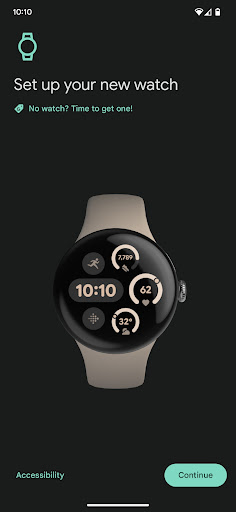
Google Pixel Watch screenshot 1
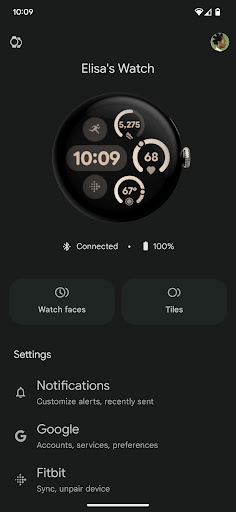
Google Pixel Watch screenshot 2
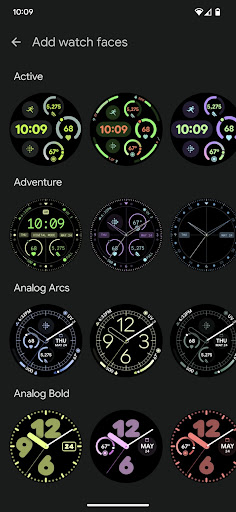
Google Pixel Watch screenshot 3
Google Pixel Watch screenshot 4
Google Pixel Watch screenshot 5
Google Pixel Watch screenshot 6

Ratings Breakdown

4.7 ★★★★★ 166K+ ratings
5 ★ 83%
4 ★ 10%
3 ★ 3%
2 ★ 1%
1 ★ 3%

Data from Google Play at the time of writing.

What This Companion App Actually Does

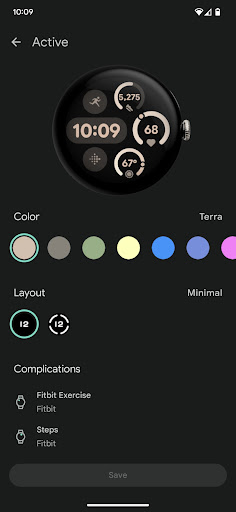
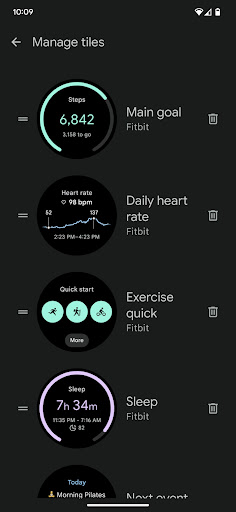
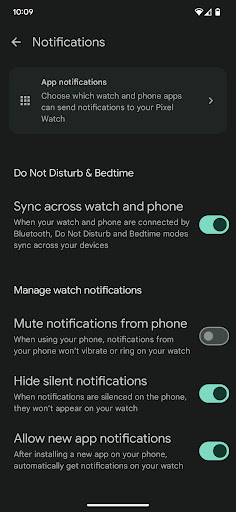
The Google Pixel Watch app is the required setup and management hub for anyone who owns a Pixel Watch. It handles pairing the watch to an Android 8.0+ phone, customizing watch faces and tiles, configuring Google Assistant and Google Wallet, managing notifications, installing apps, and setting up carrier connectivity where supported. It is not optional; without it your watch is essentially a paperweight, so every Pixel Watch owner ends up with this app whether they like it or not.

Where It Works Well

When everything goes smoothly, reviewers note the app is quick and user friendly for day-to-day tasks like adjusting watch faces and toggling settings. It gets the basics right: the interface is clean, navigation is simple, and for users whose watch and phone sync properly, ongoing management of tiles, alerts, and installed apps is genuinely straightforward. That ease of use is consistently mentioned even by reviewers who otherwise had complaints.

Setup Failures and Sync Problems

The most damaging and frequently cited issue is setup itself. Multiple users describe an incredibly long setup process that fails outright, often requiring a full factory reset of the watch just to try again, with no guarantee of success the second time. Beyond initial setup, ongoing sync problems are common: notifications arriving inconsistently, text messages coming through only sometimes, and watches getting stuck ‘waiting to back up’ even while connected to power and wifi. One reviewer reported the app crashing immediately on open after previously working fine, with Google’s support email auto-replying that it was no longer monitored. Others experienced random reboots on Pixel Watch 2 that interrupted workout recordings, and unexplained factory resets that wiped settings without warning.

Missing Features That Frustrate Power Users

Several complaints go beyond bugs and point to design decisions. Battery management is a recurring sore spot, with requests for the ability to manually disable constantly running sensors and a per-app battery drain breakdown similar to what’s available on phones. Fitness-focused users are unhappy that the workout watch face was changed from a corner-based multi-field layout to a scrolling list, making it harder to glance at key stats mid-workout. Others wish for more watch face variety and larger display options, since the small screen is hard to read for farsighted users.

Who Should and Shouldn’t Download This

If you already own a Pixel Watch, this app isn’t optional, and most users report a functional, even pleasant, experience once setup succeeds. But the setup failure rate described in top reviews is a real risk, and the lack of refund flexibility after prolonged troubleshooting (as one reviewer experienced with repeated reboots) adds to the frustration. Buyers should go in expecting occasional friction: possible factory resets, patchy notification sync, and thin battery controls. This app is worth accepting as part of the Pixel Watch package, but it’s not a reason to buy the watch, and anyone considering the purchase should budget time for troubleshooting early on.


Pros

  • ✓Simple, user-friendly interface for daily tasks
  • ✓Easy watch face and tile customization
  • ✓Straightforward Google Assistant and Wallet setup
  • ✓Central hub for notifications and apps
  • ✓Works well once properly synced

Cons

  • ✕Setup frequently fails, requiring factory resets
  • ✕Inconsistent notification and message syncing
  • ✕Limited battery-saving controls and app breakdowns

What Real Users Say

Michael “Irish” O'Neill ★ 1/5

“Setup takes an incredibly long time just to fail. Several problems cannot be resolved without performing a factory reset on the Pixel Watch and forcing you through the incredibly long setup process again (which is more likely than not to fail again). Edit: Fortunately, Google came back and told me to try the thing I've already tried 8 times. Incredible.”

👍 128 found this helpfulDeveloper responded
Cody Williams ★ 3/5

“Lacking. Yes, very quick and easy to use and very user friendly, but... PLEASE add more battery saving options. Like the ability to turn off the constant running sensors and have an option to check manually. Also, it would be great to see what apps are draining what percentage of battery like on my pixel phone. Or make it easier…”

👍 105 found this helpful
Brenton Wisniewski ★ 1/5

“Absolutely useless for pixel watch 2 and pixel 8 pro. I contacted support after having the watch for less than a day and solved nothing. The syncing for notifications and everything else mostly doesn't work at all. I only get text message notifications sometimes. That's literally as good as it gets. The app will show that other notifications apparently came…”

👍 61 found this helpfulDeveloper responded

Reviews sourced from Google Play, selected by helpfulness at the time of writing.

App Info & Permissions

Developer Google LLC
Content rating Everyone
Contains ads No
Installs 25M+
Released 09/30/2022
Price Free

Permissions this app requests

📅 Calendar Read calendar events plus confidential information
📷 Camera Take pictures and videos
👥 Contacts Read your contacts; modify your contacts
📱 Device ID & call information Read phone status and identity
📍 Location Approximate location (network-based); precise location (GPS and network-based)
📞 Phone Directly call phone numbers; read call log; read phone status and identity
💬 SMS Read your text messages (SMS or MMS); send SMS messages

Similar Apps

Frequently Asked Questions

1

What is Google Pixel Watch?

Google Pixel Watch is the official companion app for setting up and managing a Pixel Watch from an Android 8.0+ phone. It lets you customize watch faces and tiles, configure Google Assistant and Google Wallet, manage notifications, install apps, and set up carrier service where supported. It is required for the watch to function properly with your phone.

2

Is the Google Pixel Watch app free?

Yes, the app itself is free to download and use, since it's a required companion tool for the Pixel Watch hardware. There are no in-app purchases described by users; the cost is in the watch itself, not the software. You simply need an Android 8.0+ device to install and run it.

3

Does the app work reliably for pairing a new Pixel Watch?

Reviews are mixed on this point, with several users reporting setup takes a long time and then fails, sometimes requiring a factory reset and a repeat attempt. Others had smoother experiences and found the app quick and easy once paired. Given the reported failure rate, it's wise to set aside extra time when first setting up your watch.

4

Why do notifications sometimes not show up on the watch?

Multiple reviewers reported inconsistent notification syncing, including only receiving text messages sporadically and other alerts not coming through at all. This appears to be a persistent syncing issue between the app and watch rather than a one-off glitch. If you experience this, factory resets have helped some users, though not permanently for everyone.

5

Can I control battery usage or see which apps drain the watch battery?

Currently the app offers limited battery management tools, and reviewers specifically ask for the ability to manually disable constantly running sensors. There's also no detailed per-app battery drain breakdown similar to what's available on Android phones. This is listed as one of the app's clearer feature gaps by users who track battery life closely.

