
Whoscall – Caller ID & Block

by Gogolook

3.8 ★ 805K+ reviews
73M+ Installs
07/24/2010 Released
Whoscall – Caller ID & Block icon
Communication

Whoscall – Caller ID & Block

by Gogolook

3.8 ★ 805K+ reviews
73M+ Installs
07/24/2010 Released
Advertisements
Whoscall – Caller ID & Block screenshot 1
Whoscall – Caller ID & Block screenshot 2
Whoscall – Caller ID & Block screenshot 3
Whoscall – Caller ID & Block screenshot 4
Whoscall – Caller ID & Block screenshot 5
Whoscall – Caller ID & Block screenshot 6

Ratings Breakdown

3.8 ★★★★★ 805K+ ratings
5 ★ 59%
4 ★ 8%
3 ★ 7%
2 ★ 4%
1 ★ 21%

Data from Google Play at the time of writing.

What Whoscall Actually Does

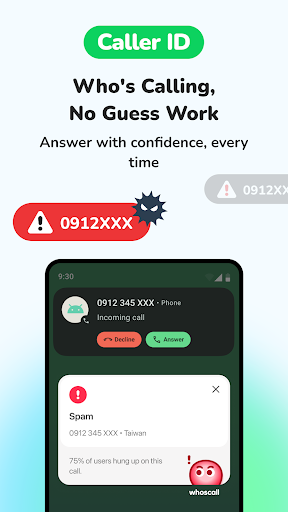
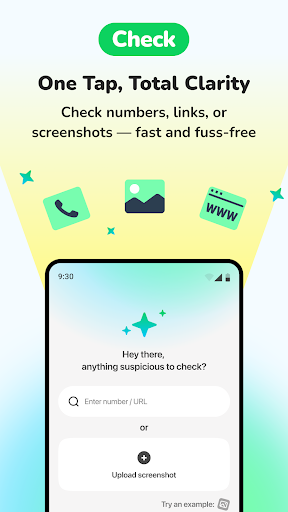
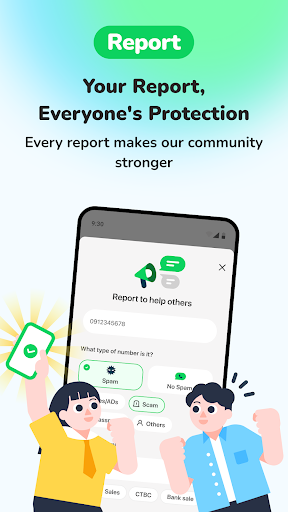
Whoscall is a caller ID and call-blocking app from Gogolook that flags unknown numbers, screens texts for phishing, and lets users verify suspicious phone numbers, URLs, or screenshots through a feature called Check. It’s aimed at anyone tired of scam calls and spam texts, and it leans on a global community reporting system plus a gamified Badge and Mission Board setup to keep that database growing. With over 73 million installs, it’s clearly found an audience among people who want a free-ish layer of protection on top of their phone’s default dialer.

Where It Actually Delivers

The core promise, identifying who’s calling before you pick up, works for a lot of users, and the sheer size of the reporting community is what makes the caller ID database useful in the first place. Reviewers note it’s cheaper than comparable apps, and for basic scam-number identification it does the job it says on the tin. The Check tool for scanning suspicious links or screenshots is a genuinely useful addition that goes beyond what most caller ID apps offer.

The Default App Problem

The biggest recurring complaint is that Whoscall increasingly pushes users to set it as their default phone and messaging app, and once you do, basic functionality suffers. Reviewers report losing the ability to pull up contacts from search, missing custom ringtones because the app falls back to generic notification sounds, and blocked numbers cluttering the same call log as legitimate calls. One user specifically said they were uninstalling because the app got ‘too nosy’ about wanting to be both dialer and SMS handler at once, which is a fair complaint when a caller ID app starts acting like a full phone replacement.

Blocking Calls You Didn’t Ask It To Block

More concerning is a report of the app automatically blocking unknown numbers without the user ever enabling that setting, resulting in missed calls including a job interview and a delivery. Another reviewer described the reverse problem: a scam caller’s name didn’t show until after they’d already answered, which defeats the entire purpose of caller ID. There are also complaints about persistent ‘beware of scammers’ notifications that bypass system-level notification settings entirely, meaning turning off notifications in your phone settings doesn’t actually stop them.

The Premium Upgrade Experience

Multiple low-rated reviews describe a rough premium trial experience, including a demand for a second backup payment method after the 7-day trial and a spike in unknown calls and texts right after signing up for premium, which some reviewers flatly called scam-like behavior. Whether that’s a coincidence or a pattern, it’s shown up often enough in reviews to be a real red flag worth knowing about before entering payment details.

Who Should Actually Download This

Whoscall makes sense for someone who wants a supplementary caller ID lookup tool and is fine leaving their default phone and messaging apps alone. It’s a harder sell for anyone expecting a full dialer replacement, given the ringtone issues, contact search problems, and cluttered call logs reported by longtime users. Given the complaints around auto-blocking legitimate calls and the premium trial’s payment demands, it’s worth using cautiously, sticking to the free tier, and avoiding default-app status until Google Play reviews suggest these issues have been resolved.


Pros

  • ✓Large community-driven caller ID database
  • ✓Cheaper than many competing apps
  • ✓Useful Check tool for links and screenshots
  • ✓Effective at flagging known scam numbers
  • ✓Blocks spam automatically for many users

Cons

  • ✕Pushes to become default dialer and SMS app
  • ✕Notifications can bypass system settings
  • ✕Premium trial demands extra payment method

What Real Users Say

A Google user ★ 1/5

“Loved the app so much, I wanted to upgrade to the premium paid plan. I gave them my card number & at the end of the 7 day trial, they wanted a 2nd form of payment as back up. Sorry.. Ain't gonna happen. I'm probably going to drop the free app as well. That's just absurd. Not even my utilities…”

👍 556 found this helpful
Cynthia Bea ★ 2/5

“Used this app for quite a while, it's okay, but since it requires to be the default app, it can't pull up any contacts in contact search, and always warn you, that you may be charged if you use the dial pad to make a call, and the blocked numbers appear on the call log along with my regular calls,…”

👍 385 found this helpful
Jonquil M ★ 3/5

“Cheaper than other apps, but the interface is so annoying that it doesn't matter. You have to use the app as default for calls and texts, and they don't have hardly any features for those functions. I can't even get an actual ring tone so I don't miss calls... the app has to use notification sounds for the phone ringing,…”

👍 281 found this helpful

Reviews sourced from Google Play, selected by helpfulness at the time of writing.

App Info & Permissions

Developer Gogolook
Content rating Everyone
Contains ads Yes
In-app purchases $0.99 - $99.99 per item
Installs 73M+
Released 07/24/2010
Price Free

Permissions this app requests

👥 Contacts Find accounts on the device; read your contacts
📱 Device ID & call information Read phone status and identity
🪪 Identity Find accounts on the device; read your own contact card
📞 Phone Directly call phone numbers; reroute outgoing calls; read call log; read phone status and identity
🖼️ Photos/Media/Files Read the contents of your USB storage; modify or delete the contents of your USB storage
💬 SMS Read your text messages (SMS or MMS); receive text messages (MMS); receive text messages (SMS)
💾 Storage Read the contents of your USB storage; modify or delete the contents of your USB storage
📶 Wi-Fi connection information View Wi-Fi connections

Similar Apps

Frequently Asked Questions

1

What is Whoscall - Caller ID & Block?

Whoscall is a caller ID and spam-blocking app made by Gogolook that identifies unknown callers, screens text messages for phishing attempts, and lets users verify suspicious numbers, links, or screenshots. It relies on a large global community of user reports to build its caller identification database. It also includes gamified features like badges and a mission board to encourage users to keep reporting scam numbers.

2

Is Whoscall free to use?

Whoscall offers a free version with core caller ID and blocking features, plus a premium paid plan with a 7-day trial. However, several reviewers reported that the premium trial required a second backup payment method before continuing, and some noticed an increase in spam calls and texts after subscribing. It's worth reading the trial terms carefully before entering payment information.

3

Does Whoscall need to be my default phone and messaging app?

Whoscall increasingly prompts users to set it as their default dialer and SMS app to unlock full functionality. Reviewers report that doing so causes issues like losing contact search, missing custom ringtones in favor of generic notification sounds, and blocked numbers mixing into the regular call log. Many users choose to keep their original default apps and use Whoscall only as a supplementary lookup tool.

4

Can Whoscall block calls without me setting it up?

At least one reviewer reported that the app auto-blocked unknown numbers without them enabling any blocking feature, causing them to miss a job interview and delivery calls. This suggests the app's automatic protection settings can be more aggressive than expected. It's a good idea to periodically check your blocked call log to make sure important calls aren't being filtered out.

5

Are the scam alert notifications from Whoscall reliable?

Mostly, but not perfectly. One reviewer noted that a scam caller's identity didn't show up until after they'd already answered the call, which limits the usefulness of the warning. Additionally, some users report that 'beware of scammers' notifications keep appearing even after disabling notifications in phone settings, since the app can bypass those system controls.

