
Xfinity

by Comcast

3.8 ★ 341K+ reviews
22M+ Installs
04/18/2017 Released
Xfinity icon
Xfinity icon
Productivity

Xfinity

by Comcast

3.8 ★ 341K+ reviews
22M+ Installs
04/18/2017 Released
Advertisements
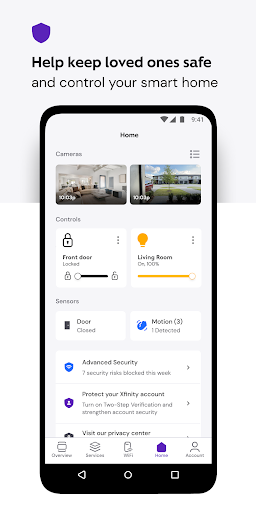
Xfinity screenshot 1
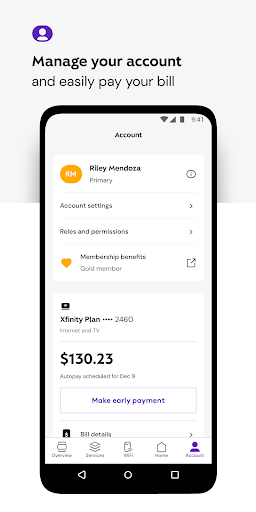
Xfinity screenshot 2
Xfinity screenshot 3
Xfinity screenshot 4
Xfinity screenshot 5
Xfinity screenshot 6

Ratings Breakdown

3.8 ★★★★★ 341K+ ratings
5 ★ 59%
4 ★ 9%
3 ★ 5%
2 ★ 4%
1 ★ 23%

Data from Google Play at the time of writing.

What This App Is Supposed to Do

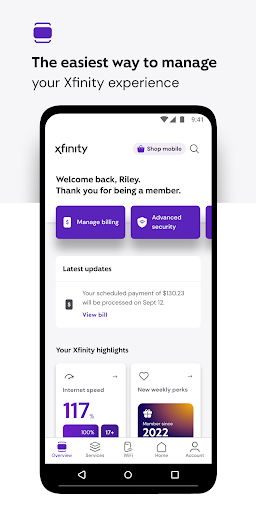
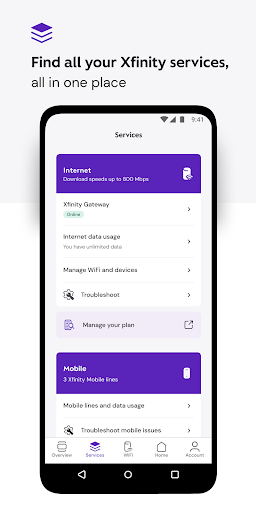
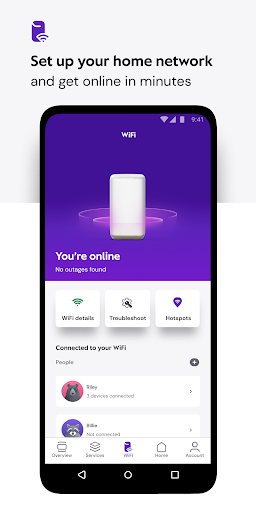
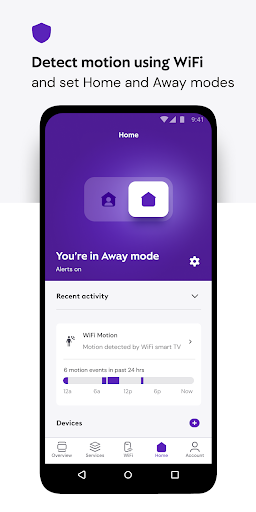
The Xfinity app is Comcast’s all-in-one account management tool, meant to let customers pay bills, check data usage, manage WiFi, run speed tests, set up parental controls, and get support without calling in. It also pushes Xfinity’s newer NOW internet and mobile plans and Xfinity Rewards perks. It’s built for existing Xfinity customers who rent Comcast equipment, since that’s where most of the advanced features like Advanced Security and device management live. Anyone who just wants to glance at a bill or troubleshoot a router outage is the target user.

Where It Actually Works Well

When the app is functioning, the basics are convenient: checking your balance, viewing plan details, and seeing connected devices in one screen beats digging through the website. The idea behind Advanced Security and parental controls, like pausing WiFi for specific devices or setting family-safe browsing, is genuinely useful for households with kids or shared networks, and the concept of activating equipment or running a speed test from your phone is a nice time-saver when it cooperates.

The Recurring Bugs Users Keep Reporting

The complaints here are consistent and specific. Multiple users describe the app failing exactly when it’s needed most: during an internet outage. One reviewer explains that if you’re on WiFi when the gateway is down, the app won’t connect at all, but disconnecting from WiFi makes it falsely report that everything is fine. Another says the outage-reporting tool insists ‘no outages have been reported’ even mid-outage, forcing them to call in anyway. Bill payment is another sore spot, with one user saying 75% of attempts throw errors, freeze, or fail to load, and another noting the app forced an update but then refused to open, still demanding the same update.

Missing Features and Broken Device Management

Beyond crashes, users report that core functionality has been stripped or broken in updates. One reviewer says an overnight update cut the bottom navigation from five tabs to two, eliminating the WiFi tab entirely, along with screen time controls and connected device management. Another describes being unable to rename or remove old devices from their network, hitting a ‘something went wrong’ error repeatedly even after reinstalling the app and restarting the modem. A separate complaint mentions being stuck in a login loop just trying to reach email or Diamond tier benefits, calling the app ‘almost totally useless’ for that purpose.

Who Should Actually Download It

If you’re an existing Xfinity customer and only need to check your bill amount or chat with a support bot, the app handles that adequately, and it’s a required install if you rent Comcast equipment and want any mobile access to WiFi tools at all. But go in with low expectations for anything beyond the basics: don’t count on it during an actual outage, don’t expect smooth bill payment every time, and expect features to occasionally vanish after updates. For managing devices, parental controls, or troubleshooting real internet problems, many users end up calling support anyway, which undercuts the app’s entire pitch as a one-stop tool.


Pros

  • ✓Centralizes bill, plan, and device info
  • ✓Speed test and equipment activation tools
  • ✓Parental controls and pause WiFi concept
  • ✓Xfinity Rewards perks built in
  • ✓Useful for quick balance checks

Cons

  • ✕Fails during actual internet outages
  • ✕Frequent crashes and payment errors
  • ✕Updates remove key features like WiFi tab

What Real Users Say

Promise Revell ★ 1/5

“3/13/26 update, the app is still awful. you'd think they have it fixed by now. You can't use the app to do anything, but look at your amt owed and talk to a bot. I'm so close to canceling my entire xfinity accounts (cable, landline, internet and cell phone) because I can't get into the app & you can never…”

👍 3,283 found this helpfulDeveloper responded
Jason Ingraham ★ 1/5

“The app is useless when there's an Internet issue. If you're connected to wi-fi when your gateway is down, the app won't connect at all. If you disconnect from wi-fi, the app runs, and tells you your internet is fine. It is absolute garbage for troubleshooting. Edit 01/09/23 Now it just constantly crashes. They made it even more useless. Edit…”

👍 2,532 found this helpful
Malachi Cole ★ 1/5

“The app is slow and buggy still, it's honestly atrocious that an internet company can't make a polished app. 3 years later: The app is a full scale advertisement for services you don't want, and never use. Enjoy paying for an unlimited plan because they don't offer less, unhappy about it because I don't really need to be paying this…”

👍 1,674 found this helpful

Reviews sourced from Google Play, selected by helpfulness at the time of writing.

App Info & Permissions

Developer Comcast
Content rating Everyone
Contains ads No
Installs 22M+
Released 04/18/2017
Price Free

Permissions this app requests

📷 Camera Take pictures and videos
📱 Device ID & call information Read phone status and identity
📍 Location Approximate location (network-based); precise location (GPS and network-based)
🎙️ Microphone Record audio
📞 Phone Read phone status and identity
🖼️ Photos/Media/Files Read the contents of your USB storage; modify or delete the contents of your USB storage
💾 Storage Read the contents of your USB storage; modify or delete the contents of your USB storage
📶 Wi-Fi connection information View Wi-Fi connections

Similar Apps

Frequently Asked Questions

1

What is Xfinity?

Xfinity is Comcast's mobile app for managing internet, cable, and mobile service accounts. It lets customers pay bills, check plan details, manage WiFi and connected devices, set parental controls, and access support. It also promotes Xfinity's NOW internet and mobile plans and the Xfinity Rewards program.

2

Is the Xfinity app free?

Yes, the app itself is free to download and use for anyone with an Xfinity account. You still pay for your actual Xfinity internet, cable, or mobile service separately; the app is simply the management tool for those paid services.

3

Does the Xfinity app work during internet outages?

Based on user reports, not reliably. Some users say the app won't even load or connect while on WiFi during a gateway outage, and switching to cellular data sometimes falsely shows the internet as working fine. The built-in outage reporting tool has also been reported as failing to detect real outages.

4

Can I manage connected devices and parental controls in the app?

That's the intent, but several users report errors like 'something went wrong' when trying to rename or remove devices, and one reported an update that removed the WiFi tab and screen time controls entirely. Results seem inconsistent, so don't rely on it exclusively for device management.

5

Is it easy to pay my bill through the Xfinity app?

It can be, but it's not consistently reliable. One reviewer reported errors, freezing, or failed loads in roughly three out of four payment attempts, and another described being blocked by a forced update that then wouldn't open. If a payment fails, the Xfinity website may be a more dependable backup.

