





What This App Actually Does
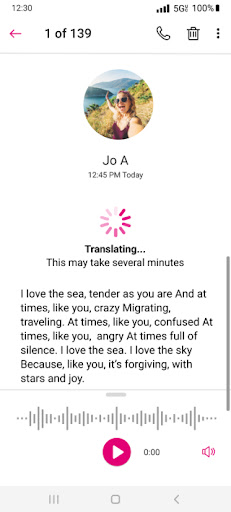
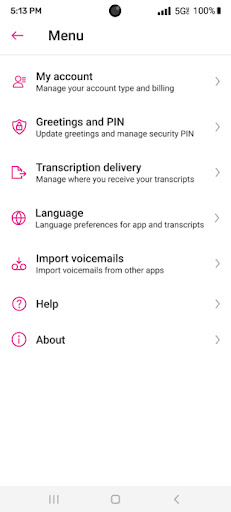
Visual Voicemail is Metro by T-Mobile’s app for managing voicemail without dialing into the traditional voicemail system. Instead of calling a number, sitting through prompts, and pressing keys to save or delete messages, you get a visual inbox where messages can be played in any order, saved, deleted, or responded to with one click. It’s built for Metro PCS/Metro by T-Mobile customers who want a faster, less tedious way to handle voicemail, and it activates automatically the first time you open it with no need to reconfigure forwarding or change your voicemail number.
Where It Genuinely Improves on Old-School Voicemail
The core appeal is simplicity. Users consistently point out that it eliminates the hassle of calling voicemail, listening through prompts, and manually pressing buttons to manage each message. For anyone who gets more than a couple voicemails a week, that alone is a real time-saver. The app is free to use for its basic function, and one reviewer specifically noted they didn’t even need the paid Voicemail to Text upgrade to get value out of it – the core visual inbox was enough. There’s also an Unread Messages widget for the home screen, which is a nice touch for people who don’t want to open the app just to check if anything new came in.
The Sync and Refresh Problems That Keep Coming Back
The most consistent complaint across reviews is a ‘we’re sorry, we’re having difficulty fetching your voicemail’ error that shows up after updates. Multiple users describe the same cycle: the app suddenly can’t connect, manual refresh doesn’t fix it, and they’re told to dial into voicemail the old-fashioned way instead – defeating the entire purpose of the app. Some users say uninstalling and reinstalling helps temporarily, but the problem returns. Others report the app simply stops notifying them of new voicemails at all, showing an empty inbox even when call logs confirm missed calls came in with messages attached.
Storage Limits and Stuck Messages
Beyond sync failures, there’s a recurring frustration with deleting old voicemails. One reviewer describes having to delete the same voicemail repeatedly – sometimes 20 times over a month – because the app refuses to actually remove it from storage, which becomes a real problem given how limited the inbox capacity seems to be. When storage fills up with messages that won’t delete, new voicemails can’t come through properly, compounding the sync issues mentioned above.
Who Should Actually Install This
If you’re a Metro by T-Mobile customer and the app is working normally on your device, it’s a clear upgrade over calling into voicemail – that’s not in dispute, and plenty of long-time users confirm it worked great for years. The problem is reliability has clearly degraded for a meaningful chunk of users, particularly after updates, with connection errors and stuck messages being the norm rather than the exception for them. Install it because it’s the only visual voicemail option for your carrier and it costs nothing to try, but go in expecting that you may need to troubleshoot, reinstall, or fall back on dialing 123 occasionally when the sync breaks.



