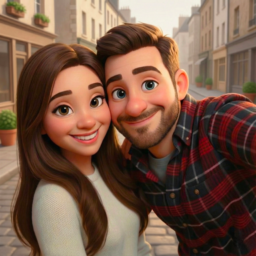
ToonMe photo cartoon maker

by PHOTO LAB DMCC

4.5 1.8M+ reviews
121M+ Installs
11/05/2020 Released
ToonMe photo cartoon maker icon
Photography

ToonMe photo cartoon maker

by PHOTO LAB DMCC

4.5 1.8M+ reviews
121M+ Installs
11/05/2020 Released
ToonMe photo cartoon maker screenshot 1
ToonMe photo cartoon maker screenshot 2
ToonMe photo cartoon maker screenshot 3
ToonMe photo cartoon maker screenshot 4
ToonMe photo cartoon maker screenshot 5
ToonMe photo cartoon maker screenshot 6

Ratings Breakdown

4.5 ★★★★★ 1.8M+ ratings
5 76%
4 10%
3 5%
2 2%
1 7%

Data from Google Play at the time of writing.

What ToonMe Actually Does

ToonMe is a selfie-to-cartoon converter that uses AI to turn a portrait into stylized art, ranging from 3D cartoon faces to full-body illustrated scenes and TV-show-themed presets like the Game of Thrones direwolf filter mentioned in the app description. It’s aimed at people who want a quick, fun new avatar for Instagram or Facebook without learning a real illustration app. Anyone who enjoys novelty photo filters and doesn’t mind a subscription will find the core concept appealing.

Where the Filters Genuinely Impress

Real users consistently single out the 3D cartoon effect as the highlight, with one reviewer saying they were ‘blown away’ by it and using the app daily. Another described a family gathering spent ‘toonifying’ each other, which says a lot about how entertaining the results can be in a casual social setting. The free version, when it works, delivers smooth results fast, and the sheer number of filters and backgrounds gives people plenty to experiment with over multiple sessions.

The Subscription Trap That Frustrates Users

The biggest recurring complaint has nothing to do with image quality and everything to do with money. Multiple reviewers report that what looks like a free trial is actually a forced annual subscription, one citing a $30/year charge billed immediately after only a 3-day trial, with no monthly or one-time-purchase option. Others note you’re required to set up payment info before you can even use the app, and one user says the app kept ‘loading’ and never worked despite reinstalling and restarting their phone. Even after going Pro, one reviewer was annoyed that watermark-style thumbnails in the corner didn’t disappear as expected, which feels like a bait-and-switch after paying.

Practical Limitations Beyond Pricing

The app only works on images containing a human face, so you can’t use it on pets, landscapes, or other subjects, which one user specifically called out as a missed opportunity. You also can’t upload a plain photo and browse filters freely; you have to commit to an effect first. Several 2D filters struggle with facial hair, occasionally creating odd bald patches on beards, and certain filters unexpectedly zoom into a close-up even when the original photo was a full-body shot. The filter library itself is large but disorganized, lacking tags or categories, which makes browsing overwhelming and repetitive after a while.

Who Should Actually Download This

ToonMe is worth trying if you want occasional fun with cartoon-style selfies and are comfortable canceling subscriptions promptly to avoid the annual charge, or sticking to the ad-supported free tier despite the heavier ad load. It’s less suitable for anyone expecting a one-time purchase, editing flexibility beyond faces, or a bug-free experience, since loading failures and billing setup requirements have tripped up multiple users. Casual users chasing a quick profile picture upgrade will likely get their money’s worth in the short term; anyone wanting a long-term editing tool should look elsewhere.


Pros

  • Impressive 3D cartoon effect quality
  • Huge library of filters and backgrounds
  • Easy one-tap sharing to social media
  • Fun for group and family use
  • Free tier still produces usable results

Cons

  • Forced annual subscription after short trial
  • Only works on photos with faces
  • Filters disorganized and hard to browse

What Real Users Say

Robert F 2/5

“You've got a lot of work to do!! I lived the free version of the app. All worked smoothly and I got some really fun results. I wanted to get rid of the thumbnails in the lower left corner and assumed that going "pro" would allow me to do that. Well, I was wrong. Not only do the thumbnails stay…”

👍 2,186 found this helpfulDeveloper responded
Ramon Matos 5/5

“Best toon app I've ever used. Definitely worth buying the premium package. I use this everyday. Tons of filters and backgrounds. My only issue is that on certain filters it zooms in. If the original pic is of a full body that it stays that way instead of turning into a close-up on certain filters. Other than that I absolutely…”

👍 1,221 found this helpful
Liyana Lynx Xoxo 4/5

“This is a cute, fun, and easy to use app. I have the free version, and though there are a LOT of ads (hey, they gotta make that $$$ somewhere), they're just like background noise once you get playing with it enough. The watermarks placed on the free version aren't overwhelming. I do wish more of the templates were in…”

👍 1,101 found this helpfulDeveloper responded

Reviews sourced from Google Play, selected by helpfulness at the time of writing.

App Info & Permissions

Developer PHOTO LAB DMCC
Content rating Everyone
Contains ads Yes
In-app purchases $0.99 - $99.99 per item
Installs 121M+
Released 11/05/2020
Price Free

Permissions this app requests

📷 Camera Take pictures and videos
🖼️ Photos/Media/Files Read the contents of your USB storage; modify or delete the contents of your USB storage
💾 Storage Read the contents of your USB storage; modify or delete the contents of your USB storage
📶 Wi-Fi connection information View Wi-Fi connections

Similar Apps

Frequently Asked Questions

1

What is ToonMe photo cartoon maker?

ToonMe is a Photography app by PHOTO LAB DMCC that uses AI to turn selfies into cartoon-style art, including 3D cartoon faces, full-body illustrations, and themed presets inspired by shows and pop culture. It's designed mainly for creating fun profile pictures and avatars for social media. The app requires a photo with a visible human face to apply its effects.

2

Is ToonMe free to use?

There's a free version with ads and watermarks, but full access to filters requires a paid subscription. Several users report the paid option is structured as a 3-day trial that automatically converts into an annual charge around $30, with no monthly plan offered. You're also asked to enter payment details upfront, which has frustrated users who expected a simpler free trial.

3

Does ToonMe work well on all types of photos?

No, it only processes images that contain a human face, so pets, landscapes, and objects aren't supported. Some 2D filters also struggle with facial hair, occasionally producing odd bald patches on beards. Certain filters can unexpectedly zoom into a close-up even if your original photo was full-body.

4

Are there a lot of ads in the free version?

Yes, reviewers note the free version has a significant number of ads, though one user described them as becoming 'background noise' once you're engaged with the app. The tradeoff is that the free tier still lets you access many filters, just with watermarks and interruptions. If ads bother you significantly, the paid tier removes them but comes with its own billing concerns.

5

Is ToonMe worth downloading?

It's worth trying if you want short-term fun creating cartoon avatars and are careful about canceling before the trial converts to a paid subscription. Users who want a one-time purchase, non-face photo editing, or long-term reliability may be disappointed given reports of loading failures and subscription frustrations. Casual, short-term users are likely to get the most enjoyment out of it.

