Sygic GPS Navigation & Maps

by Sygic.

4.2 1.8M+ reviews
95M+ Installs
11/05/2010 Released
Sygic GPS Navigation & Maps icon
Maps & Navigation

Sygic GPS Navigation & Maps

by Sygic.

4.2 1.8M+ reviews
95M+ Installs
11/05/2010 Released
Sygic GPS Navigation & Maps screenshot 1
Sygic GPS Navigation & Maps screenshot 2
Sygic GPS Navigation & Maps screenshot 3
Sygic GPS Navigation & Maps screenshot 4
Sygic GPS Navigation & Maps screenshot 5
Sygic GPS Navigation & Maps screenshot 6

Ratings Breakdown

4.2 ★★★★★ 1.8M+ ratings
5 71%
4 7%
3 5%
2 4%
1 13%

Data from Google Play at the time of writing.

What Sygic Offers and Who It’s Built For

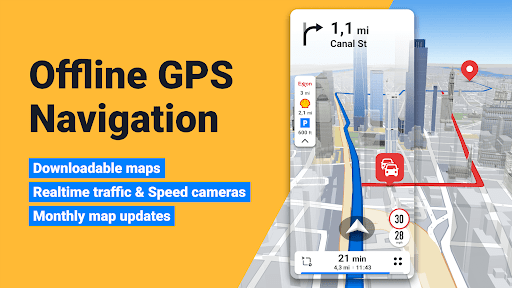
Sygic GPS Navigation & Maps is an offline-first navigation app aimed at drivers who want turn-by-turn directions without burning mobile data, plus riders who can switch into a dedicated motorbike mode. With over 95 million installs, it has a large user base that relies on its offline 3D maps, speed camera alerts, and live traffic data. It’s positioned as an alternative to Google Maps or Waze for people who drive through areas with patchy signal or who cross borders often and want to dodge roaming charges.

The core pitch is straightforward: download maps once, navigate anywhere without internet, and get free map updates multiple times a year. For anyone doing long road trips or international driving, that offline capability is the main draw over data-hungry competitors.

Where the App Actually Delivers

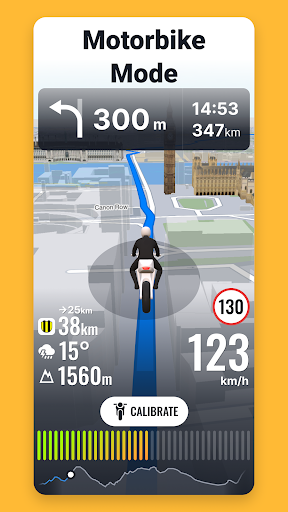
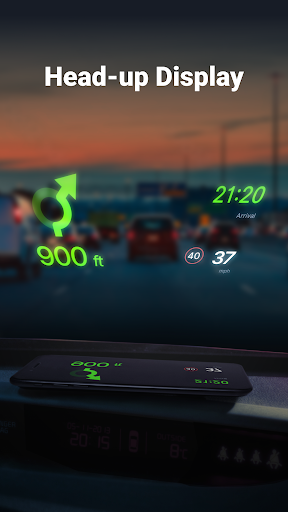
Reviewers confirm the offline maps work as advertised, and the sheer country coverage is a genuine strength for travelers. One long-time user called it ‘a good app’ overall, appreciating the general navigation experience even while flagging some quirks. The motorbike mode with twisty routing and glove-friendly UI is a distinctive feature you won’t find in mainstream map apps, and the addition of Android Auto support, HUD projection, and dashcam recording shows real ambition in the safety-feature department.

The Subscription Backlash Is Real

The biggest recurring complaint in user reviews is the shift to a subscription model. Multiple reviewers who paid full price for a ‘lifetime world license’ in the past are furious about now being asked to pay annually, with one calling it a ‘killer’ change and suggesting a one-time fixed price would be fairer. Another user specifically says Android Auto connectivity used to be free and is now gated behind a paywall, which feels like a bait-and-switch to longtime customers. If you bought this app years ago expecting lifetime access, the current pricing structure will likely frustrate you.

Navigation Accuracy and Rerouting Problems

Beyond pricing, the app’s core navigation logic draws real criticism. Reviewers describe recalculation as ‘wildly long’ and say it often forces an unworkable route instead of adapting to actual driving conditions. Speed limit data is repeatedly called inaccurate, especially on rural roads, and one user reports being charged $200 in congestion fees despite explicitly setting the app to avoid tolls and congestion pricing. Another compared it unfavorably to Google Maps and Waze, saying it talks too much and constantly narrates ‘keep going straight’ through intersections that don’t need it.

Ads, Notifications, and Android Auto Friction

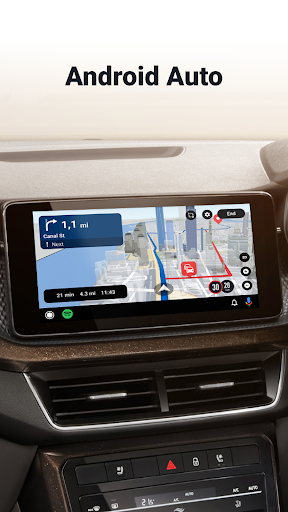
Several users complain about spam notifications and multiple ads loading before the app is even usable, which is a real problem when you need directions quickly. Android Auto integration also has documented friction: one reviewer found that connecting to Android Auto disables the phone app’s own destination entry, forcing reliance on the car’s touchscreen, and that exiting the app sometimes leaves it in a broken half-connected state.

Final Verdict on Downloading Sygic

Sygic still has real value for drivers who need genuine offline maps and motorbike-specific routing, and the feature list is more ambitious than most competitors. But the subscription shift, inconsistent speed limit data, slow rerouting, and ad clutter are significant enough that casual US drivers with reliable data service may be better served by Google Maps or Waze. Try the Premium+ free trial first before committing to a paid plan.
Pros

  • Robust offline 3D maps worldwide
  • Free multiple map updates yearly
  • Dedicated motorbike navigation mode
  • Android Auto and HUD support
  • Speed camera and traffic alerts

Cons

  • Subscription pricing angers past buyers
  • Slow, inaccurate rerouting reported
  • Ads and spam notifications annoy users

What Real Users Say

Alexander B. 3/5

“Switching to a subscription model is a killer for me. I paid a full price for the app and a lifetime world licence. Now they want to charge me every year for the app that crashes, leads to wrong locations, and is terrible at searches. There is a better business model: charge a fixed price once, give updates for the…”

👍 91 found this helpfulDeveloper responded
Jesse Adams 1/5

“I used this for personal navigation. I do not drive in a fleet. This app used to work with Android Auto. Now you want to charge me to use in Android Auto. Pass. BTW, when I paid for the app, connectivity to Android Auto was not part of the premium package. You try to make me look cheap? You look…”

👍 42 found this helpfulDeveloper responded
S 2/5

“Seems like it might be OK, but shows spam notifications. Ads are one thing (though I really don't like that you get multiple ads when trying to load the app, a big problem when trying to quickly navigate somewhere, especially when driving), but I get enough notifications without getting random ones pestering me to use this app. I'll use it…”

👍 30 found this helpfulDeveloper responded

Reviews sourced from Google Play, selected by helpfulness at the time of writing.

App Info & Permissions

Developer Sygic.
Content rating Everyone
Contains ads No
In-app purchases $0.99 - $89.99 per item
Installs 95M+
Released 11/05/2010
Price Free

Permissions this app requests

📷 Camera Take pictures and videos
👥 Contacts Read your contacts
📍 Location Approximate location (network-based); precise location (GPS and network-based)
🎙️ Microphone Record audio
🖼️ Photos/Media/Files Read the contents of your USB storage; modify or delete the contents of your USB storage
💾 Storage Read the contents of your USB storage; modify or delete the contents of your USB storage
📶 Wi-Fi connection information View Wi-Fi connections

Similar Apps

Frequently Asked Questions

1

What is Sygic GPS Navigation & Maps?

It's an offline-capable GPS navigation app offering 3D maps, live traffic, speed camera alerts, and voice-guided directions. It also includes specialized modes like motorbike navigation and features such as Android Auto support, HUD projection, and dashcam recording. It's designed for drivers and riders who want reliable navigation even without an internet connection.

2

Is Sygic GPS Navigation & Maps free?

The app offers a free trial of its Premium+ features, but full functionality now largely depends on a subscription. Some users who previously paid for a lifetime license report being unhappy that ongoing features, including Android Auto connectivity, now require recurring payment. Basic navigation may still work without a subscription, but premium features are gated behind Premium+.

3

Does Sygic work without an internet connection?

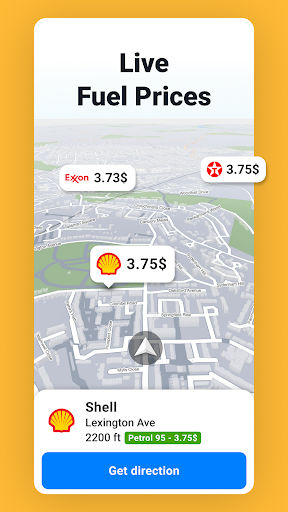
Yes, offline 3D maps are its main selling point, letting you navigate without mobile data or roaming charges. However, features like live traffic, speed camera alerts, and fuel prices require an internet connection to function. The core turn-by-turn navigation itself is designed to work fully offline once maps are downloaded.

4

How accurate is Sygic's traffic and speed limit data?

User reviews report notable inaccuracies, especially with speed limits on rural roads and slow rerouting when a driver misses a turn. One reviewer also reported being charged unexpected congestion fees despite setting the app to avoid tolls. If precise real-time accuracy is your top priority, some users feel Sygic lags behind Google Maps or Waze.

5

Does Sygic support Android Auto?

Yes, but user reviews indicate mixed experiences. Some report that connecting to Android Auto disables the phone app's own interface, forcing use of the car's touchscreen instead. Others are frustrated that Android Auto access, once free, is now tied to the paid Premium+ subscription.