
Subway®

by SUBWAY Restaurants

4.1 ★ 514K+ reviews
27M+ Installs
07/31/2014 Released
Subway® icon
Subway® icon
Food & Drink

Subway®

by SUBWAY Restaurants

4.1 ★ 514K+ reviews
27M+ Installs
07/31/2014 Released
Advertisements
Subway® screenshot 1
Subway® screenshot 2
Subway® screenshot 3
Subway® screenshot 4
Subway® screenshot 5

Ratings Breakdown

4.1 ★★★★★ 514K+ ratings
5 ★ 69%
4 ★ 10%
3 ★ 3%
2 ★ 2%
1 ★ 16%

Data from Google Play at the time of writing.

What This App Is Supposed to Do

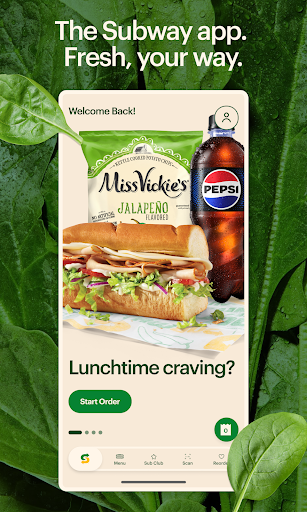
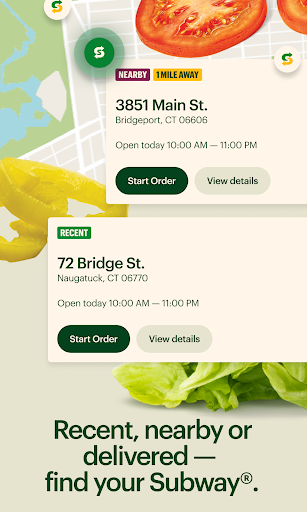
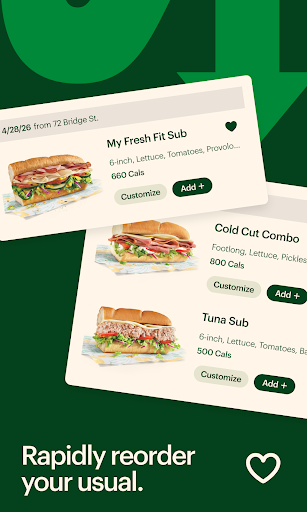
The Subway app lets you build a Footlong the way you would at the counter, choosing bread, toasting, toppings, and adding sides, then pay through the app for pickup or delivery. It also houses Subway Rewards (Sub Club), letting members redeem points for Subway Cash and access member-only offers. A Rapid Reorder feature puts your favorite or past orders in the menu bar for quick repeat ordering. In theory it’s built for regular Subway customers who want to skip the counter line and rack up rewards points automatically.

Where the App Actually Delivers

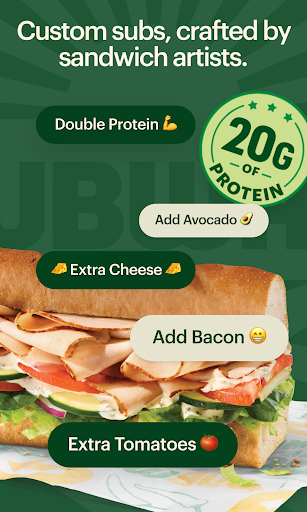
When it works, reviewers acknowledge the core idea is sound. Rapid Reorder is genuinely useful for people who order the same sandwich repeatedly, and the customization flow mirrors an in-store build, letting you double meat, add extra cheese, and load on veggies without confusion. Some users note that at earlier points the app ‘used to be a really good and useful app,’ suggesting the basic ordering and rewards concept has real value when the backend cooperates.

The Login and Loading Problems That Dominate Reviews

The most common complaint by far is that the app simply fails to function. Multiple reviewers describe persistent login errors, with one saying the app ‘never loads never keeps me signed in’ and passwords getting rejected for no clear reason. Another user reported the app being broken for over a month, having tried deleting cache, clearing stored data, uninstalling, reinstalling, and restarting their phone, all with no success. These aren’t isolated glitches; they read as a widespread, ongoing stability issue that pushes loyal customers away entirely.

Payment, Coupons, and Checkout Frustrations

Beyond login failures, checkout itself is a sore spot. One reviewer reported that the app still cannot split payment between two methods, so a gift card with a balance below the order total simply can’t be used, and Subway won’t cash it out either, an issue still present after 9 months. Others describe payment methods being repeatedly rejected even when the store confirms the card itself is fine. Coupon codes are another recurring failure point, with users saying codes that used to work no longer apply, and one reviewer finding only a single coupon deal available, which then failed to function.

Order Speed and Reliability In Practice

Even for users who get past login and payment, order timing is inconsistent. One longtime customer says orders placed through the app can take 40 minutes or more even when the store has no other customers and no other online orders, a complaint serious enough that they said they’ve stopped using Subway altogether because of it. Cart errors are also mentioned, including a generic ‘Oops’ message that blocks checkout entirely after items are added.

Who Should Actually Download This

If you’re a casual, occasional Subway customer just looking to browse the menu, this app can technically get the job done on a good day. But based on repeated, detailed complaints about login failures, broken payment splitting, non-functional coupons, and unpredictable order times, frequent or rewards-focused customers should go in with low expectations. Many reviewers who once relied on it for deals and quick ordering say they’ve simply stopped using it, ordering elsewhere instead. Until stability issues are resolved, treat this as a backup ordering method, not your primary one.


Pros

  • ✓Mirrors in-store sandwich customization closely
  • ✓Rapid Reorder speeds up repeat orders
  • ✓Sub Club rewards redeemable for Subway Cash
  • ✓Supports both pickup and delivery options
  • ✓Simple, familiar ordering flow when functional

Cons

  • ✕Frequent login and sign-in failures
  • ✕Cannot split payment across two methods
  • ✕Coupons often fail to apply correctly

What Real Users Say

Ghastly Sunflower ★ 1/5

“If I could give zero stars, I would. Zero stars for the app and zero stars for your website both of which are unusable. The app never loads never keeps me signed in, and half the time my correct password has to be changed because for whatever reason, the app won't recognize it. On your website I can order things,…”

👍 1,029 found this helpful
David Berry ★ 1/5

“Update 10/2025: still broken 9 months later! The app is absolutely broken. You cannot use two payment methods on the same order on the app, so if you have a gift card with a balance below your order, you can't use it, and Subway won't cash it out. You're supposed to be able to use the app to pay, but…”

👍 862 found this helpful
Scott Norman ★ 1/5

“I've been going to Subway for decades and it's because of this app that I'm no longer going. it takes 40 minutes or more if you place an order through the app, even if you're standing outside of the store and there's no customers, and no online orders, also the app won't take the coupon codes anymore. I work at…”

👍 718 found this helpful

Reviews sourced from Google Play, selected by helpfulness at the time of writing.

App Info & Permissions

Developer SUBWAY Restaurants
Content rating Everyone
Contains ads No
Installs 27M+
Released 07/31/2014
Price Free

Permissions this app requests

📱 Device ID & call information Read phone status and identity
📍 Location Approximate location (network-based); precise location (GPS and network-based)
🎙️ Microphone Record audio
📞 Phone Read phone status and identity
🖼️ Photos/Media/Files Read the contents of your USB storage; modify or delete the contents of your USB storage
💾 Storage Read the contents of your USB storage; modify or delete the contents of your USB storage
📶 Wi-Fi connection information View Wi-Fi connections

Similar Apps

Frequently Asked Questions

1

What is Subway®?

Subway® is the official ordering app from SUBWAY Restaurants, letting customers build custom Footlong sandwiches, choose toasting and toppings, and add sides like cookies and drinks. It also supports pickup and delivery ordering and includes the Subway Rewards program, known as Sub Club, for earning and redeeming points. The app aims to replicate the in-store ordering experience digitally.

2

Is the Subway app free to use?

Yes, the app itself is free to download and use, and you only pay for the food you order through it. There's no subscription fee to join Sub Club rewards either. However, some users report issues using certain payment methods or applying gift card balances within the app.

3

Why does the Subway app keep failing to log me in?

Multiple users report persistent login errors, including the app not recognizing correct passwords or failing to load at all. Some have tried clearing cache, reinstalling, and restarting their phones without resolving the issue. This appears to be an ongoing, widespread technical problem rather than a one-off bug.

4

Can I use a gift card and another payment method together in the app?

According to user reports, no, the app does not currently support splitting payment across two methods. This means if you have a gift card balance lower than your order total, you can't combine it with another card, and Subway reportedly won't cash out the remaining balance either.

5

Are Subway app coupons and promo codes reliable?

Based on user feedback, coupon and promo code functionality has been inconsistent, with some codes no longer working at all. One reviewer noted only a single coupon deal was available and it failed to apply during checkout. If you rely on coupons for savings, be prepared for occasional failures.