



Steam

by Valve Corporation

3.1 ★ 1M+ reviews
173M+ Installs
01/26/2012 Released
Steam icon
Steam icon
Entertainment

Steam

by Valve Corporation

3.1 ★ 1M+ reviews
173M+ Installs
01/26/2012 Released
Advertisements
Steam screenshot 1
Steam screenshot 2
Steam screenshot 3
Steam screenshot 4
Steam screenshot 5
Steam screenshot 6

Ratings Breakdown

3.1 ★★★★★ 1M+ ratings
5 ★ 42%
4 ★ 7%
3 ★ 6%
2 ★ 6%
1 ★ 39%

Data from Google Play at the time of writing.

What This App Is Supposed To Do

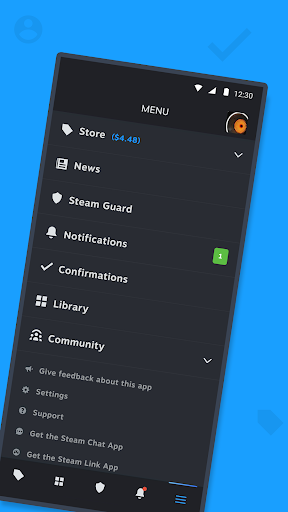
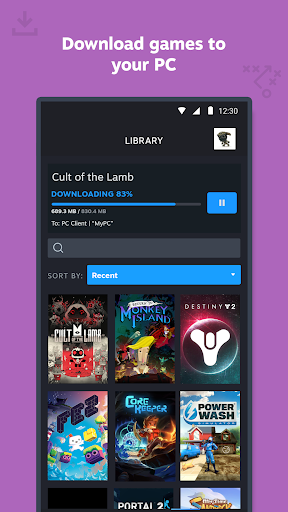
Steam Mobile is Valve’s companion app to the PC gaming platform of the same name. It lets you browse and buy PC games from your phone, manage your library, queue up remote downloads to your gaming rig, and handle Steam Guard two-factor authentication so you can log into Steam on any device. It also covers trade and market confirmations, community features like discussions and guides, and a personalized news feed pulled from your library. It’s aimed squarely at existing Steam users who want account security and light store browsing on the go, not a full gaming experience in itself.

Where It Actually Delivers

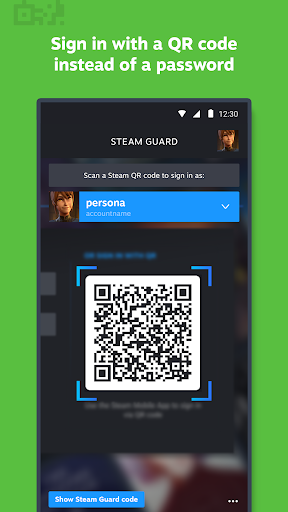
The core reason most people install this app is Steam Guard, and that part generally works as intended: two-factor authentication, QR code sign-in, and approve/deny prompts for new logins are genuinely useful and make securing an account far less annoying than juggling a separate authenticator. One reviewer who rated the app 4 stars said they liked it overall aside from a couple of feature gaps, and a 3-star review noted the underlying idea works fine when the session actually stays logged in. For checking a wishlist sale notification, glancing at friend activity, or approving a trade while away from your PC, the app fills a real gap when it’s functioning normally.

Login and Server Errors That Drive Users Away

The single biggest complaint across reviews is login failure. Multiple users describe changing their password and then being unable to sign into the app at all, hitting a generic ‘server issue’ error even after triple-checking credentials and copy-pasting passwords directly from notes. One reviewer spent over an hour trying to log in before giving up in frustration. Others report being logged in one moment and then abruptly logged out, only to be blocked from signing back in by the same server error, with one person noting the website itself works fine while the app’s authentication breaks. This isn’t a minor bug; it’s the app failing at its most basic function for a meaningful chunk of reviewers.

Broken Pages, Slow Loading, and a Confusing Split

Beyond login, users repeatedly describe a sluggish, half-broken browsing experience. One reviewer said the app used to mirror the PC store version well but is now ‘slow asf,’ with workshop pages showing readable text but images that won’t display and pages that can’t be scrolled horizontally. Another described getting ‘there was a problem loading this web content’ errors on roughly half their attempts to open links from notifications, including wishlist sale alerts that simply stop working afterward. Several reviewers also complain that Valve split functionality across two separate apps, arguing that neither one now does what the single original app used to handle, and that even logged-in accounts sometimes show an empty library or force repeated re-logins when trying to wishlist or follow a game.

Missing Conveniences From the Desktop Version

Even for users who get past the login and loading issues, there are functional gaps compared to the PC client. A 4-star reviewer specifically wants the option to hide or remove games from their library on mobile, something already possible on PC, and would like an easier way to add free games to the library without navigating to each game’s individual page. These aren’t dealbreakers on their own, but combined with the reliability problems they add up to an app that feels like a scaled-back, less polished sibling of the desktop experience rather than a true extension of it.

Who Should Actually Install This

Steam Mobile is worth having if you mainly want Steam Guard security, QR sign-in, and occasional trade or market confirmations, since that core function still serves its purpose. If you’re expecting smooth store browsing, reliable library access, or dependable notification links, be prepared for server errors, broken pages, and login lockouts that multiple reviewers describe as recurring rather than one-off glitches. Existing Steam users who need two-factor authentication should keep it installed regardless; anyone hoping for a polished mobile storefront should temper expectations.


Pros

  • ✓Two-factor Steam Guard authentication works well
  • ✓QR code sign-in is convenient
  • ✓Useful for trade and market confirmations
  • ✓Wishlist sale notifications when they load
  • ✓Handles remote PC download management

Cons

  • ✕Frequent server errors block login
  • ✕Pages and images fail to load properly
  • ✕Functionality split across two separate apps

What Real Users Say

Leo Rose ★ 1/5

“I've been trying for well over an hour to log into the app after changing my password on my account. I continuously get the error that it's a server issue and thus cannot log in. I'm frustrated and confused, as I love to use steam. I had it on my phone to share the games I play with my friends…”

👍 239 found this helpful
Nathan Van Slyke ★ 1/5

“Old app was just fine and worked exactly like the pc store version. Now, its slow asf. The full webpages don't even display. For example, ill go to a workshop page for a mod for a game. The text is perfectly fine, but the images are half unseeable and you cannot scroll the page left or right. Its frustrating and…”

👍 221 found this helpful
David Cunningham ★ 2/5

“If they could figure out the bugs this app would be alright. At least 50% of the time I get an error rather than the link I clicked on. I just had a notification for something on my wish list on sale. I clicked on it and got "there was a problem loading this web content." After that nothing worked.…”

👍 163 found this helpful

Reviews sourced from Google Play, selected by helpfulness at the time of writing.

App Info & Permissions

Developer Valve Corporation
Content rating Teen
Contains ads No
Installs 173M+
Released 01/26/2012
Price Free

Permissions this app requests

📅 Calendar Read calendar events plus confidential information; add or modify calendar events and send email to guests without owners' knowledge
📷 Camera Take pictures and videos
📱 Device ID & call information Read phone status and identity
📍 Location Approximate location (network-based); precise location (GPS and network-based)
🎙️ Microphone Record audio
📞 Phone Read phone status and identity
🖼️ Photos/Media/Files Read the contents of your USB storage; modify or delete the contents of your USB storage
💾 Storage Read the contents of your USB storage; modify or delete the contents of your USB storage
📶 Wi-Fi connection information View Wi-Fi connections

Similar Apps

Frequently Asked Questions

1

What is Steam?

Steam is Valve Corporation's digital PC gaming platform, and the Steam Mobile app is its companion app for phones. It lets users browse and buy PC games, manage their game library, and handle account security features like two-factor authentication while away from their computer. It also supports community features such as discussions, guides, and trade confirmations.

2

Is the Steam app free?

Yes, the Steam Mobile app itself is free to download and use. You only pay for games you purchase through the Steam store, either on the app or on PC. There's no subscription cost tied to using the app for account management or security.

3

Why can't I log into the Steam app?

Many users report persistent 'server issue' errors when trying to log in, especially right after changing their password. This appears to be a recurring problem rather than an isolated bug, based on multiple reviews describing hour-long login attempts and repeated failures even with correct credentials. Trying again later, reinstalling the app, or logging in via the website first sometimes helps, but there's no guaranteed fix reported by users.

4

Does the Steam app replace the desktop client?

No, it's meant to complement the desktop client rather than replace it. You can browse the store, manage remote downloads, and confirm trades, but core gameplay and full library management still happen on PC. Some reviewers note the mobile app lacks features like hiding games from your library, which is available on desktop.

5

Is Steam Guard on the mobile app reliable for account security?

Steam Guard's two-factor authentication, QR code sign-in, and login approval prompts generally work as intended and are the app's strongest feature according to reviewers. However, some users report being logged out unexpectedly and then blocked from signing back in due to server errors, which can complicate using Steam Guard when you need it most. Overall it's still considered useful despite these occasional hiccups.

