
Sky Map

by Sky Map Devs

4.1 ★ 482K+ reviews
71M+ Installs
Sky Map icon
Sky Map icon
Books & Reference

Sky Map

by Sky Map Devs

4.1 ★ 482K+ reviews
71M+ Installs
Advertisements
Sky Map screenshot 1
Sky Map screenshot 2
Sky Map screenshot 3
Sky Map screenshot 4
Sky Map screenshot 5
Sky Map screenshot 6

Ratings Breakdown

4.1 ★★★★★ 482K+ ratings
5 ★ 67%
4 ★ 11%
3 ★ 6%
2 ★ 4%
1 ★ 13%

Data from Google Play at the time of writing.

What Sky Map Does and Who It’s For

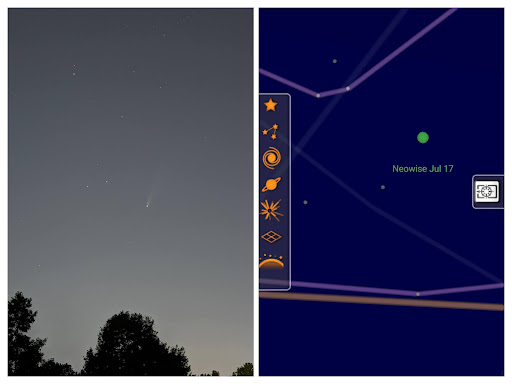
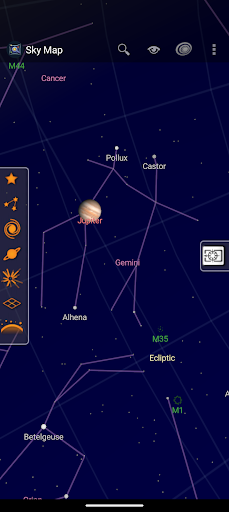
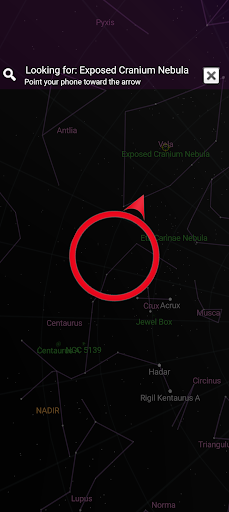
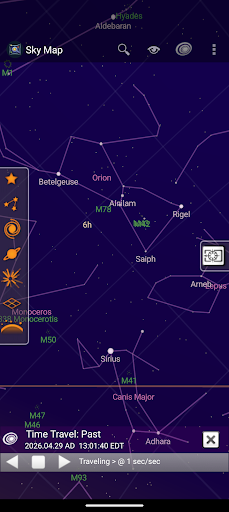
Sky Map is a bare-bones planetarium app that uses your phone’s sensors to show you what stars, planets, and constellations are above you in real time. Point your phone at the sky and it overlays labels on the celestial objects you’re looking at. It began life as Google Sky Map and is now kept alive by an open-source community. It’s aimed at casual stargazers who want a quick answer to ‘what is that bright thing in the sky’ as well as amateur astronomers who want a lightweight companion app rather than a full-blown astronomy suite.

The Point-and-Identify Experience

The core feature still works as advertised for a lot of users: you hold up your phone and it tracks celestial objects instantly, guiding you to Mars or whatever else you search for. Longtime users describe it as something they’ve had installed since the early Android days, using it for fun on spring and summer nights to identify stars rather than for any serious practical work. Reviewers also praise how small it is on storage, with one calling it a ’10MB wonder’ that beats bulkier astronomy apps for quick phone use.

Calibration Is Where Things Fall Apart

The most consistent complaint is accuracy. Multiple reviewers who loved the app for years report that it has become wildly inaccurate, showing the moon dozens of degrees from its actual position or placing the sun overhead when it’s still below the horizon. Some say recalibrating no longer works at all, even after wiping the phone entirely. This seems tied to GPS and magnetometer reliance: one reviewer notes it performs much better on phones with a good magnetometer, and that you need to manually enable GPS coordinates and magnetic correction in settings to get reliable results. When that setup isn’t done right, or on phones with weaker sensors, the whole experience breaks down.

Small Interface Annoyances

Beyond calibration, there are smaller usability gripes. One long-time user wants an option to lock labels into a single orientation, since tilting the phone causes labels to flip upside down and become hard to read. Requests for a way to keep headings consistent suggest the interface, while simple, hasn’t been refined much over the years despite ongoing maintenance.

Who Should Actually Download This

If you just want a fun, no-frills way to identify what’s in the sky on a given night, and you don’t need the depth of a dedicated astronomy app, Sky Map is still a reasonable pick, especially given its tiny size and lack of ads or tracking. But go in aware that calibration issues are a real and recurring problem for some users, particularly on newer phones like the Pixel 7 Pro, and that satellite tracking or fine-grained accuracy may require patience or extra settings tweaking. Amateur astronomers who want precision, or anyone who’s been burned by the accuracy complaints, should treat this as a casual add-on rather than their primary sky-reading tool.


Pros

  • ✓Lightweight, small storage footprint
  • ✓No ads or tracking
  • ✓Simple point-and-identify stargazing
  • ✓Useful search to locate planets
  • ✓Free and open-source

Cons

  • ✕Frequent calibration and accuracy complaints
  • ✕Labels flip orientation awkwardly
  • ✕Depends heavily on phone's magnetometer

What Real Users Say

A Google user ★ 5/5

“One of the first Android apps I ever downloaded, probably around 2009. I've had it installed on many devices, and sometimes I've forgotten to download it at all. I've never used it for any practical purposes, mostly just for fun to pass a few minutes at night in the spring and summer to help locate constellations. Never had any problems…”

👍 278 found this helpful
JA ★ 5/5

“I love this app. It does better on phones with a good magnetometer. You need to let it use your GPS coordinates in the settings and use magnetic correction. Tap the upper right corner of the phone to bring up settings and tap on location settings to tap on gps and magnetic correction. Also have your location on to use…”

👍 235 found this helpful
Amy Jerome ★ 2/5

“Worked amazingly well until it didn't. I loved everything about it until I could no longer calibrate the app. I'm an avid star gazer (amateur), so this was so fun! I even bought the extensions so I could see satellites. But suddenly I couldn't calibrate the program. Even wiping my entire phone and reinstalling didn't help. (north was west). After…”

👍 221 found this helpfulDeveloper responded

Reviews sourced from Google Play, selected by helpfulness at the time of writing.

App Info & Permissions

Developer Sky Map Devs
Content rating Everyone
Contains ads No
Installs 71M+
Price Free

Permissions this app requests

📱 Device ID & call information Read phone status and identity
📍 Location Approximate location (network-based); precise location (GPS and network-based)
📞 Phone Read phone status and identity
🖼️ Photos/Media/Files Read the contents of your USB storage; modify or delete the contents of your USB storage
💾 Storage Read the contents of your USB storage; modify or delete the contents of your USB storage

Similar Apps

Frequently Asked Questions

1

What is Sky Map?

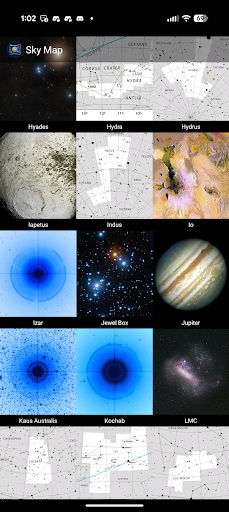
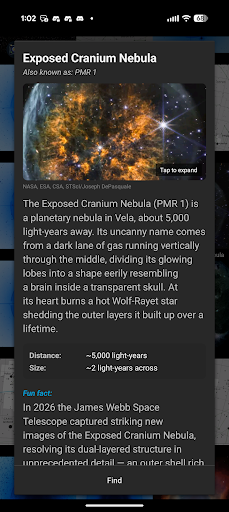
Sky Map is a lightweight planetarium app for Android that identifies stars, planets, and constellations when you point your phone at the sky. It was originally developed by Google as Google Sky Map and is now maintained by an open-source community. It offers point-and-identify tracking, search for specific objects like Mars, and info cards with basic facts about celestial objects.

2

Is Sky Map free?

Yes, Sky Map is free to use with no ads or tracking according to its store description. It's maintained as an open-source project, so there's no subscription or paywall involved.

3

Why is Sky Map showing the wrong position for objects like the moon or sun?

Several users report accuracy problems where the app shows objects far from their real position, sometimes even placing the sun overhead when it's below the horizon. This appears related to GPS and magnetometer calibration, and some users say recalibrating doesn't fix it even after a phone reset. Enabling GPS coordinates and magnetic correction in settings can help but doesn't always resolve the issue.

4

Does Sky Map work well on all phones?

Not equally. One reviewer notes it performs noticeably better on phones with a good magnetometer, and that you need to manually enable location and magnetic correction settings for best results. Phones with weaker sensors seem more prone to the accuracy and calibration complaints mentioned by multiple users.

5

Is Sky Map good for serious amateur astronomers?

It can be a handy lightweight companion, with one reviewer calling it a '10MB wonder' compared to heavier astronomy apps. However, given the recurring accuracy and calibration issues reported by long-time users, serious astronomers may want to pair it with a more precise dedicated app rather than rely on it exclusively.