


Remini – AI Photo Enhancer

by Bending Spoons

4.1 5.8M+ reviews
601M+ Installs
07/21/2019 Released
Remini – AI Photo Enhancer icon
Photography

Remini – AI Photo Enhancer

by Bending Spoons

4.1 5.8M+ reviews
601M+ Installs
07/21/2019 Released
Remini – AI Photo Enhancer screenshot 1
Remini – AI Photo Enhancer screenshot 2
Remini – AI Photo Enhancer screenshot 3
Remini – AI Photo Enhancer screenshot 4
Remini – AI Photo Enhancer screenshot 5
Remini – AI Photo Enhancer screenshot 6

Ratings Breakdown

4.1 ★★★★★ 5.8M+ ratings
5 70%
4 6%
3 3%
2 3%
1 17%

Data from Google Play at the time of writing.

What Remini Actually Does and Who It’s For

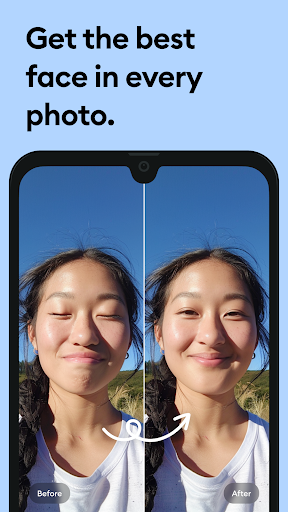
Remini is an AI-powered photo enhancer from Bending Spoons that takes old, blurry, pixelated, or damaged photos and sharpens them into HD versions with a single tap. It also generates AI-stylized portraits from selfies. The core audience is twofold: people who want to restore old family photos and scanned prints, and people who want AI-enhanced or ‘glow-up’ style portraits of themselves. With over 600 million installs, it’s clearly found a mass audience, but that scale also means the free experience and subscription tactics get scrutinized heavily by everyday users.

Where the AI Enhancement Genuinely Impresses

When it works, Remini does what it promises. Reviewers consistently note it’s good at enhancing photos and bringing clarity to old or low-quality images, which is the entire premise of the app. Restoring scratched, vintage, or out-of-focus family photos into something crisp is the standout feature, and it’s the reason so many people keep coming back despite the frustrations described below. For a quick, one-tap fix to a grainy old photo, the underlying technology holds up.

The AI Portrait and Body Rendering Glitches

The AI portrait generation is where things get messier. One detailed reviewer pointed out that the app sometimes adds extra arms or partial limbs, gets proportions wrong so arms or legs look too long for the body, and mixes up hair styles and textures so strands appear to hang off oddly. These aren’t minor nitpicks — they’re the kind of AI rendering errors that undermine trust in the ‘professional looking AI Photos’ the store listing promises. Another user flagged that photo enhancement has recently made images, including those of darker-skinned people, come out unnaturally bright, suggesting the enhancement algorithm isn’t evenly calibrated across all skin tones.

Ads, Paywalls, and a Frustrating Monetization Shift

This is the most consistent complaint across reviews, and it’s a big one. Multiple users describe being unable to do anything without paying, with no free trial offered — just $2.99/week or $9.99/week subscription options and a ‘Restore Purchases’ button that found nothing to restore. Others recall a better era when a single ad let you enhance one photo a few times a day; now they describe stacked full-screen ads before opening the app, before enhancing, and before saving, with some ads being unskippable and over a minute long. One reviewer even claimed the app installs background games automatically. If you’re hoping for a mostly-free experience, the current reviews suggest that door has largely closed.

Reliability Problems and Support Response Times

Beyond monetization, several reviewers report the app simply breaking. One paying subscriber of over a year described a persistent ‘we’re experiencing unusually high traffic’ warning that made the app unusable, while another said they uninstalled, reinstalled, cancelled, and resubscribed to a yearly plan only to keep hitting server-side errors — and after sending support three screenshots, still waited almost a week without resolution. These aren’t isolated hiccups; they point to backend stability issues that hit users who’ve already paid, which is arguably worse than free-tier limitations since money is on the line.

Who Should Actually Download This

Remini is worth trying if you have a handful of genuinely old or damaged photos you want restored and you’re comfortable either watching ads or paying for a subscription to get consistent access. It’s less appealing if you want a casual free tool for regular use, given the reports of aggressive ad loops, disappearing free trials, and a ‘Restore Purchases’ function that didn’t work for at least one reviewer. Given the recurring complaints about brightness/skin-tone issues, distorted limbs in AI portraits, and slow support responses even for paying customers, go in with tempered expectations, test it on a few photos before subscribing, and keep an eye on your subscription settings so you’re not surprised by the weekly charge.


Pros

  • Effectively restores old, blurry, damaged photos
  • One-tap HD enhancement is genuinely impressive
  • Popular with massive installed user base
  • Sharpens vintage and out-of-focus pictures well
  • Useful for reviving family photo memories

Cons

  • Frequent, sometimes unskippable full-screen ads
  • No reliable free trial before paywall
  • Server errors affect even paying subscribers

What Real Users Say

michael peck 1/5

“I couldn't do anything at all without paying. Was never offered a free trial at all. The only available options were $2.99/week, $9.99/week, & "Restore Purchases." Just to see what would would happen, I hit "Restore Purchases" and it said that there were no purchases to restore. Both options for $2.99 and $9.99 were trying to charge me right out…”

👍 1,925 found this helpful
Ms. Ellis 3/5

“This app is decent but it requires some improvements. Some pictures add too many arms or a piece of an arm or hand is added. Sometimes the arms or legs are too long for the body size. The hair feature mixes up the styles/textures or a portion of the hair hangs off. It would be nice to incorporate a few…”

👍 1,682 found this helpful
Mk 4/5

“it's good at enhancing photos, but the ads are annoying. One ad for opening the app, one ad for enhancing, and one ad for saving the picture. Also, I'm very glad they remove the feature where you have to pay to remove their "fixed lighting". I couldn't use the app for a while because they're fixed lighting usually just whitewashed…”

👍 1,281 found this helpful

Reviews sourced from Google Play, selected by helpfulness at the time of writing.

App Info & Permissions

Developer Bending Spoons
Content rating Everyone
Contains ads Yes
In-app purchases $0.49 - $189.99 per item
Installs 601M+
Released 07/21/2019
Price Free

Permissions this app requests

📷 Camera Take pictures and videos
🎙️ Microphone Record audio
🖼️ Photos/Media/Files Read the contents of your USB storage; modify or delete the contents of your USB storage
💾 Storage Read the contents of your USB storage; modify or delete the contents of your USB storage
📶 Wi-Fi connection information View Wi-Fi connections

Similar Apps

Frequently Asked Questions

1

What is Remini - AI Photo Enhancer?

Remini is a photography app by Bending Spoons that uses AI to restore old, blurry, pixelated, or damaged photos into HD quality with one tap. It also generates AI-stylized portraits from selfies and group photos. It's designed for both restoring vintage family photos and creating enhanced modern portraits.

2

Is Remini free to use?

Remini is not fully free in practice, according to many users. Reviewers report being unable to access core features without paying, with subscription options starting around $2.99/week or $9.99/week and no free trial actually offered in some cases. Ads are also present throughout the free experience, and several users describe them as frequent and hard to skip.

3

Does Remini distort photos or add errors during editing?

Some users report noticeable AI errors, including extra or misshapen arms, incorrect body proportions, and mixed-up hair textures in generated portraits. There are also complaints about photos becoming unnaturally bright after enhancement, particularly for darker-skinned subjects. These issues suggest the AI model isn't consistently accurate across all photo types.

4

Is the Remini subscription worth the cost?

It depends on how much you value the photo restoration feature and how tolerant you are of ads and occasional bugs. Some paying users report server errors and slow support responses despite an active subscription, which is a real risk to weigh. If you only need to restore a few photos, it may be worth testing the limited free options first before committing to a weekly or yearly plan.

5

Can I cancel my Remini subscription easily?

According to the app's own subscription terms, you can manage or cancel your subscription through your Google Account settings, and cancellation stops auto-renewal but keeps the plan active until the current period ends. No refund is given for the unused portion. Some reviewers have reported confusion or difficulty when trying to get purchases restored, so it's worth double-checking your account settings after canceling.

