
PayPal Business

by PayPal Mobile

3.8 ★ 108K+ reviews
30M+ Installs
11/28/2016 Released
PayPal Business icon
Business

PayPal Business

by PayPal Mobile

3.8 ★ 108K+ reviews
30M+ Installs
11/28/2016 Released
Advertisements
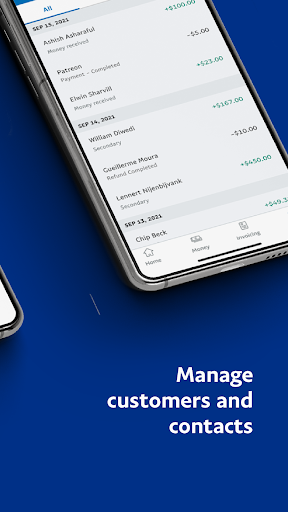
PayPal Business screenshot 1
PayPal Business screenshot 2
PayPal Business screenshot 3
PayPal Business screenshot 4
PayPal Business screenshot 5

Ratings Breakdown

3.8 ★★★★★ 108K+ ratings
5 ★ 61%
4 ★ 8%
3 ★ 6%
2 ★ 4%
1 ★ 21%

Data from Google Play at the time of writing.

What This App Is Built To Do

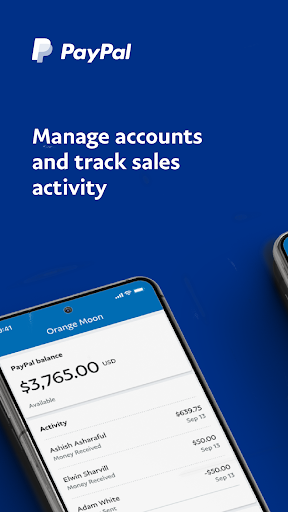
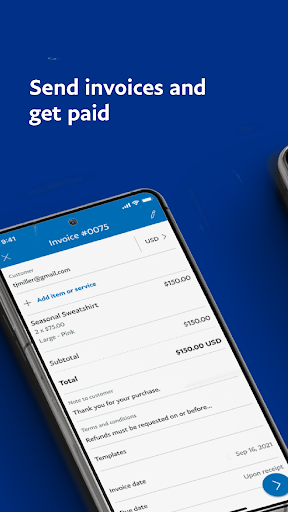
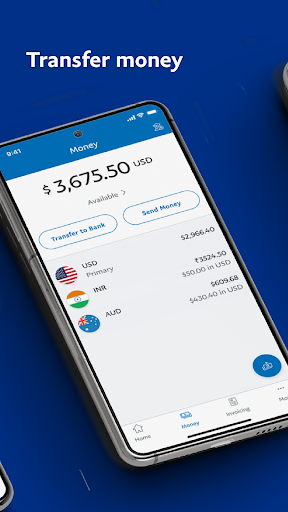
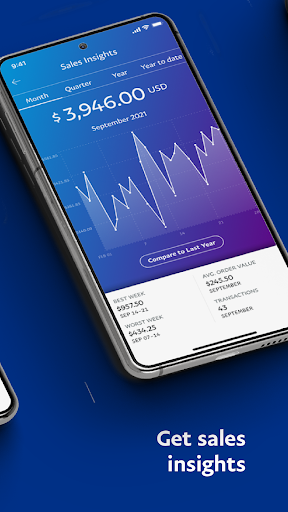
PayPal Business app is meant to let small business owners run their PayPal account from a phone instead of a desktop browser. The pitch covers the basics: check your balance, track sales over different time periods, create and send invoices, transfer money to a linked bank account, issue refunds, and accept in-person payments through a QR code. It’s aimed at freelancers, solo operators, and small shops who need to invoice customers and take payments without sitting at a computer.

Where It Actually Works Well

When it functions as intended, users say setting up a business account is fast and invoicing is genuinely convenient. One reviewer described being able to send professional invoices to customers within minutes of signing up, calling the app quick and convenient for that core task. For a business owner who just needs to fire off an invoice while away from a desk, that basic workflow does deliver on the app’s promise, at least until something breaks.

Login And Stability Problems That Keep Coming Up

The most repeated and highest-scored complaints are about the app simply not working. Multiple reviewers describe entering their password, tapping login, and being kicked straight back to the login screen with no error message, making it impossible to send invoices or check anything. Fingerprint login is reported as broken for some users. Others describe the app as ‘bricked’ after reinstalling and restarting their phone multiple times, with the account balance endlessly loading before the app crashes. One reviewer specifically pointed to a 2023 update that broke functionality on Samsung Galaxy phones, including invoice payment notifications, and said it was still unresolved six months later.

Invoicing Bugs And Fees That Frustrate Users

Beyond login issues, the invoicing tool itself has reliability problems. Reviewers report the app locking up while saving an invoice and losing everything they entered, or saving line items but not the descriptions attached to them. Another common complaint is that the security code keypad simply stops appearing, blocking any further use of the app. On the money side, users flag that payments can be placed on hold and that fees are taken as a percentage of the transaction rather than a flat rate, which one reviewer felt worked against the point of accepting more payments. Another reviewer said they were charged four separate times for a single transaction while trying to process a customer’s credit card.

Who Should Actually Install This

If you already run everything through PayPal for invoicing and payments and mostly need balance checks and occasional invoice sends on the go, the app can work, especially since setup itself is described as easy. But given how many detailed, high-upvote reviews describe login failures, crashes, and invoices vanishing mid-save, this isn’t an app to depend on for time-sensitive payment processing, especially in front of a customer. Anyone considering it for point-of-sale credit card acceptance should have a backup method ready, because several reviewers say they couldn’t complete a single transaction on it.


Pros

  • ✓Quick, hassle-free business account setup
  • ✓Convenient for sending invoices on the go
  • ✓Supports QR code in-person payments
  • ✓Tracks sales across monthly and yearly periods
  • ✓Direct transfers to linked bank account

Cons

  • ✕Frequent login failures and crashes
  • ✕Invoices can lock up or lose data
  • ✕Percentage-based fees, not flat rate

What Real Users Say

Kael Beebe ★ 1/5

“This is the most frustrating, confusing, non user-friendly app I have ever tried to use. Downloaded for customer credit card payments, haven't been able to make a payment yet. By the way you get charged 4 separate times for each transaction. GARBAGE! How hard is it to type in a credit card number and accept a payment? Infinitely hard with…”

👍 1,184 found this helpful
Drew ★ 2/5

“Payment on hold and percentage taken, not flat fee (this could be an option). I rarely use this app for receiving payments because getting a percentage of my business should mean you are increasing my revenues. Still, i had it as a back up and finally had a situation where the buyer was even willing to pay the fee. Now,…”

👍 721 found this helpful
A Google user ★ 4/5

“I like paypal because it's quick and convenient. Setting up my business account was hassle free, within minutes, I am able to send professional invoices to my customers. My main gripes are: Sometimes when I try to create an invoice it gets stuck on the "add" page. I have to completely restart my phone, sometimes more than once! Also, sometimes…”

👍 700 found this helpful

Reviews sourced from Google Play, selected by helpfulness at the time of writing.

App Info & Permissions

Developer PayPal Mobile
Content rating Everyone
Contains ads No
Installs 30M+
Released 11/28/2016
Price Free

Permissions this app requests

📷 Camera Take pictures and videos
👥 Contacts Find accounts on the device; read your contacts
📱 Device ID & call information Read phone status and identity
🪪 Identity Find accounts on the device
📍 Location Approximate location (network-based); precise location (GPS and network-based)
🎙️ Microphone Record audio
📞 Phone Read phone status and identity
🖼️ Photos/Media/Files Read the contents of your USB storage; modify or delete the contents of your USB storage
💾 Storage Read the contents of your USB storage; modify or delete the contents of your USB storage
📶 Wi-Fi connection information View Wi-Fi connections

Similar Apps

Frequently Asked Questions

1

What is PayPal Business?

PayPal Business is a mobile app from PayPal Mobile that lets business owners manage their PayPal account, track sales, send invoices, transfer funds, and accept in-person QR code payments from a phone. It's designed for freelancers and small businesses who need to handle payments without using a desktop. The store description highlights account management, invoicing, transfers and refunds, and tools to attract new customers via social selling links.

2

Is PayPal Business app free to download?

Yes, the app itself is free to download and install. PayPal instead charges transaction fees on payments processed through the account, which multiple reviewers note are taken as a percentage of each sale rather than a flat fee. There's no separate subscription cost mentioned in user feedback beyond these standard PayPal processing fees.

3

Does the PayPal Business app work reliably for invoicing?

Reliability is a mixed bag according to reviews. Some users say setup and initial invoice sending is fast and professional-looking, but others report the app locking up while saving invoices, losing entered data, or failing to save item descriptions. Given how often these bugs are mentioned, it's worth keeping a backup way to invoice customers if a deal is time-sensitive.

4

Why can't I log into the PayPal Business app?

Several reviewers report the same issue: entering a password and tapping login just reloads the login screen instead of granting access, and fingerprint login stops working for some users too. One reviewer said PayPal support confirmed a bug report was filed but gave no fix timeline. If you're stuck, reinstalling has not reliably solved it for everyone who tried.

5

Is PayPal Business app good for accepting in-person credit card payments?

Based on user feedback, this is one of the weaker areas of the app. One reviewer described being unable to complete a single customer credit card payment and being charged four separate times while trying. If accepting cards in person is your main use case, test it thoroughly before relying on it in front of customers.

