
Microsoft OneNote: Save Notes

by Microsoft Corporation

4.6 ★ 1.4M+ reviews
1B+ Installs
02/07/2012 Released
Microsoft OneNote: Save Notes icon
Productivity

Microsoft OneNote: Save Notes

by Microsoft Corporation

4.6 ★ 1.4M+ reviews
1B+ Installs
02/07/2012 Released
Advertisements
Microsoft OneNote: Save Notes screenshot 1
Microsoft OneNote: Save Notes screenshot 2
Microsoft OneNote: Save Notes screenshot 3
Microsoft OneNote: Save Notes screenshot 4
Microsoft OneNote: Save Notes screenshot 5
Microsoft OneNote: Save Notes screenshot 6

Ratings Breakdown

4.6 ★★★★★ 1.4M+ ratings
5 ★ 77%
4 ★ 15%
3 ★ 3%
2 ★ 1%
1 ★ 5%

Data from Google Play at the time of writing.

What OneNote Does and Who It’s For

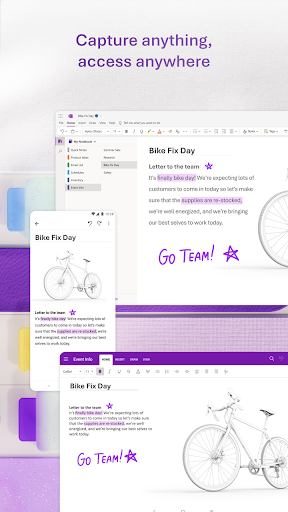
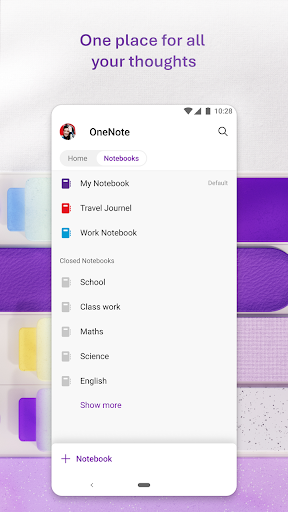
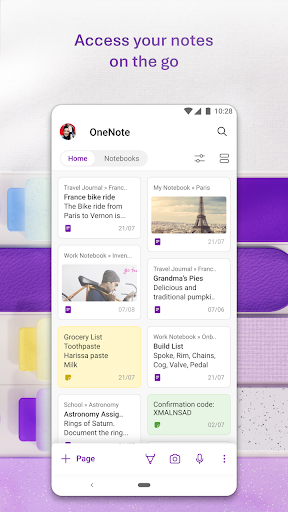
Microsoft OneNote is a free-form note-taking app that lets you type, write in ink, record audio, scan documents, and clip content from the web, then organize it all into notebooks, sections, and pages. It syncs across phones, tablets, and desktops through a Microsoft account, and ties into the wider Office ecosystem alongside Word and Excel. It’s aimed at students, professionals juggling meeting notes and to-do lists, and anyone who wants one place to dump ideas, scanned documents, and voice memos rather than scattering them across sticky notes and separate apps.

The app now also leans into AI with Copilot notebook summaries and audio overviews generated from your notes, plus voice dictation in 27 languages with auto-punctuation. On paper it’s a genuinely broad toolkit, and reviewers confirm that the mobile version has matured a lot over the years compared to earlier, clunkier releases.

Where the App Genuinely Shines

The formatting freedom is a recurring highlight in user feedback. One reviewer using OneNote for a D&D campaign with many sections praised the freedom to format notes in any style and said it took some time to learn but became an excellent tool once it clicked. Another user specifically called out the ability to change font size, type, color, and highlighting, plus customizing page backgrounds and styles, saying the app offers so many settings to help you organize things your way.

Users also appreciate that it doesn’t feel bloated for a Microsoft product, with one calling it a decent cross-platform text editor that works well moving between a Windows laptop and an Android phone. Search and organizational layout also get credit, with one reviewer noting it’s great for notes, easy to use, and easy to search through.

The Syncing Problems That Won’t Go Away

Sync reliability is the single biggest complaint across reviews, and it’s a serious one. One user reported having hundreds of notes suddenly stop syncing, only to find them missing entirely from their OneDrive account, while oddly a notebook they had deleted was still present. Another described opening the app, seeing outdated note content, waiting several minutes with nothing happening, and being unable to find a manual sync option at all, eventually giving up. A third reviewer, while noting improvement over time, still flagged syncing as an ongoing issue rather than something fully resolved.

Beyond sync, editing feels imprecise to some users. One reviewer noted that basic cursor placement by touch, which is easy on most Android text apps, often lands in the wrong spot in OneNote, making quick edits more fiddly than they should be.

Organization Quirks That Frustrate Some Users

Not everyone finds the free-form canvas liberating. One reviewer said the app isn’t very functional for people who want an actual structured note-taking experience, describing pages as feeling infinite and prone to shifting around, with no way to freeze layouts into fixed folders and notes. That same reviewer said the experience isn’t very ADHD- or autism-friendly because of this lack of rigid structure. Another long-time user pointed out a smaller but persistent annoyance: the app opens to a recents page rather than the notebook list, a default some people say they almost never actually use.

DEX compatibility also came up as broken for at least one user, which matters if you rely on desktop-mode multitasking on a Samsung device.

Who Should Actually Download This

If you want a flexible, richly formattable notebook that handles typed notes, handwriting, scanned documents, and voice memos in one app, and you’re comfortable with an open canvas rather than rigid folders, OneNote still delivers real value, especially if you’re already in the Microsoft Office ecosystem. Students and long-form note organizers seem to get the most out of it based on real usage.

But go in with eyes open about sync reliability. Multiple detailed reports describe notes vanishing or failing to update without warning, which is a genuinely risky flaw for an app whose entire pitch is safely syncing your notes across devices. If losing access to your notes even temporarily would be a real problem for you, keep manual backups, and if you need tightly structured, folder-like organization, this may not be the right fit.


Pros

  • ✓Highly flexible formatting and page styling
  • ✓Strong cross-platform syncing when it works
  • ✓Good search and organizational layout
  • ✓Scans documents and extracts text easily
  • ✓Voice dictation supports 27 languages

Cons

  • ✕Sync failures can cause missing notes
  • ✕Free-form pages lack rigid structure options
  • ✕Cursor placement can feel imprecise

What Real Users Say

Joy Hoskins ★ 4/5

“OneNote mobile has improved much over the years. Problems syncing is still an issue, but not as frequent. Also there are some features I don't find helpful. 1) Not having a choice to open to your notebook list rather than recents. I can count on one hand the number of times I've used the recents page. 2) Moving pages takes…”

👍 282 found this helpfulDeveloper responded
Raymond Dunne ★ 4/5

“Decent app considering it is an MS product. Plenty of useful functionality and not bloated. I wanted a text editing app that I could use cross platform between my windows laptop and Android phone. I was actually a bit apprehensive about OneNote when I saw it in the results but cross platform update ability was a must and there weren't…”

👍 200 found this helpful
Shante ★ 5/5

“This app has all kinds of features that really help to organize your notes, like importing or copy and paste. I like that I can change font size, type, color, and highlight. It even allows you to invent and change the background and style of the page. So many settings are offered to help you choose what makes you comfortable,…”

👍 176 found this helpful

Reviews sourced from Google Play, selected by helpfulness at the time of writing.

App Info & Permissions

Developer Microsoft Corporation
Content rating Everyone
Contains ads No
Installs 1B+
Released 02/07/2012
Price Free

Permissions this app requests

📷 Camera Take pictures and videos
📱 Device ID & call information Read phone status and identity
🎙️ Microphone Record audio
📞 Phone Read phone status and identity
🖼️ Photos/Media/Files Read the contents of your USB storage; modify or delete the contents of your USB storage
💾 Storage Read the contents of your USB storage; modify or delete the contents of your USB storage
📶 Wi-Fi connection information View Wi-Fi connections

Similar Apps

Frequently Asked Questions

1

What is Microsoft OneNote: Save Notes?

It's a free note-taking app from Microsoft that lets you type, handwrite, record audio, and scan documents into organized notebooks and sections. It syncs across phones, tablets, and PCs via a Microsoft account and integrates with Word and Excel. Newer versions add AI-powered Copilot summaries and audio overviews generated from your notes.

2

Is Microsoft OneNote free to use?

Yes, OneNote is free to download and use, though it requires a free Microsoft account to sign in and sync notes. Some advanced features may tie into broader Microsoft 365 subscriptions depending on your account type. For syncing with OneDrive for Business, you'll need an organizational Office 365 or SharePoint sign-in.

3

Does OneNote sync reliably across devices?

Sync has reportedly improved over time, but it remains one of the app's most-criticized weaknesses. Users have described notes failing to update, sync appearing stuck with no manual sync option, and in one case entire notebooks disappearing from OneDrive unexpectedly. If sync reliability is critical for you, consider keeping periodic backups.

4

Can I handwrite or scan documents into OneNote?

Yes, OneNote supports ink handwriting, drawing, and a built-in scanner that extracts text from photos, documents, and files. You can apply filters, crop images, and add ink annotations to scanned content. This makes it useful for digitizing paper notes or documents on the go.

5

Is OneNote a good fit for people who want strict folder organization?

Not necessarily. Some users find the free-form, scrolling page layout frustrating because it doesn't behave like fixed folders and files, with pages that can feel infinite and hard to pin down. If you need rigid, static organization rather than a flexible canvas, this open structure may feel disorganized rather than freeing.

