
JW Library

by Jehovah's Witnesses

4.8 ★ 1.6M+ reviews
62M+ Installs
07/03/2013 Released
JW Library icon
JW Library icon
Books & Reference

JW Library

by Jehovah's Witnesses

4.8 ★ 1.6M+ reviews
62M+ Installs
07/03/2013 Released
Advertisements
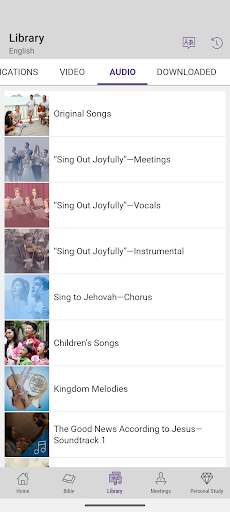
JW Library screenshot 1
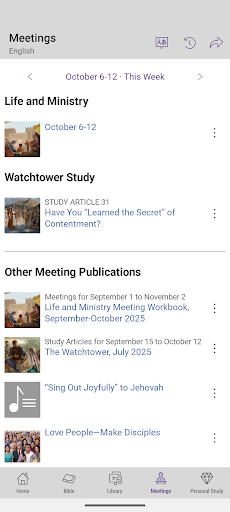
JW Library screenshot 2
JW Library screenshot 3
JW Library screenshot 4
JW Library screenshot 5
JW Library screenshot 6

Ratings Breakdown

4.8 ★★★★★ 1.6M+ ratings
5 ★ 93%
4 ★ 3%
3 ★ 1%
2 ★ 1%
1 ★ 3%

Data from Google Play at the time of writing.

What JW Library Actually Does

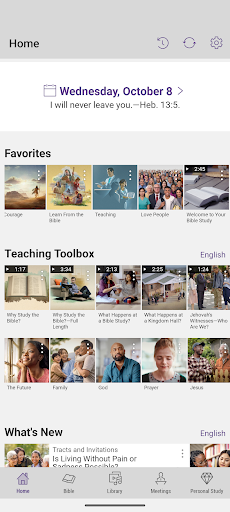
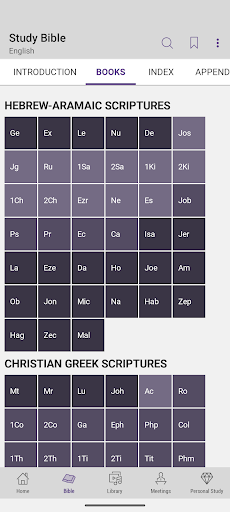
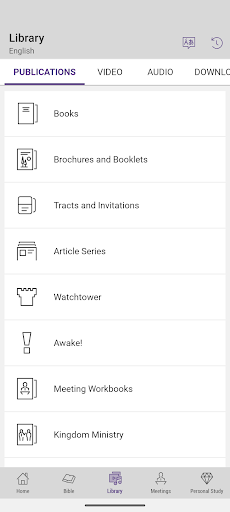
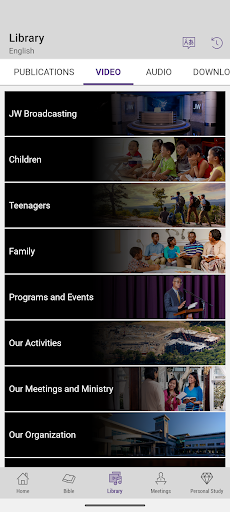
JW Library is the official scripture and study app produced by Jehovah’s Witnesses, and it’s built around one goal: putting the Bible and a huge library of related publications, videos, and audio in one offline-friendly place. Users can download multiple Bible translations, including the New World Translation and other versions like the King James, compare verses side by side, and pull in books, brochures, workbooks, and meeting materials in over 1,000 languages, including sign languages. It’s aimed squarely at Jehovah’s Witnesses for personal study, meeting prep, and daily Bible reading, though anyone curious about their publications can use it too.

Where the App Really Shines

The standout strength reviewers keep mentioning is the sheer amount of content available with zero ads and no subscription cost. One reviewer called it ‘phenomenal’ specifically because there’s no advertising interrupting study, and because it bundles tracts, workbooks, articles, movies, and audio readings into a single app instead of forcing users to hunt across websites. The recently added side panel showing highlighted scriptures also gets real praise, with users saying it helps them keep their place and jog their memory without losing context while reading. Downloadable media for offline use in areas with poor signal is another practical win people bring up often.

Small Annoyances That Add Up

Not everything is smooth. A recurring complaint involves highlight colors in dark mode looking washed out and hard to see, with users specifically asking for more saturated, vivid highlight tones. Samsung users have reported difficulty highlighting text at all, with one reviewer offering a workaround involving the text settings menu and font size adjustment just to get it functioning properly on an S24 Ultra. There’s also a persistent technical glitch where some devices default to using JW Library as the mp3 player for all audio files system-wide, which causes the app to briefly open and crash whenever a user tries to play an unrelated mp3.

Feature Requests Users Keep Asking For

Beyond bugs, a lot of the feedback is wishlist-style rather than complaint-style, which says something about how invested the user base is. People want the ability to play song melodies directly within the songbook without needing a video, a way to check off articles and media as read or watched, an option to have the Daily Text read aloud, and the ability to add personal study notes directly to home screen favorites. None of these are dealbreakers, but their absence is clearly felt by heavy daily users who’ve been with the app through multiple updates.

Who Should Download This

If you’re a Jehovah’s Witness, this app is essentially essential — it consolidates meeting materials, Bible translations, and study tools into one offline-capable tool, and the review volume and installs suggest it’s already deeply embedded into daily routines for millions of users. If you’re not affiliated but want to explore their publications or compare Bible translations for research purposes, it’s still a legitimate, ad-free way to do that. Just expect a few rough edges around dark mode highlighting, Samsung-specific text selection quirks, and that odd mp3 default-app crash if you haven’t disabled it in your phone’s settings.


Pros

  • ✓Completely free with zero ads
  • ✓Offline access to Bibles and publications
  • ✓Available in over 1,000 languages
  • ✓Side panel for highlighted scriptures
  • ✓Combines meeting materials in one app

Cons

  • ✕Dark mode highlight colors look washed out
  • ✕Samsung devices have highlighting issues
  • ✕Wrongly becomes default mp3 player app

What Real Users Say

raquel diaz ★ 5/5

“love it. always better updates to better serve each time. recommendation: Maybe could have ability to play melody song option when in the book for melodies to not depend on video to practice. like for songs on the schedules can click for the sheet and option on top to download/play audio like if it were the audio for the books.…”

👍 3,741 found this helpful
Ivana Falls ★ 5/5

“All is fantastic! I love the new feature where I can see my highlighted scriptures in the side panel. It's great for helping my eyes stay focused and jog my memory, without losing my place. It's awesome for keeping main points together 😄. I'm having one recent issue though, the same as Miguel Abad. On my laptop, I can be…”

👍 3,222 found this helpful
Mora Landa ★ 5/5

“Phenomenal! I really do like this app. There is ZERO ads. It's convenient. It's accurate. There is MORE THAN ONE BIBLE, if you prefer king james version, if you prefer the study bible or new world translation. All kinds of different languages. You can add what you want to favorites, bookmark items. There is Children activities and my children listen…”

👍 775 found this helpful

Reviews sourced from Google Play, selected by helpfulness at the time of writing.

App Info & Permissions

Developer Jehovah's Witnesses
Content rating Everyone
Contains ads No
Installs 62M+
Released 07/03/2013
Price Free

Permissions this app requests

🖼️ Photos/Media/Files Read the contents of your USB storage; modify or delete the contents of your USB storage
💾 Storage Read the contents of your USB storage; modify or delete the contents of your USB storage
📶 Wi-Fi connection information View Wi-Fi connections

Similar Apps

Frequently Asked Questions

1

What is JW Library?

JW Library is the official app from Jehovah's Witnesses for reading the Bible, studying publications, and preparing for meetings. It includes multiple Bible translations, downloadable books and brochures, videos, audio programs, and music. It also supports personal study features like highlighting, notes, tags, and playlists. It's designed for both individual study and congregation meeting use.

2

Is JW Library free to use?

Yes, JW Library is completely free to download and use, and reviewers specifically highlight that it contains zero ads. There are no subscriptions or in-app purchases required to access the Bible translations, publications, videos, or audio content. All downloadable materials, including sign language content, are provided at no cost.

3

Does JW Library work offline?

Yes, one of its core strengths is letting users download Bible translations, publications, videos, and audio programs so they can be accessed without an internet connection. This is especially useful for meetings, travel, or areas with unreliable signal. Content is stored locally once downloaded through the app.

4

Why does JW Library keep opening for mp3 files on my phone?

Some devices mistakenly set JW Library as the default app for playing all mp3 files, not just the audio meant for the app itself. This causes it to briefly open and then crash when trying to play unrelated audio files, according to user reports. This appears to be a device-level default app setting issue rather than something the app intends to do. Changing your phone's default app association for mp3 files may help resolve it.

5

Are the highlighting and note-taking features reliable?

Mostly yes, and the personal study tools like highlighting, notes, and tags are popular with regular users, especially the newer side panel that displays highlighted scriptures. However, some users report the highlight colors are hard to see in dark mode, and Samsung users specifically have reported trouble getting highlighting to work at all without adjusting text settings first. Once those settings are tweaked, most users say the feature works as expected.