
Hypic – Photo Editor & AI Art

by Bytedance Pte. Ltd.

3.6 ★ 250K+ reviews
115M+ Installs
01/03/2023 Released
Hypic – Photo Editor & AI Art icon
Photography

Hypic – Photo Editor & AI Art

by Bytedance Pte. Ltd.

3.6 ★ 250K+ reviews
115M+ Installs
01/03/2023 Released
Advertisements
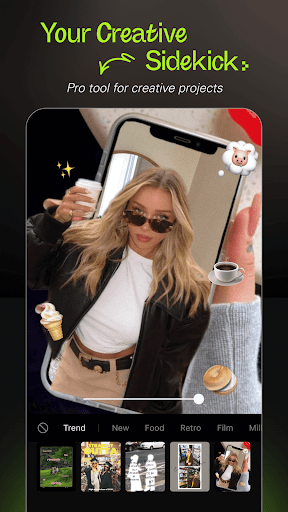
Hypic – Photo Editor & AI Art screenshot 1
Hypic – Photo Editor & AI Art screenshot 2
Hypic – Photo Editor & AI Art screenshot 3
Hypic – Photo Editor & AI Art screenshot 4
Hypic – Photo Editor & AI Art screenshot 5

Ratings Breakdown

3.6 ★★★★★ 250K+ ratings
5 ★ 53%
4 ★ 8%
3 ★ 5%
2 ★ 7%
1 ★ 26%

Data from Google Play at the time of writing.

What Hypic Actually Does and Who It’s For

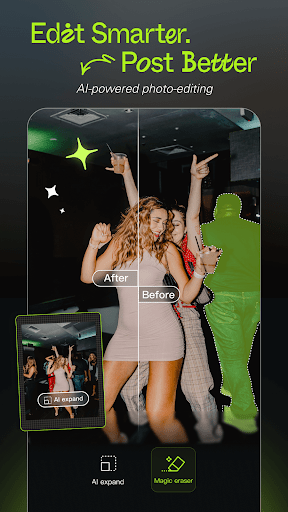
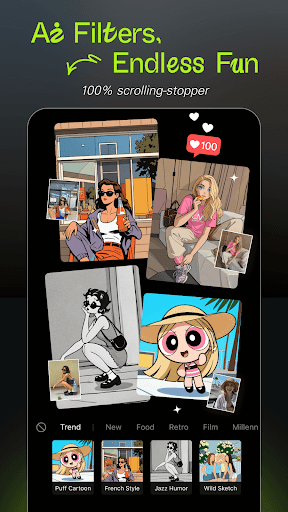
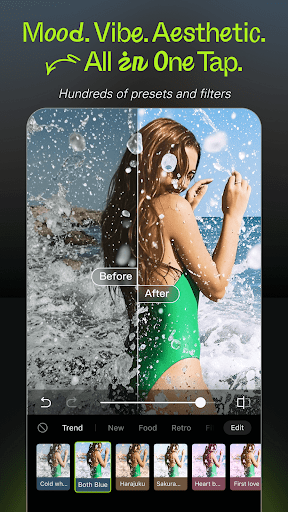
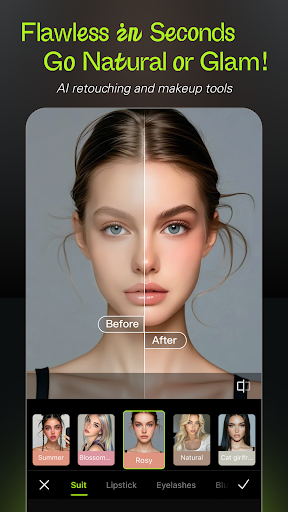
Hypic is a Bytedance-made photo editor built around AI tools: background removal, avatar generation, cartoon-style filters, and image upscaling, plus a library of retro film and soft glow presets aimed squarely at Instagram, TikTok, and Pinterest users. It also bundles retouching tools for smoothing and reshaping, aesthetic templates for photo dumps and stories, plus batch editing and collage making. It’s aimed at casual editors and content creators who want polished results fast without learning a full editing suite like Lightroom or Photoshop.

Where the AI Tools and Templates Impress

Users consistently praise the variety of text fonts and styles, the ability to layer in extra photos, and the background cutout tool, which one reviewer specifically called out for including a zoomed-in precision view while cutting out subjects. The template system is also a genuine strength once you find it: reviewers note that picking a template from the ‘templates’ tab and hitting ‘use template’ unlocks a workflow that isn’t obvious from the main edit screen but works well once discovered. For users just wanting a quick aesthetic upgrade to a selfie or story post, the one-tap filters and stickers deliver on the app’s promise of fast, curated-looking content.

The Save-Behind-a-Paywall Problem

The most common and damaging complaint is that Hypic lets you fully edit a photo and then blocks saving unless you subscribe to VIP, with no clear warning beforehand. One highly-upvoted review describes being ‘really impressed’ until discovering the save function itself was locked. This isn’t a minor annoyance — it means the app can waste your time on an edit you never intended to pay to keep, and multiple reviewers flagged this lack of upfront disclosure as the core trust issue with the app.

Rising Costs and Shrinking Free Features

Beyond the save paywall, reviewers describe a pattern of previously free tools being progressively locked behind ‘pro’ access, including basic drawing functionality that one user called ‘the most basic, barebones, minimum requirement for an editing app.’ Others report subscription pricing that feels disproportionate in local currency (specifically called out as too expensive in MYR), unexpected bank charges tied to filters, and general frustration that a 50/50 chance now exists of hitting a paywall on basic actions. Several longtime users say the app has gotten ‘greedier every single day’ compared to when they first installed it.

Stability Issues Add to the Frustration

On top of the monetization complaints, some reviewers mention functional problems: filters that simply don’t work, content that fails to load, and occasional crashes. These aren’t universal complaints but they compound the paywall frustration, since users are sometimes paying for VIP access to features that then don’t function reliably.

Final Verdict on Downloading Hypic

Hypic is worth trying if you want fast AI-powered edits and templates and you go in expecting a hard paywall on saving and many advanced tools. It’s a poor fit if you want a genuinely free editor or predictable pricing, since multiple reviewers report the free tier shrinking over time and subscription costs feeling steep for what you get.


Pros

  • ✓Wide variety of text fonts and styles
  • ✓Precise background removal with zoomed view
  • ✓Large template library for quick edits
  • ✓Batch editing and collage tools included
  • ✓One-tap trending filters and effects

Cons

  • ✕Saving edits often requires VIP subscription
  • ✕Free tools increasingly locked behind paywall
  • ✕Some filters buggy or fail to load

What Real Users Say

Elchan ★ 4/5

“At first, I was really impressed with this app. It’s super user-friendly, fun to use, and seemed completely free. But once I started editing photos, I realized I couldn’t even save my work unless I subscribed to VIP. That was really frustrating—especially since nothing indicated upfront that such a basic feature would be locked behind a paywall. I ended up…”

👍 10,461 found this helpful
Jessie netha ★ 3/5

“honestly its a good app for pic editor and i get it if the free is no longer available but could you make the price more reasonable? its way too expensive in MYR currency. i'm willing to pay for monthly subscription, but for the price, its too expensive. i hope the developer would consider again with the monthly/yearly subscription. please…”

👍 8,732 found this helpful
Jena ★ 5/5

“Okay guys, they didn't take away the features, you just have to get to them in a weird way: Open the app, on the bottom row you will see where it says edit, templates, business, me. Click templates. Pick any template and select used template at the bottom. Give it permission to access your media if you haven't already, then…”

👍 2,293 found this helpful

Reviews sourced from Google Play, selected by helpfulness at the time of writing.

App Info & Permissions

Developer Bytedance Pte. Ltd.
Content rating Everyone
Contains ads No
In-app purchases $2.99 - $159.99 per item
Installs 115M+
Released 01/03/2023
Price Free

Permissions this app requests

📷 Camera Take pictures and videos
🎙️ Microphone Record audio
🖼️ Photos/Media/Files Read the contents of your USB storage; modify or delete the contents of your USB storage
💾 Storage Read the contents of your USB storage; modify or delete the contents of your USB storage
📶 Wi-Fi connection information View Wi-Fi connections

Similar Apps

Frequently Asked Questions

1

What is Hypic - Photo Editor & AI Art?

Hypic is a mobile photo editing app from Bytedance that uses AI to remove backgrounds, generate avatars, apply cartoon effects, and enhance image quality. It also includes filters, retouching tools, aesthetic templates, and batch editing features. It's designed for casual editors and social media creators posting to platforms like Instagram and TikTok.

2

Is Hypic actually free to use?

Hypic is free to download and start editing, but many reviewers report that saving finished edits requires a VIP subscription, which isn't clearly disclosed upfront. Several core tools, including basic drawing, have reportedly moved behind the paywall over time. Users should expect that meaningful use of the app likely requires a paid subscription.

3

Are the AI background removal and template tools reliable?

Reviewers generally praise these features, specifically noting the precision of background cutouts with a zoomed-in view and the quality of the template designs. The template workflow can be confusing to find at first since it's tucked under a separate tab, but once located it functions well. These are considered among the app's strongest features.

4

Is the Hypic subscription price reasonable?

Multiple reviewers say the subscription pricing feels too high, with one specifically noting it's disproportionately expensive in their local currency. Users have asked the developer to reconsider pricing tiers for different regions. If cost is a major concern, it's worth checking current subscription pricing in your region before committing.

5

Does Hypic have any performance or reliability issues?

Some users report filters that don't work, content that fails to load, and occasional app crashes. These issues aren't universal but appear frequently enough in reviews to be a real consideration. Combined with paywall frustrations, they contribute to a drop in satisfaction among some long-term users.

