
Google Ads

by Google LLC

4.1 ★ 210K+ reviews
44M+ Installs
03/04/2015 Released
Google Ads icon
Google Ads icon
Business

Google Ads

by Google LLC

4.1 ★ 210K+ reviews
44M+ Installs
03/04/2015 Released
Advertisements
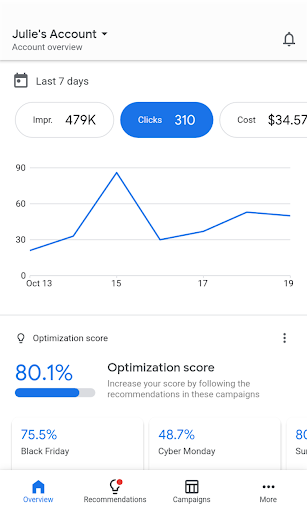
Google Ads screenshot 1
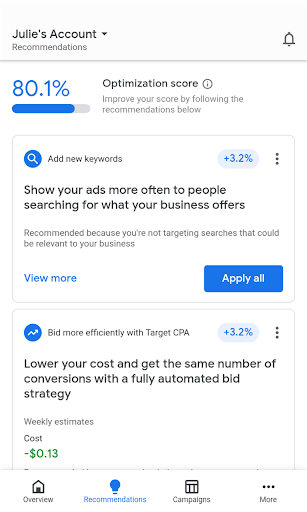
Google Ads screenshot 2
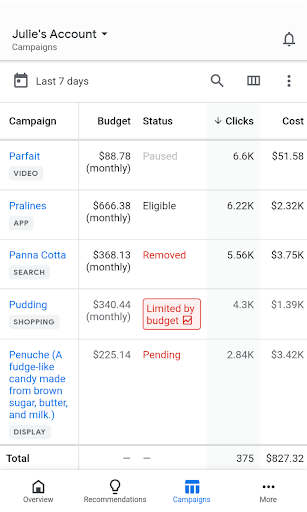
Google Ads screenshot 3
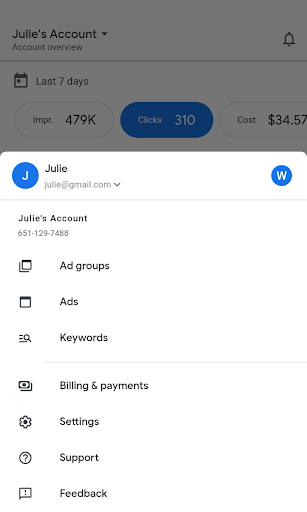
Google Ads screenshot 4

Ratings Breakdown

4.1 ★★★★★ 210K+ ratings
5 ★ 69%
4 ★ 8%
3 ★ 6%
2 ★ 3%
1 ★ 14%

Data from Google Play at the time of writing.

What This App Actually Does

The Google Ads mobile app is the on-the-go companion to the full desktop Google Ads platform. It lets business owners and marketers check campaign stats like impressions, clicks, and conversions, tweak bids and budgets, edit keywords, and respond to policy alerts without sitting at a computer. It’s aimed at small business owners running their own campaigns and account managers who need to check in between meetings, not at agencies managing dozens of complex accounts, since heavy campaign building is still better suited to desktop.

Where It Genuinely Helps

For quick monitoring, the app does what it promises. Users note it’s ‘useful for managing your apps on the go’ with an interface that many find intuitive, and the ability to get real-time notifications for things like ad disapprovals is a real convenience if you’re not chained to a desktop. Being able to glance at optimization scores and apply a recommendation between errands is a genuine time-saver for solo operators who don’t have a dedicated marketing team watching the account all day.

The Billing Transparency Problem

The most damaging and recurring complaint has nothing to do with the app’s design and everything to do with how spending is communicated. Multiple reviewers describe the $500 ad credit offer as misleading, with one saying they were charged $78 ‘for basically nothing’ after assuming they were still spending credit. Others report being charged $150 or several hundred dollars a month for campaigns that produced zero actual leads, with phone-call conversions logged in reports that reviewers insist never happened. This isn’t a minor gripe; it’s the top complaint by a wide margin and it’s about trust in the numbers the app is showing you.

Syncing, Budget Controls, and Cancellation Headaches

Several users report that the app’s balance doesn’t refresh reliably. One reviewer checked every morning for a week and consistently saw a lower spend and click count in the app than what the desktop site showed for the same account. Budget controls also frustrate people who want simple control, like specifying ‘$100 over 3 days’ – instead the app forces a per-day breakdown that reviewers describe as confusing ‘weird math’ with no way to set a clean start date. On top of that, canceling an account is reportedly difficult, with one user hitting a 404 error trying to stop payments, and another spending two weeks trying to figure out how to cancel despite the app suggesting it’s simple.

Policy Alerts That Lead Nowhere

A smaller but telling complaint involves the policy manager. One reviewer got an email about two policy issues, clicked through to fix them, and landed on a page telling them there were no policy issues to resolve – a disconnect that wastes time and adds confusion right when someone is trying to get an ad approved.

Who Should Actually Download This

If you already run Google Ads campaigns and just want a way to peek at performance and clear simple alerts while away from your desk, this app is functional enough for that narrow job. But go in skeptical of the balance figures and double check spend on desktop periodically. If you’re new to advertising and drawn in by a sign-up credit offer, read the terms closely before you connect a payment method, and know that canceling may take more effort than it should.


Pros

  • ✓Convenient real-time performance monitoring on the go
  • ✓Useful push notifications for disapprovals and alerts
  • ✓Intuitive interface for basic account checks
  • ✓Quick access to optimization score and recommendations
  • ✓Handy for solo operators without a marketing team

Cons

  • ✕Balance and stats often out of sync with desktop
  • ✕Confusing per-day budget math, no custom start date
  • ✕Canceling account reportedly difficult, some report errors

What Real Users Say

Dan Carey ★ 1/5

“Unfortunately the $500 add credit offer is very misleading and deceptive. The functionality of the app and the ads are just fine, but I was very disappointed when I thought I was using ad credit, but then realized that I was going to be charged $78 for basically nothing. I never would have let my bill run up that high…”

👍 2,028 found this helpful
Jessie Sasser ★ 1/5

“App is not dependable and does not refresh your balance properly. I literally pulled down to refresh and it said $30 but if I open the site on my desktop it said $84 with double the clicks and impressions. It's not just a fluke. I checked it every morning for the past week and it is always way lower than…”

👍 1,434 found this helpful
Mick Hull ★ 1/5

“The worst thing I have ever done!! Each week the reports say that I received 3 phone calls from my ads but I Never did! I received zero work from the ads over the past two months and was charged several hundred dollars a month! It took me two weeks to find out how to cancel even though it says…”

👍 927 found this helpful

Reviews sourced from Google Play, selected by helpfulness at the time of writing.

App Info & Permissions

Developer Google LLC
Content rating Everyone
Contains ads No
Installs 44M+
Released 03/04/2015
Price Free

Permissions this app requests

📷 Camera Take pictures and videos
👥 Contacts Find accounts on the device
🪪 Identity Find accounts on the device; add or remove accounts
🎙️ Microphone Record audio

Similar Apps

Frequently Asked Questions

1

What is Google Ads?

Google Ads is Google's advertising platform that lets businesses create and manage online ad campaigns across Search, Display, and other Google properties. The mobile app is a companion tool for monitoring and adjusting those campaigns from a smartphone. It's built for advertisers who already have or want to set up paid campaigns, not for casual users. It mirrors much of the desktop dashboard in a simplified mobile format.

2

Is the Google Ads app free to download?

Yes, the app itself is free to download and install. However, running actual ad campaigns costs money, since you're billed for clicks, impressions, or conversions depending on your campaign setup. Some reviewers report confusion around introductory ad credit offers turning into unexpected charges. It's worth reading the billing terms carefully before linking a payment method.

3

Can I trust the performance numbers shown in the app?

Multiple users report discrepancies between the app's displayed balance and stats versus the desktop site, with one noting a gap of roughly $30 versus $84 for the same account over several days. Because of this, it's wise to cross-check important numbers on desktop periodically rather than relying on the app alone. This seems to be a recurring sync issue rather than an isolated case.

4

Is it easy to cancel or stop ad spending through the app?

Several reviewers describe difficulty canceling accounts or stopping campaigns, including one who encountered a 404 error when trying to delete their account and another who took two weeks to figure out the cancellation process. This is one of the more serious complaints since it directly affects unwanted charges. If you're concerned about overspending, it may be safer to manage cancellation through desktop support channels.

5

Who is this app best suited for?

It's best suited for small business owners or marketers who already understand Google Ads and just want a way to check performance and handle quick tasks while away from a computer. It's less ideal for advertising beginners, given the complaints about misleading credit offers and confusing budget controls. Agencies managing many complex accounts will likely still prefer the full desktop platform.

