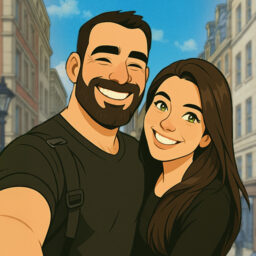
Ghibli Style Cartoon – ToonApp

by Lyrebird Studio

4.5 2.4M+ reviews
114M+ Installs
12/22/2020 Released
Ghibli Style Cartoon – ToonApp icon
Photography

Ghibli Style Cartoon – ToonApp

by Lyrebird Studio

4.5 2.4M+ reviews
114M+ Installs
12/22/2020 Released
Ghibli Style Cartoon – ToonApp screenshot 1
Ghibli Style Cartoon – ToonApp screenshot 2
Ghibli Style Cartoon – ToonApp screenshot 3
Ghibli Style Cartoon – ToonApp screenshot 4
Ghibli Style Cartoon – ToonApp screenshot 5
Ghibli Style Cartoon – ToonApp screenshot 6

Ratings Breakdown

4.5 ★★★★★ 2.4M+ ratings
5 82%
4 5%
3 2%
2 1%
1 9%

Data from Google Play at the time of writing.

What ToonApp Actually Does

ToonApp, made by Lyrebird Studio, is a photo-to-cartoon converter that turns selfies into anime characters, Ghibli-style art, caricatures, action figures, and 3D clay-style avatars. It’s aimed at casual users who want a quick, shareable cartoon profile picture for Instagram, TikTok, or Snapchat rather than anyone needing precise creative control. With over 114 million installs, it’s clearly found a big audience among people who just want to tap a button and see a fun version of themselves.

Where the Cartoon Results Impress

Real users consistently say the actual transformations look good. One reviewer said they and their daughter were ‘amazed at how cute’ their tooned photos looked, and now use them as profile pictures. Another long-term user admitted their first impression was too harsh once they saw the variety of styles and backgrounds available. The core AI cartoon engine seems to be the app’s real strength, and when a clear, well-lit selfie is used, the output can genuinely surprise you.

The Animation and Consistency Problem

Results aren’t reliable across every photo. One user with 7,000+ helpful votes noted the app only offers one real animation option, and if your source image isn’t close to ideal, the result can cut out eyes or distort features. Another reviewer echoed this, saying only a few of the many advertised effects actually look decent. So while the best-case output is impressive, you should expect inconsistency, especially with anything other than a straightforward, well-cropped face photo.

Ads Are the Biggest Complaint

Almost every critical review centers on the sheer volume of ads. Multiple users describe an ad appearing behind nearly every tap, even during simple navigation before you’ve selected a photo. One reviewer said they uninstalled after 15 minutes because of how aggressive the ad-and-subscription prompting was. Even users who ultimately gave the app 4 stars admitted the ads never really stop, they just learned to tolerate the 5-second interruptions over time.

Subscription Billing Deserves Extra Caution

Beyond ads, there’s a recurring warning about the subscription model. One user reported being charged every 10 days regardless of actual usage, and said they only caught it after checking the fine print closely. If you plan to try ToonApp for a one-off project or a few photos, treat any trial or subscription screen carefully and check your account settings afterward, since cancellation doesn’t appear to be obvious or automatic.

Who Should Actually Download This

ToonApp makes sense for casual users who want a fun, occasional cartoon avatar for social media and are willing to sit through frequent ads for a free-tier experience. It’s less suited to anyone who wants a smooth, ad-light workflow, needs consistent results across many photos, or plans to use it professionally without carefully monitoring billing. If you go in expecting some trial and error with source images and a genuine ad gauntlet, the underlying cartoon and caricature quality can still deliver a result worth the annoyance.


Pros

  • Cartoon and caricature results often look impressive
  • Wide variety of styles and backgrounds
  • Fun for casual social media profile pics
  • Simple one-tap photo transformation
  • Popular with huge install and review base

Cons

  • Extremely frequent ads on nearly every tap
  • Inconsistent results with non-ideal photos
  • Subscription can auto-charge every 10 days

What Real Users Say

Zipporah Loucks 3/5

“It's a good app, and I like how it does groups, however it has one option for animation, and if the image isn't perfect it doesn't turn out super well. If you're looking for a quick animation get this app, but if you want variety and not for the animation to cut out the eyes, or include something that you…”

👍 7,033 found this helpfulDeveloper responded
Theresa Ream 1/5

“It has some great features but the number of ads is too much. I understand that you need ads to help your revenue base, but this was crazy. Every tap generated an ad. I read below that they were 5 second ads & didn't think it would be an issue. But after 15 minutes, I was done. Also being hit…”

👍 3,090 found this helpfulDeveloper responded
Leah Whitson (L) 5/5

“I love this app! If you ever want an app to stroke your ego and make a lackluster photo really POP, get ToonApp! My daughter and I were both amazed at how cute we looked. We now have our "tooned" photos as our profile pics.♡ Easy and fun to use, there are many different styles, backgrounds. The only thing I'd…”

👍 2,837 found this helpful

Reviews sourced from Google Play, selected by helpfulness at the time of writing.

App Info & Permissions

Developer Lyrebird Studio
Content rating Everyone
Contains ads Yes
In-app purchases $2.00 - $69.99 per item
Installs 114M+
Released 12/22/2020
Price Free

Permissions this app requests

🖼️ Photos/Media/Files Read the contents of your USB storage; modify or delete the contents of your USB storage
💾 Storage Read the contents of your USB storage; modify or delete the contents of your USB storage
📶 Wi-Fi connection information View Wi-Fi connections

Similar Apps

Frequently Asked Questions

1

What is Ghibli Style Cartoon - ToonApp?

ToonApp is a photo editing app by Lyrebird Studio that turns selfies into cartoons, anime characters, Ghibli-inspired art, caricatures, and 3D action figure avatars. It includes tools like an AI cartoon generator, caricature maker, toon me filters, and background removal. It's designed mainly for quick, fun profile pictures rather than professional editing.

2

Is ToonApp free to use?

ToonApp is free to download and offers some features without payment, but it relies heavily on ads and pushes a subscription for fuller access. Several users reported being charged repeatedly, such as every 10 days, even with light usage. It's wise to check subscription terms carefully before confirming any trial.

3

Does ToonApp show a lot of ads?

Yes, this is the most common complaint among reviewers. Multiple users describe an ad appearing behind almost every tap, including simple navigation steps, with typical ad lengths around 5 seconds each. Some users uninstalled the app within 15 minutes specifically because of ad frequency.

4

How good are the cartoon and caricature results?

Many users report being genuinely impressed, saying photos 'POP' and look cute enough to use as permanent profile pictures. However, results can be inconsistent, with one heavily-voted review noting the app has only one main animation option that can distort features like eyes if the source photo isn't ideal. Expect some trial and error to get a great result.

5

Is ToonApp worth downloading?

It's worth trying if you want occasional, fun cartoon avatars for social media and don't mind wading through frequent ads for free use. If you need consistent quality across many photos or want to avoid subscription billing surprises, proceed cautiously and monitor your account after any trial.

