

File Manager

by File Manager Plus

4.6 ★ 1.6M+ reviews
170M+ Installs
10/19/2015 Released
File Manager icon
File Manager icon
Productivity

File Manager

by File Manager Plus

4.6 ★ 1.6M+ reviews
170M+ Installs
10/19/2015 Released
Advertisements
File Manager screenshot 1
File Manager screenshot 2
File Manager screenshot 3
File Manager screenshot 4
File Manager screenshot 5
File Manager screenshot 6

Ratings Breakdown

4.6 ★★★★★ 1.6M+ ratings
5 ★ 84%
4 ★ 8%
3 ★ 2%
2 ★ 1%
1 ★ 5%

Data from Google Play at the time of writing.

What File Manager Plus Actually Does

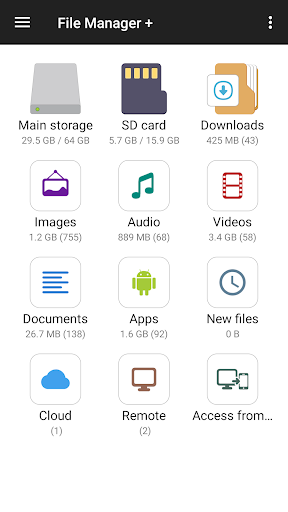
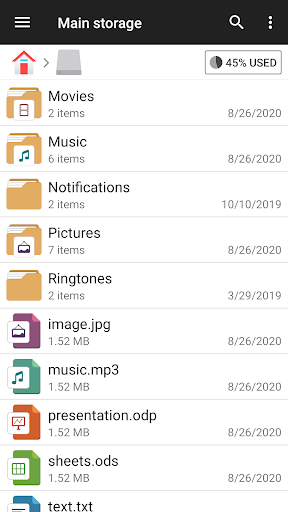
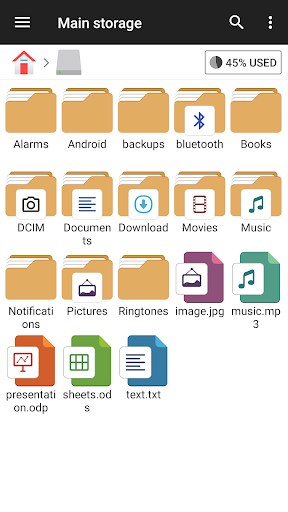
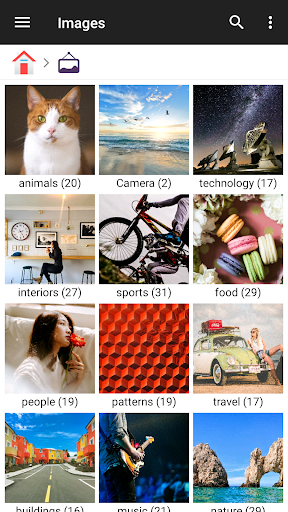
File Manager Plus is a general-purpose file explorer for Android that handles the basics you’d expect: browsing internal storage, SD cards, and USB OTG drives, plus connecting to cloud accounts like Google Drive, OneDrive, Dropbox, Box, and Yandex, along with NAS and FTP servers. It auto-sorts files into categories like Downloads, Images, Audio, Videos, and Documents, and it doubles as an app manager so you can see what’s installed and how much space everything takes up. It’s aimed at anyone who wants more control over their phone’s storage than the stock Files app gives them, from casual users cleaning up photos to power users juggling multiple drives and remote servers.

Where It Genuinely Shines

The core file-finding and transfer experience is where this app earns its reputation. One long-time user called it one of their ‘few Must Have apps,’ installed across every phone and tablet they own, praising how it instantly detects thumb drives and other storage without fuss. Another reviewer noted it handles heavy file loads better than competitors, saying ‘some apps choke’ when a device has too many files, but this one keeps working. Support for moving multiple files at once, up to around eight simultaneous transfers according to one reviewer, is also called out as a standout feature not many rivals match.

The Editing and Text Tools Have Regressed

Not everything has aged well. One reviewer with over a thousand upvotes on their complaint described the app as ‘wonderful, until they upgraded it recently,’ explaining that a recent update broke text selection in the built-in editor, limiting selection to a single paragraph instead of allowing select-all, and causing the screen to jump erratically while editing. This is a significant regression for anyone using the internal text editor regularly, and it hasn’t been fixed according to that review.

Bugs in Multi-File Transfers and Sorting

Beyond the editor issue, there are real complaints about reliability during bulk operations. A reviewer who relies on moving multiple files noted that recent updates introduced a bug where an error in one transfer can halt all other queued activities, and sometimes a file being moved doesn’t get removed from its original location, or only partially transfers. Photo browsing has its own friction too: thumbnails load slowly and only after scrolling stops, which one user said makes sorting through large photo libraries genuinely inconvenient. Missing quality-of-life features, like continuing a naming pattern during batch renames or easily finding the most recently downloaded file, also came up more than once.

Ads and Overall Usability

Multiple reviewers mention ads, but the consensus is that they’re tolerable. One user said ads ‘don’t block your work,’ and another called them ‘not intrusive at all’ once you understand the main screen is really a filtered view combining device and SD card contents. That learning curve is minor, and once past it, most reviewers describe the app as easier to use than competing file managers.

Who Should Actually Install This

If you need a dependable everyday file browser with solid cloud and network storage support, this covers the essentials well and has earned genuine long-term loyalty from many users. But if you depend heavily on the internal text editor or do frequent large batch file moves, the recent bugs around text selection and multi-transfer reliability are worth knowing about before you commit to it as your primary tool.


Pros

  • ✓Handles internal, SD, and USB storage smoothly
  • ✓Detects cloud and NAS storage reliably
  • ✓Supports multiple simultaneous file transfers
  • ✓Ads are minimal and non-intrusive
  • ✓Long-term users call it a must-have app

Cons

  • ✕Recent update broke text selection tool
  • ✕Bulk transfers can fail or halt entirely
  • ✕Photo thumbnails load slowly while scrolling

What Real Users Say

Kurt Schmidt ★ 5/5

“It's really a very, very good app to manage files and folders on your Android phone; works with other attached computers. Let's just say it is among the very best apps of its kind. Works great even if you got too many apps and files on your computer; some apps choke. Also, nicely integrated access to OneDrive, Google Drive, etc.…”

👍 1,056 found this helpful
Carol ★ 1/5

“it just got worse. it used to let me select all in a file so I can can copy and paste. now it limits it to selecting just one.paragraph. im going to try something else. This app was wonderful, until they upgraded it recently. Now the screen jumps wildly as I try to edit. This has not been corrected as…”

👍 1,034 found this helpful
Alan Teas (Walter Alan Teas III) ★ 5/5

“This is one of my few Must Have apps. I have it on all my phones and tablets. It makes finding, sorting, and transferring files a breeze. It immediately finds my various thumb drives & other storage. It always works perfectly and has never lost a file. Find, sort, copy, move, categorize your files, place in folders -- do it…”

👍 493 found this helpful

Reviews sourced from Google Play, selected by helpfulness at the time of writing.

App Info & Permissions

Developer File Manager Plus
Content rating Everyone
Contains ads Yes
In-app purchases $0.99 - $11.99 per item
Installs 170M+
Released 10/19/2015
Price Free

Permissions this app requests

👥 Contacts Find accounts on the device
🪪 Identity Find accounts on the device
🖼️ Photos/Media/Files Read the contents of your USB storage; modify or delete the contents of your USB storage
💾 Storage Read the contents of your USB storage; modify or delete the contents of your USB storage
📶 Wi-Fi connection information View Wi-Fi connections

Similar Apps

Frequently Asked Questions

1

What is File Manager?

File Manager Plus is an Android file explorer app that lets you browse, copy, move, rename, compress, and organize files across internal storage, SD cards, USB drives, and cloud services. It also includes an app manager, storage analyzer, and built-in tools like an image viewer, music player, and text editor. It supports phones, tablets, and Android TV.

2

Is File Manager Plus free to use?

Yes, the app is free to download and use, and it includes ads to support that. Multiple reviewers note the ads are not intrusive and don't interfere with actual file management tasks, though your experience may vary depending on the version installed.

3

Can File Manager Plus connect to cloud storage and NAS devices?

Yes, it supports Google Drive, OneDrive, Dropbox, Box, and Yandex, as well as NAS and FTP servers for remote or shared storage access. You can also access your Android device's storage from a PC using FTP. This makes it useful for users managing files across multiple systems.

4

Does File Manager Plus have any major bugs right now?

Yes, based on user reports, a recent update limited text selection in the internal editor to a single paragraph instead of allowing select-all, and caused erratic screen jumping while editing. There are also reports of bulk file transfers failing partway through or halting entirely if one file errors out.

5

Is File Manager Plus good for managing large photo libraries?

It works but has friction points, since one reviewer noted photo thumbnails load slowly and only after you stop scrolling, which slows down organizing large collections. The app also lacks some convenience features like continuing a naming pattern during batch renames. It's usable for photo management but not the most polished experience for that specific task.

