Canon PRINT

by Canon Inc.

4.5 ★ 845K+ reviews
88M+ Installs
07/21/2013 Released
Canon PRINT icon
Canon PRINT icon
Tools

Canon PRINT

by Canon Inc.

4.5 ★ 845K+ reviews
88M+ Installs
07/21/2013 Released
Advertisements
Canon PRINT screenshot 1
Canon PRINT screenshot 2
Canon PRINT screenshot 3
Canon PRINT screenshot 4
Canon PRINT screenshot 5
Canon PRINT screenshot 6

Ratings Breakdown

4.5 ★★★★★ 845K+ ratings
5 ★ 79%
4 ★ 10%
3 ★ 3%
2 ★ 1%
1 ★ 7%

Data from Google Play at the time of writing.

What Canon PRINT Actually Does

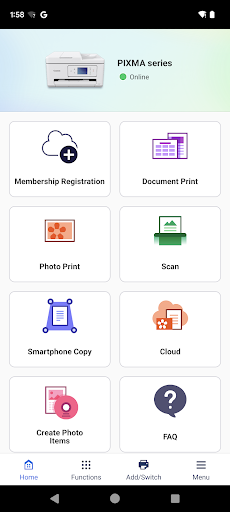
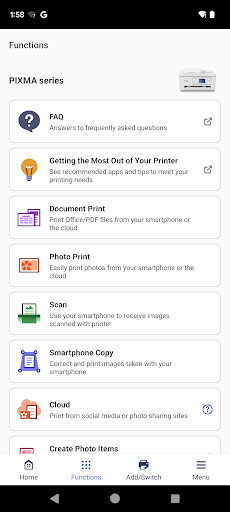
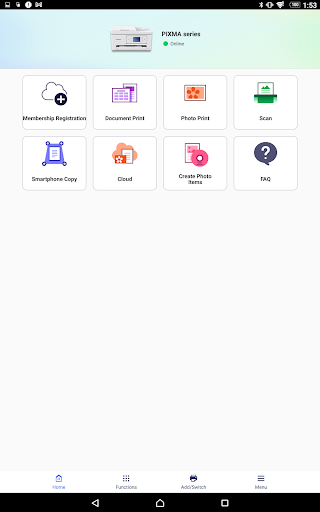
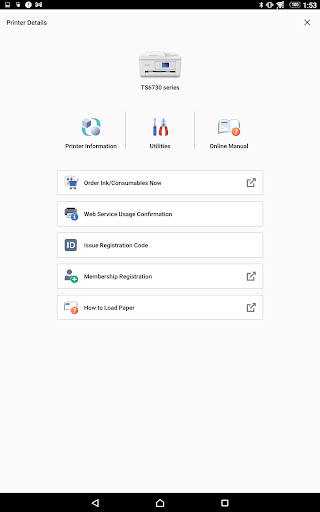
Canon PRINT (formerly Canon PRINT Inkjet/SELPHY) is the companion app for Canon’s inkjet, laser, and compact photo printers, covering everything from PIXMA and MAXIFY to imageCLASS and SELPHY lines. It handles printer setup, wireless connection, printing documents and photos from your phone, scanning, checking ink or toner levels, and cloud printing. It’s aimed squarely at home users who bought a Canon printer and want to print or scan straight from a smartphone instead of a computer.

Where It Actually Delivers

The core promise works: printing photos and documents directly from your phone is genuinely convenient once it’s set up, and several users specifically praise being able to print photos on photo paper without touching a computer. For casual, occasional printing jobs – a boarding pass, a school worksheet, a handful of photos – the app does what it says on the tin, and setup for basic printing is straightforward for most supported PIXMA and MAXIFY models.

The Missing Controls That Frustrate Power Users

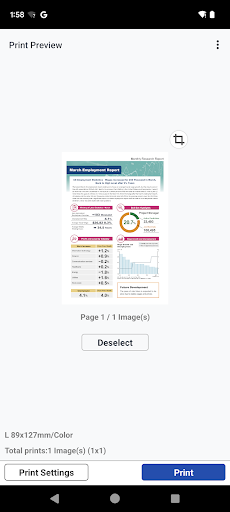
The most consistent complaint from real users isn’t that the app breaks, it’s that it’s too limited. Reviewers repeatedly note there’s no way to crop a photo before printing, only zoom, and no controls for brightness or other image adjustments. Print options are basically reduced to picking pages and copy count, with no way to choose paper size alongside picture size together. This forces people to waste ink and paper doing physical test prints just to see how a photo will actually look, which defeats the purpose of a ‘convenience’ app.

Connectivity Problems That Show Up Over Time

A recurring pattern in low-rated reviews is that the app works fine initially, then starts failing to connect – to the phone, to a PC, or even over USB – after weeks of normal light use. Multiple users describe printers that won’t wake from sleep to accept a print job, requiring a walk over to physically power the printer on, which undermines the entire point of wireless printing. Switching the printer to a different Wi-Fi network is also called out as needlessly difficult, and one reviewer specifically mentions the scan button disappearing from the app, leaving it usable only for printing.

Permissions and Everyday Annoyances

Beyond connectivity, there are smaller usability gripes: the app asks for permissions labeled ‘optional’ that the app apparently won’t function without, and there’s no way to jump straight to a specific photo album, forcing users to scroll through an entire camera roll to find an image. None of these are dealbreakers individually, but combined with the connection drops, they add up to an app that many describe as more frustrating than it should be for something this basic.

Who Should Actually Download This

If you own a supported Canon printer and only need occasional, no-frills printing or scanning from your phone, Canon PRINT covers the basics adequately. But if you print photos regularly and want cropping, brightness adjustment, or reliable day-in-day-out wireless connectivity, be prepared for real friction – this is a functional but rough-edged utility, not a polished photo-printing tool.


Pros

  • ✓Easy direct printing from phone
  • ✓Good for casual photo printing
  • ✓Works across many Canon printer models
  • ✓Simple setup for basic print jobs
  • ✓Supports cloud printing functions

Cons

  • ✕No photo cropping or brightness controls
  • ✕Wireless connection drops over time
  • ✕Limited print customization options

What Real Users Say

Erica Leeper ★ 4/5

“Great to be able to print documents directly from my phone! I wish there were options to change print features though. There are currently only two features available - 1) choosing which page(s) to print and 2) choosing how many copies to print. I would really like to have choices such as printing black and white or printing front to…”

👍 187 found this helpful
Bonnie Boas ★ 4/5

“I mostly like this app. It's really nice to be able to print photos on photo paper from my phone. However, there are some functions in the app that are missing which would provide a better experience. One is the ability to choose the size of the paper AND the picture itself. Currently, if I put that my paper is…”

👍 170 found this helpful
Ms. Angie Mc ★ 3/5

“I'm having trouble making adjustments before printing. You get no options to change things. It won't allow me to crop.. only zoom in on a picture. It doesn't give you the ability to adjust brightness or other things. And you will waste ink when you test out your picture on regular paper. In other words, if your picture isn't already…”

👍 150 found this helpful

Reviews sourced from Google Play, selected by helpfulness at the time of writing.

App Info & Permissions

Developer Canon Inc.
Content rating Everyone
Contains ads Yes
Installs 88M+
Released 07/21/2013
Price Free

Permissions this app requests

📷 Camera Take pictures and videos
📍 Location Approximate location (network-based); precise location (GPS and network-based)
🖼️ Photos/Media/Files Read the contents of your USB storage; modify or delete the contents of your USB storage
💾 Storage Read the contents of your USB storage; modify or delete the contents of your USB storage
📶 Wi-Fi connection information View Wi-Fi connections

Similar Apps

Frequently Asked Questions

1

What is Canon PRINT?

Canon PRINT is the official companion app for Canon printers, formerly called Canon PRINT Inkjet/SELPHY. It lets you set up your printer, print documents and photos from your phone, scan, check ink or toner levels, and print via the cloud. It supports a wide range of Canon inkjet, laser, and compact photo printers including PIXMA, MAXIFY, imageCLASS, and SELPHY series.

2

Is Canon PRINT free?

Yes, Canon PRINT is free to download and use with a compatible Canon printer. There are no listed subscription fees or in-app purchases required for its core printing and scanning functions. You do need an actual Canon printer for the app to be useful, since it's designed purely as a companion tool.

3

Can I edit or crop photos before printing with Canon PRINT?

Editing options are very limited. Users report the app only allows zooming into a photo rather than true cropping, and there are no controls for brightness or other image adjustments. This often means printing test copies on regular paper first to check how a photo will look, which wastes ink.

4

Why does Canon PRINT keep losing connection to my printer?

Several users report that the app works well for a while and then starts failing to connect to the phone, PC, or even via USB after weeks of use. Some printers also fail to wake from sleep mode, requiring you to manually power them on before printing. This appears to be an intermittent issue rather than something guaranteed to happen to every user.

5

Does Canon PRINT still support scanning?

Scanning is listed as a core function of the app, but at least one user reported that the scan button was removed in an update, leaving them unable to scan at all. Availability of scanning may depend on your specific printer model, so it's worth checking your printer's supported features before relying on this.

