App Lock – Applock Fingerprint

by Trusted Tools

4.7 ★ 668K+ reviews
138M+ Installs
11/01/2022 Released
App Lock – Applock Fingerprint icon
Productivity

App Lock – Applock Fingerprint

by Trusted Tools

4.7 ★ 668K+ reviews
138M+ Installs
11/01/2022 Released
Advertisements
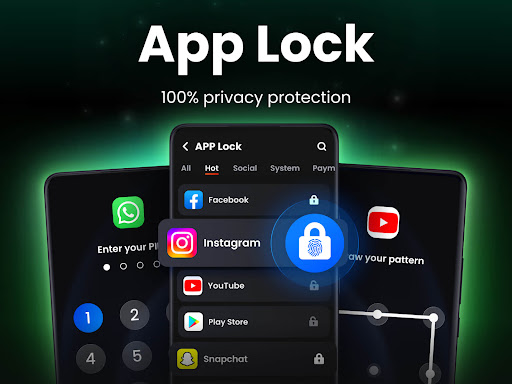
App Lock – Applock Fingerprint screenshot 1
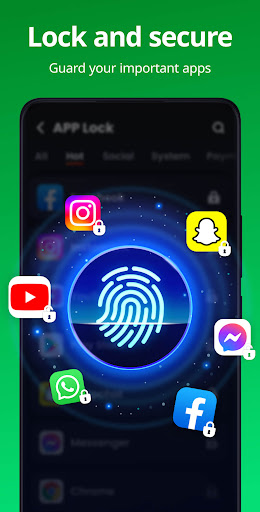
App Lock – Applock Fingerprint screenshot 2
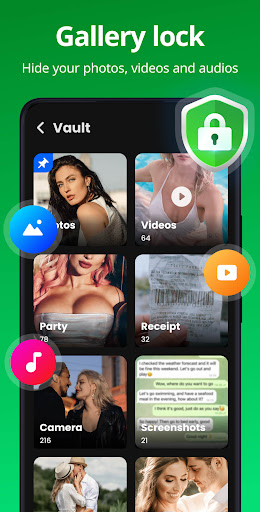
App Lock – Applock Fingerprint screenshot 3
App Lock – Applock Fingerprint screenshot 4
App Lock – Applock Fingerprint screenshot 5
App Lock – Applock Fingerprint screenshot 6

Ratings Breakdown

4.7 ★★★★★ 668K+ ratings
5 ★ 88%
4 ★ 4%
3 ★ 2%
2 ★ 1%
1 ★ 5%

Data from Google Play at the time of writing.

What This App Does and Who It’s For

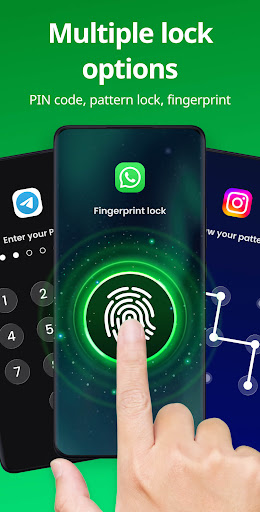
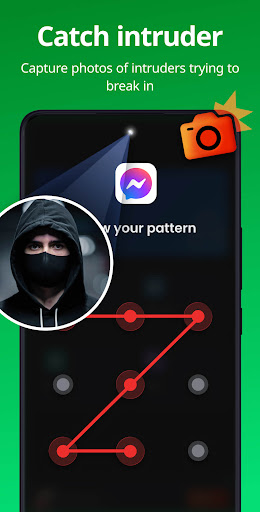
App Lock – Applock Fingerprint is exactly what the name says: a utility that lets you lock individual apps behind a PIN, pattern, or fingerprint. It’s aimed at anyone who shares a phone with family or friends and wants to keep certain apps like WhatsApp, Instagram, Facebook, Gallery, or Messages out of reach. It also throws in a Safe Vault for hiding photos and videos, an Intruder Selfie feature that snaps a photo of anyone who fails to unlock, and a Disguise mode that changes the app’s icon so it doesn’t look like a locker at all.

Setup and Everyday Usability

The onboarding is genuinely one of the app’s strong points. One reviewer noted it ‘walls you through step by step to set up the minimal security you want’ before letting you dig deeper into settings afterward. That kind of guided setup matters for a productivity-security app like this, since most people just want to lock a couple of apps and move on rather than dig through menus. Once configured, choosing between fingerprint, PIN, and pattern is straightforward, and the random keyboard and hidden pattern path are nice touches for anyone worried about shoulder-surfing.

Where the Locking Actually Breaks Down

The reviews make clear this isn’t foolproof. One user said locked apps still showed up unprotected in the recent apps tab after waking the phone, which ‘defeated the purpose’ of hiding chats from a snooping housemate. Another found you could bypass the lock screen entirely by swiping up to switch apps, and a third reported that the photo vault’s palette button let anyone view hidden photos with no password check at all. These aren’t minor nitpicks; they go to the core promise of the app, and if you’re relying on this for real privacy from a determined snooper, that’s a serious problem.

Backup, Battery, and Other Annoyances

Beyond the security gaps, a couple of practical complaints show up repeatedly. One user said the backup feature failed completely when switching phones, with nothing restored despite having it enabled on the old device. Another mentioned the app ‘drains a freaking lot of battery,’ which is a real concern for something meant to run in the background at all times. There’s also the ever-present ask for a paid, ad-free tier; multiple reviewers say they’d happily pay a one-time fee for lifetime access and fewer ads, suggesting the free version’s ad load is noticeable enough to bother engaged users.

Final Verdict on Whether It’s Worth Installing

For casual use, like keeping a nosy sibling from opening your Instagram, this app does the basic job and has a friendly setup process that many users appreciate. But if you need airtight protection for sensitive photos or messages, the reported bypass methods and vault security holes are worth taking seriously before you trust it with anything truly private. It’s a decent, easy-to-use lightweight locker, not a bulletproof vault, and you should treat it accordingly.


Pros

  • ✓Simple, guided initial setup process
  • ✓Supports PIN, pattern, and fingerprint options
  • ✓Includes photo/video hiding vault feature
  • ✓Intruder selfie captures failed unlock attempts
  • ✓Disguise mode hides app's true purpose

Cons

  • ✕Lock can reportedly be bypassed easily
  • ✕Backup feature failed to restore data
  • ✕Noticeably high battery drain reported

What Real Users Say

曾力 ★ 5/5

“I just downloaded it, but so far it has an easy to use and understand interface and walls you through step by step to set up the minimal security you want. Once you've finished setting things up initially, you can look through the app and make changes as you'd prefer. They have lots of useful options and it's all free…”

👍 1,711 found this helpfulDeveloper responded
Robert Augustine ★ 4/5

“I rarely if ever given up a review. But this is a great app with lots of functions and choices. Give me an option to pay for a no ads version at a reasonable price and this is easy five stars. UPDATE: It's great to earn money and you should do that! What I was saying is that I would…”

👍 1,017 found this helpfulDeveloper responded
Lucky Tanuki ★ 5/5

“The app is actually pretty good. minimal issues in the months I've been using it. the one big thing I think should be added is an option for a one time payment for lifetime access. I like the app, and would consider paying for it for a reasonable price to get rid of ads and have access to the other…”

👍 43 found this helpful

Reviews sourced from Google Play, selected by helpfulness at the time of writing.

App Info & Permissions

Developer Trusted Tools
Content rating Everyone
Contains ads Yes
In-app purchases $3.99 - $30.99 per item
Installs 138M+
Released 11/01/2022
Price Free

Permissions this app requests

📷 Camera Take pictures and videos
👥 Contacts Find accounts on the device
🪪 Identity Find accounts on the device
🖼️ Photos/Media/Files Read the contents of your USB storage; modify or delete the contents of your USB storage
💾 Storage Read the contents of your USB storage; modify or delete the contents of your USB storage

Similar Apps

Frequently Asked Questions

1

What is App Lock - Applock Fingerprint?

It's a productivity and security app from Trusted Tools that lets you lock individual apps, such as WhatsApp, Instagram, or your Gallery, using a PIN, pattern, or fingerprint. It also includes a Safe Vault for hiding private photos and videos, an Intruder Selfie feature, and a disguise mode to hide the app's icon. It's designed for anyone who shares a device and wants a quick way to restrict access to specific apps and files.

2

Is App Lock - Applock Fingerprint free to use?

Yes, the app is free to download and use, and it's supported by ads. Several reviewers mention wishing for a paid, ad-free version with a one-time lifetime purchase, but as of the reviews available, that option isn't clearly offered. Expect to see ads during regular use of the free version.

3

Can the app lock be bypassed?

Based on user reports, yes, in some cases. One reviewer found locked apps still visible unprotected in the recent apps tray after waking the phone, and another said swiping up to switch apps could get around the lock screen entirely. If airtight security is your priority, be aware these are real, reported weaknesses.

4

Does the app back up hidden files and settings properly?

This is inconsistent according to user feedback. One reviewer said they enabled backup on an old phone but none of their data or hidden files transferred when they set up the app on a new device. If you plan to switch phones, don't rely solely on this app's backup for anything important.

5

Will using this app drain my phone's battery?

It can, according to at least one user who described battery drain as significant while the app was active. Since app lockers run continuously in the background to monitor app launches, some battery impact is expected, but this is worth monitoring after installation if battery life is a concern.

