

Amex

by American Express

4.8 ★ 95K+ reviews
13M+ Installs
12/02/2010 Released
Amex icon
Amex icon
Finance

Amex

by American Express

4.8 ★ 95K+ reviews
13M+ Installs
12/02/2010 Released
Advertisements
Amex screenshot 1
Amex screenshot 2
Amex screenshot 3
Amex screenshot 4
Amex screenshot 5
Amex screenshot 6

Ratings Breakdown

4.8 ★★★★★ 95K+ ratings
5 ★ 92%
4 ★ 5%
3 ★ 1%
2 ★ 0%
1 ★ 2%

Data from Google Play at the time of writing.

What This App Is Built To Do

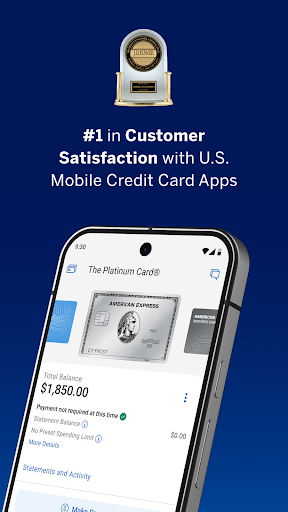
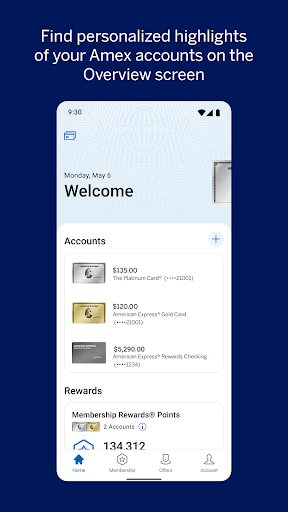
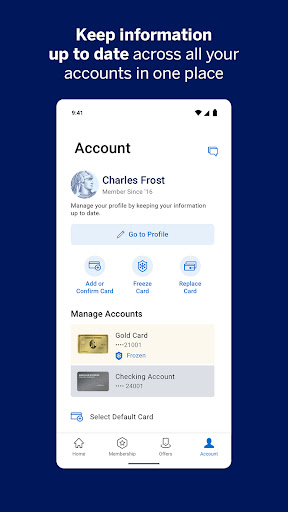
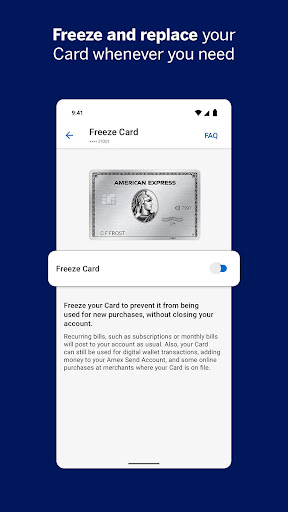
The Amex app is the official account management tool for American Express Card Members in the US, covering credit cards issued directly by Amex (not prepaid cards or cards from other issuers). It lets you check balances, pay bills, track Membership Rewards points, freeze a lost card, browse Amex Offers, and chat with support. It’s aimed squarely at existing cardholders who want to manage their account from a phone instead of logging into a browser every time.

Setup requires an Amex user ID and password, and there’s a dedicated activation flow for new cards, including turning them on for Google Pay. For anyone who already carries an Amex, this is the app you’re expected to use day to day rather than an optional extra.

Where It Actually Works Well

Once you’re logged in, several reviewers note that the core experience is solid: the UI is easy enough to navigate, payments are straightforward to make, and information generally displays clearly. The Send & Split feature is a genuine differentiator, letting you split Amex purchases with Venmo or PayPal contacts and get reimbursed as a statement credit while still earning the rewards yourself, something few competing bank apps offer. Amex Offers and the rewards browsing tools also give the app a purpose beyond basic account admin, letting you find discounts and redeem points for gift cards or statement credits without leaving the app.

The Payment Flow Has Real Bugs

The most repeated complaint is that the ‘pay other amount’ feature is broken: entering a custom payment amount can silently revert the radio button to ‘Total Balance,’ and the confirmation screen doesn’t show the amount actually being paid. There’s also no way to cancel a payment once submitted, which is a serious problem when the interface itself is misleading you about what you’re paying. Multiple users report this happening specifically when splitting payments across two bank accounts.

Login And Notification Frustrations

Biometric login is described as inconsistent by more than one reviewer, sometimes refusing to work even when enabled in settings, forcing a fallback to password entry. A recent update also drew complaints for removing information from the main dashboard, like available balance and credit limit, that used to be visible at a glance. On top of that, notification settings are criticized as limited and unreliable, with at least one user missing a payment due date entirely and getting hit with late fees because the alert never arrived, despite it showing up once they logged in manually.

A Missing Running Balance

Unlike some competing banking apps, transactions here don’t show a running total balance next to each charge, which makes it harder to track spending in real time if you’re trying to pay off your full balance. Reviewers specifically compare this unfavorably to apps like Bank of America’s, where a cumulative total is visible alongside pending charges.

Who Should Actually Install This

If you’re an Amex cardholder, you’ll likely need this app regardless, since it’s the primary way to manage your account, freeze a card, or use Send & Split. Just don’t rely on it blindly for payment amounts or due-date reminders — double check any custom payment before submitting, and set calendar reminders as backup since in-app notifications aren’t consistently trusted by users.


Pros

  • ✓Send & Split works across Venmo and PayPal
  • ✓Easy access to Amex Offers and rewards
  • ✓Straightforward bill payment for full balance
  • ✓Instant card freeze and unfreeze
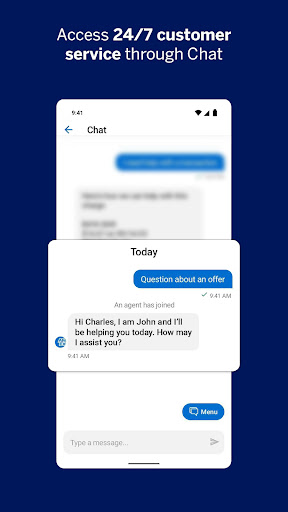
  • ✓24/7 in-app chat support

Cons

  • ✕Custom payment amount flow is buggy
  • ✕Biometric login often fails to work
  • ✕Notifications unreliable for due dates

What Real Users Say

allison mchenry ★ 2/5

“The "pay other amount" feature has broken UX. If you enter an amount other than Total Balance, the radio button then defaults to Total Balance anyway. The amount being paid isn't on the following screen, so there's no way to see that the wrong amount was selected, and no way to cancel a payment after it's gone through. On 2…”

👍 234 found this helpful
Kimmie K ★ 1/5

“Used to be great. I used to be able to easily see my available balance, credit limit, etc. After a recent update, items were removed from the main page. Also, the new "one-time passcode"every single time you log in, is a hassle & useless. E.g., if someone had my phone & able to log into my app, they would easily…”

👍 230 found this helpful
Nate Matheson ★ 1/5

“The app itself works great. However, I'm leaning more and more towards it being rigged to encourage late payment and up the interest. Notifications absolutely suck. Would you like it to remind you of a payment date? You can have it notify at 3 day till all the way up to 10 days till due date. Not the day before.…”

👍 203 found this helpful

Reviews sourced from Google Play, selected by helpfulness at the time of writing.

App Info & Permissions

Developer American Express
Content rating Everyone
Contains ads No
Installs 13M+
Released 12/02/2010
Price Free

Permissions this app requests

📷 Camera Take pictures and videos
👥 Contacts Read your contacts
📱 Device ID & call information Read phone status and identity
📍 Location Approximate location (network-based); precise location (GPS and network-based)
📞 Phone Directly call phone numbers; read phone status and identity
📶 Wi-Fi connection information View Wi-Fi connections

Similar Apps

Frequently Asked Questions

1

What is Amex?

Amex is the official mobile app from American Express that lets eligible US Card Members manage their account, including checking balances, paying bills, tracking Membership Rewards points, and browsing Amex Offers. It also supports card freezing, Google Pay activation, and a Send & Split feature for splitting purchases with Venmo or PayPal contacts. It's built for existing cardholders rather than people shopping for a new card.

2

Is the Amex app free?

Yes, the app itself is free to download and use for eligible American Express Card Members in the US. You do need an existing Amex account and user ID to log in, since the app doesn't offer standalone features without a linked card. Standard fees related to your actual Amex card or Send & Split transfers may still apply per Amex's terms.

3

Can I pay a custom amount on my Amex bill safely through the app?

You can, but multiple users report that the 'pay other amount' option has a bug where the selection reverts to Total Balance without clearly showing you which amount is actually being submitted. Since there's also no way to cancel a payment after it's made, it's safer to verify the amount carefully or make custom payments through the website until this is fixed. This is one of the most cited complaints among reviewers.

4

Does the Amex app support fingerprint or biometric login?

Yes, biometric login is a supported feature on compatible devices, but several reviewers describe it as inconsistent, sometimes failing to work even after being enabled in settings. When it fails, the app falls back to requiring your password manually. This has been a recurring frustration rather than an isolated issue.

5

Will the app reliably remind me about payment due dates?

Notifications are available and customizable, letting you set reminders from a few days up to ten days before your due date, but reviewers report inconsistent delivery. At least one user missed a payment entirely because the alert never arrived on their device, despite showing up once they opened the app. It's worth setting an independent reminder as a backup rather than relying solely on push notifications.