
PS Remote Play

by PlayStation Mobile Inc.

2.7 ★ 124K+ reviews
40M+ Installs
10/27/2014 Released
PS Remote Play icon
PS Remote Play icon
Entertainment

PS Remote Play

by PlayStation Mobile Inc.

2.7 ★ 124K+ reviews
40M+ Installs
10/27/2014 Released
Advertisements
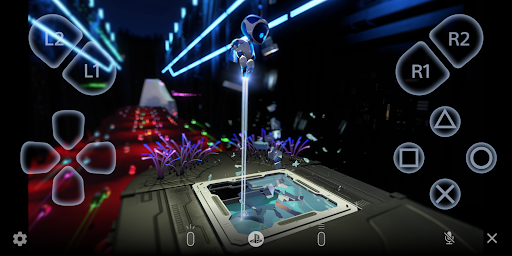
PS Remote Play screenshot 1
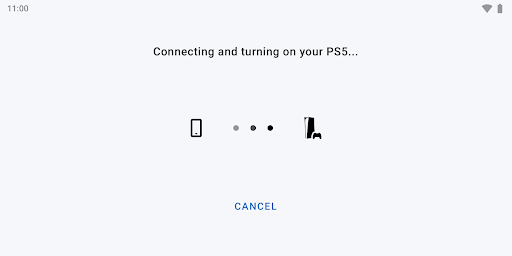
PS Remote Play screenshot 2

Ratings Breakdown

2.7 ★★★★★ 124K+ ratings
5 ★ 33%
4 ★ 7%
3 ★ 6%
2 ★ 5%
1 ★ 48%

Data from Google Play at the time of writing.

What This App Actually Does

PS Remote Play lets you stream your PS5 or PS4 screen to an Android phone or tablet and control the console using an on-screen controller, a paired DualShock 4, DualSense, DualSense Edge, or a Backbone One PlayStation Edition controller. It’s built for PlayStation owners who want to keep playing in another room, on the couch, or away from the TV without hauling the console around. You’ll need a PSN account, a console on the latest firmware, and per Sony’s own note, a fast and stable internet connection, which turns out to be the single biggest factor in whether this app works well for you.

Where It Genuinely Delivers

When conditions are right, users consistently say the app is easy to use and does what it promises. One reviewer with 505 helpful votes called it good for moving to a different room without lugging the PS4 along, and another with 411 votes praised the ability to adjust resolution and frame rate settings, noting that a strong connection keeps lag largely out of the picture. A Galaxy S23 Ultra user connecting to a PS5 confirmed lag ‘isn’t too bad,’ especially when using a physical controller instead of the touchscreen.

The On-Screen Controls Are a Weak Point

Multiple reviewers flag the touch-based controller as clunky. The Galaxy S23 Ultra user specifically noted it doesn’t register multiple touch points at once, so pressing a control stick and a face button simultaneously often fails. Another reviewer described an odd, seemingly artificial stick drift that can’t be turned off, making basic movement frustrating with a paired PS5 controller. A DS4 user also complained that the touchpad behaves like a mouse cursor over Bluetooth, which is a strange and unwelcome side effect for anyone expecting console-like input.

Connection Stability Is the Recurring Complaint

The most damaging pattern in feedback is disconnection. One 1-star review with 291 helpful votes described the connection becoming unstable within 30 seconds to a couple of minutes, forcing constant reconnects, with only occasional stretches of hours-long stability. Another user reported being told their connection wasn’t strong enough despite testing 100mbps or higher on both upload and download. A third reviewer said a mid-September 2025 update broke login entirely, throwing an immediate ‘error, try again later’ message with no actual attempt to connect. Someone else described freezing and disconnecting after about five minutes of play, with the app then refusing to reconnect to the console.

Who Should Actually Download This

If you have a genuinely fast, low-latency home network and mainly want to play in another room on the same Wi-Fi, this app can work close to as advertised, and the resolution and frame rate controls are a nice touch for tuning performance. But if your connection is even moderately inconsistent, or you’re hoping to play reliably away from home on mobile data, be prepared for frequent disconnects and login failures that several users say arrived with recent updates. It’s also worth noting you can’t run other video apps like YouTube or Netflix alongside it, which limits multitasking. Pair it with a physical controller rather than the touchscreen, since on-screen inputs are widely reported as unreliable for anything beyond simple movement.


Pros

  • ✓Easy to use on strong connections
  • ✓Adjustable resolution and frame rate settings
  • ✓Works well with physical controllers
  • ✓Supports DualSense and DualShock 4
  • ✓Good for playing in another room

Cons

  • ✕Frequent random disconnects reported
  • ✕On-screen controls miss multi-touch inputs
  • ✕Recent update broke login for some

What Real Users Say

Riley Schultz ★ 4/5

“If you have a good internet connection then it is good for when you need to be in a different room, but don't want to haul your PS4 elsewhere. Long distances aren't too great, but I've yet to fully test it. Another issue is that you can't use any video apps while using the app(YouTube, Netflix, etc.). 1st person games…”

👍 505 found this helpful
M Roybal ★ 5/5

“Great app, easy to use. Being able to change resolution and frame rate settings is nice. If your internet connection is strong you probably won't have problems with lag. The only issue I have is when using a DS4 controller, the touchpad turns into a mouse when connected with bluetooth. This makes it difficult to open menus with the touchpad…”

👍 411 found this helpful
Jordan Romaine ★ 4/5

“It works well, using Samsung Galaxy S23 Ultra connecting to PS5. Lag isn't too bad, much better with a controller than trying to use on-screen controls which don't seem to register multiple touch points at the same time (using a "control stick" and pressing "X" at the same time for example). It would be nice if I could use the…”

👍 308 found this helpful

Reviews sourced from Google Play, selected by helpfulness at the time of writing.

App Info & Permissions

Developer PlayStation Mobile Inc.
Content rating Everyone
Contains ads No
Installs 40M+
Released 10/27/2014
Price Free

Permissions this app requests

🎙️ Microphone Record audio
📶 Wi-Fi connection information View Wi-Fi connections

Similar Apps

Frequently Asked Questions

1

What is PS Remote Play?

PS Remote Play is an official Sony app that streams your PS5 or PS4 screen to an Android mobile device so you can play games remotely. It supports on-screen touch controls as well as physical controllers like the DualSense, DualShock 4, DualSense Edge, and Backbone One PlayStation Edition. You need a PSN account, a console on the latest system software, and a stable internet connection to use it. It's designed for existing PlayStation owners rather than as a standalone gaming app.

2

Is PS Remote Play free?

Yes, the app itself is free to download and use. However, you still need an existing PS5 or PS4 console and a PlayStation Network account, and using it over mobile data can consume significantly more data than typical video streaming, which may incur carrier charges. There's no separate subscription fee just to use the Remote Play feature itself.

3

Why does PS Remote Play keep disconnecting?

Many users report frequent disconnects even with fast connections, with one reviewer noting instability within 30 seconds to a couple of minutes despite testing over 100mbps upload and download. This appears to be a recurring issue rather than something limited to weak networks. Some also reported a recent update causing login errors entirely. Trying a different network, restarting the router, or checking for app updates may help, but reliability complaints are common in user feedback.

4

Can I use a PS5 or Xbox controller with PS Remote Play?

You can use the DualSense wireless controller on Android 12 or later, and the DualSense Edge on Android 14 or later, connected via Bluetooth or USB. The DualShock 4 is also supported, though on Android 10 and 11 you'll need the on-screen controller to access the touchpad function. The Backbone One PlayStation Edition works on USB Type-C Android phones. Xbox controllers are not part of the officially listed supported devices.

5

Does PS Remote Play work well for on-screen touch controls?

Not particularly well, according to user reports. One reviewer using a Galaxy S23 Ultra noted the on-screen controls don't register multiple touch points simultaneously, making combined stick and button inputs unreliable. Another described artificial-feeling stick drift that couldn't be disabled even with a physical controller connected. For the best experience, most reviewers recommend pairing a physical controller rather than relying on the touchscreen.

