UPS

by UPS

4.5 ★ 291K+ reviews
21M+ Installs
04/02/2010 Released
UPS icon
UPS icon
Business

UPS

by UPS

4.5 ★ 291K+ reviews
21M+ Installs
04/02/2010 Released
Advertisements
UPS screenshot 1
UPS screenshot 2
UPS screenshot 3
UPS screenshot 4
UPS screenshot 5
UPS screenshot 6

Ratings Breakdown

4.5 ★★★★★ 291K+ ratings
5 ★ 80%
4 ★ 8%
3 ★ 3%
2 ★ 1%
1 ★ 8%

Data from Google Play at the time of writing.

What This App Is Built For

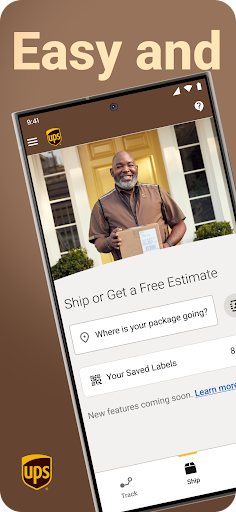
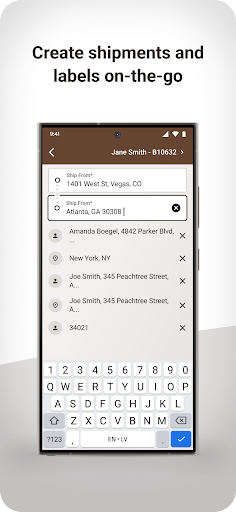
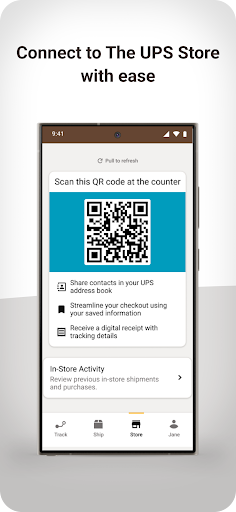
The UPS app is a package tracking and shipping tool for anyone who regularly sends or receives packages through UPS or The UPS Store. It lets you generate shipping labels, track inbound and outbound packages, get a personalized QR code for dropping off at The UPS Store, and receive digital receipts. It’s aimed at both everyday consumers waiting on deliveries and small business owners who ship internationally and need customs guidance.

Where the Tracking Actually Shines

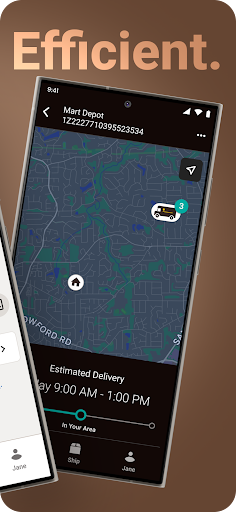
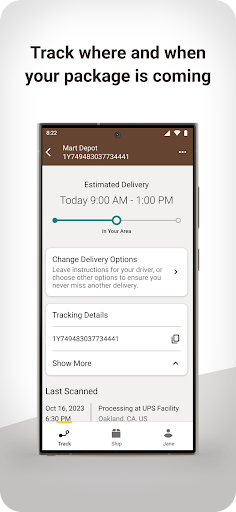
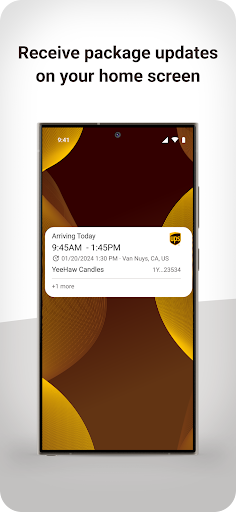
When it works, the core tracking experience is genuinely useful. One long-time user points out that it’s free and often gives a more precise delivery window than what you get directly from the retailer, and that for time-sensitive packages you can sometimes watch the truck approach in real time. That kind of granular visibility is exactly what people install this app for, and when the notifications land correctly, reviewers describe real peace of mind rather than just marketing fluff.

The Login and Reliability Problems

The most repeated complaint by far is that the app logs users out unexpectedly and then fails to let them back in, or wipes out saved tracking numbers when it does. Multiple reviewers describe sessions expiring mid-use, being told ‘technical’ errors when adding delivery addresses, and having to re-enter tracking numbers every time they switch apps. One user even reported the app getting stuck on a loading screen for over 20 minutes. These aren’t minor annoyances, they make core features unusable for the people experiencing them.

Packages Disappearing and Notification Gaps

A second cluster of complaints centers on packages vanishing from the app once a delivery date is set, even though they still show up fine on the UPS website. Other users report the app displaying a delivery window that never updates even as the day passes, or promising delivery notifications that never actually reach their phone, leading to missed signature-required deliveries. For an app whose entire purpose is keeping you informed, these gaps undercut its core value proposition.

Interface Clutter Also Frustrates Users

Beyond the bugs, several reviewers dislike the current UI, describing the tracking tab as cluttered with promotional suggestions for other UPS services rather than staying focused on the shipment information they came for. One comparison likened it to a webpage half-filled with ads. This kind of interface noise adds friction for users who just want a quick status check.

Who Should Actually Download This

If you occasionally ship or receive UPS packages and mainly want the QR code convenience for The UPS Store or basic tracking, the app can genuinely save time and the notification precision is a real strength when it functions normally. But if you rely on it daily for business shipping or signature-required deliveries, the recurring login failures, disappearing tracking data, and inconsistent notifications are serious enough that many users report the app becoming unreliable exactly when they need it most. Go in expecting occasional frustration, and keep the UPS website bookmarked as a backup.


Pros

  • ✓Free to use for tracking
  • ✓Often more precise delivery windows
  • ✓Real-time truck location visibility
  • ✓QR code for UPS Store drop-offs
  • ✓Digital receipts and label creation

Cons

  • ✕Frequent logout and login failures
  • ✕Packages disappear after pickup
  • ✕Cluttered UI with service promotions

What Real Users Say

John W. Thomas III ★ 5/5

“I really like this app because it's free and it tells me when my package is going to arrive and if there's a problem they give you a window usually much more precise than what you get from the shipper. and if it's say a sort of mission critical item often you can see where the UPS truck is when…”

👍 290 found this helpfulDeveloper responded
Nikki Simmons ★ 1/5

“Incoming packages show up in the app when not picked up yet (when a tracking number was created), but disappear as soon as they're picked up and have a delivery date set. They still show up on my account online, but they disappear from the app. Why?? Edited to add: looking at recent app reviews, this is an ongoing problem…”

👍 176 found this helpful
Nathan Roberts ★ 2/5

“I am not a fan of the current UI. The tab for tracking packages coming to me is entirely too cluttered with unwanted suggestions about using UPS services. Way too much information that has nothing to do with tracking shipments. Very similar to a web page that's more than half filled with ads and you have to scroll to find…”

👍 175 found this helpfulDeveloper responded

Reviews sourced from Google Play, selected by helpfulness at the time of writing.

App Info & Permissions

Developer UPS
Content rating Everyone
Contains ads Yes
Installs 21M+
Released 04/02/2010
Price Free

Permissions this app requests

📷 Camera Take pictures and videos
👥 Contacts Read your contacts
📍 Location Approximate location (network-based); precise location (GPS and network-based)
🖼️ Photos/Media/Files Read the contents of your USB storage; modify or delete the contents of your USB storage
💾 Storage Read the contents of your USB storage; modify or delete the contents of your USB storage
📶 Wi-Fi connection information View Wi-Fi connections

Similar Apps

Frequently Asked Questions

1

What is UPS?

UPS is the official app from United Parcel Service that lets users track inbound and outbound packages, create shipping labels, and connect with The UPS Store. It offers a personalized QR code for easier drop-offs and digital receipts. The app is designed for both everyday consumers and small businesses that ship regularly, including internationally.

2

Is the UPS app free?

Yes, the app itself is free to download and use for tracking packages and generating a QR code for shipping. Actual shipping costs still apply when you send packages or use UPS services. One reviewer specifically praised that the tracking features come at no cost while still offering precise delivery estimates.

3

Why does the UPS app keep logging me out?

Multiple users report frequent, unexplained logouts where re-entering correct credentials doesn't immediately resolve the issue, and tracking numbers saved in the app get wiped out as a result. This appears to be an ongoing session-handling bug rather than an isolated problem, based on how often it's mentioned in reviews. There's no confirmed fix mentioned by users, so re-adding tracking numbers after being logged out is currently a common workaround.

4

Why do my packages disappear from the tracking tab?

Several reviewers noted that incoming packages show up while awaiting pickup but vanish from the app once a delivery date is assigned, even though the same shipments remain visible on the UPS website. This inconsistency between the app and the web account seems to be a syncing issue rather than the package actually being lost. It's a frequently cited frustration for users who rely on the app as their primary tracking method.

5

Does the UPS app send reliable delivery notifications?

Notification reliability is inconsistent according to user reviews, with some praising precise delivery windows and others reporting notifications that never arrive on their phone at all. This has reportedly led to missed signature-required deliveries for at least one reviewer. If notifications are critical for you, it's worth double-checking delivery status manually on the site as a backup.

