

Email: Fast, Manage All Mails

by BizApp Innovators

4.6 ★ 84K+ reviews
12M+ Installs
12/15/2023 Released
Email: Fast, Manage All Mails icon
Productivity

Email: Fast, Manage All Mails

by BizApp Innovators

4.6 ★ 84K+ reviews
12M+ Installs
12/15/2023 Released
Advertisements
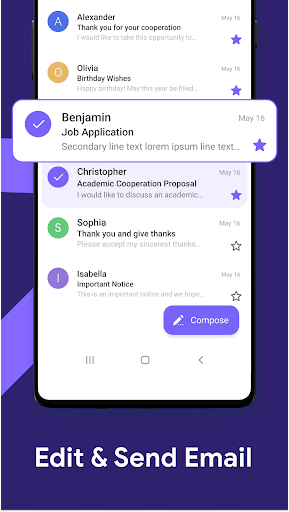
Email: Fast, Manage All Mails screenshot 1
Email: Fast, Manage All Mails screenshot 2
Email: Fast, Manage All Mails screenshot 3
Email: Fast, Manage All Mails screenshot 4
Email: Fast, Manage All Mails screenshot 5
Email: Fast, Manage All Mails screenshot 6

Ratings Breakdown

4.6 ★★★★★ 84K+ ratings
5 ★ 76%
4 ★ 15%
3 ★ 3%
2 ★ 1%
1 ★ 5%

Data from Google Play at the time of writing.

What This Email Client Actually Does

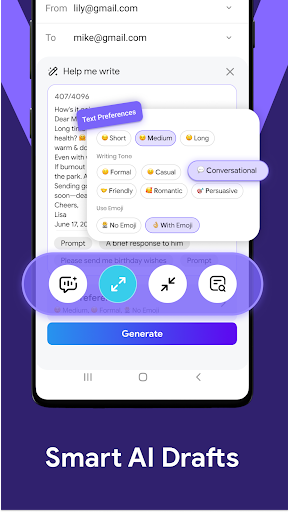
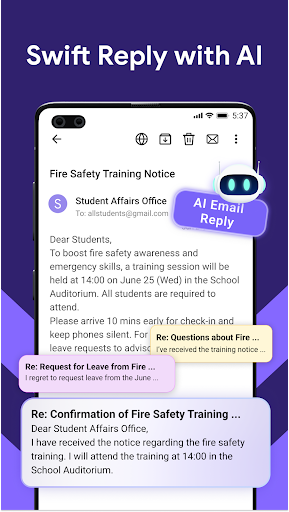
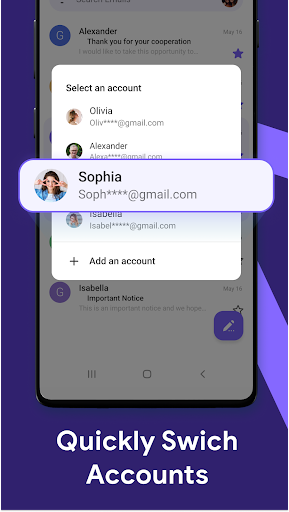
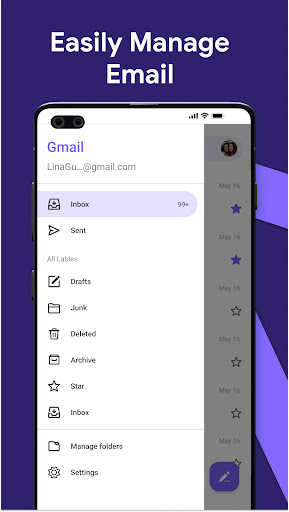
Email: Fast, Manage All Mails is an all-in-one inbox app from BizApp Innovators that pulls together Gmail, Outlook, Yahoo and other accounts into a single interface. Beyond basic send, receive and search, it layers on AI features: writing full drafts from a short prompt, suggesting replies to incoming messages, and checking grammar and spelling as you type. It’s aimed at people juggling multiple email addresses who want one app instead of switching between several official clients, with the AI tools pitched as a way to speed up daily email writing.

Where It Performs Well

User feedback consistently describes the core experience as fast and functional. One reviewer with 563 helpful votes called it ‘fast and efficient’ as a day-to-day inbox tool, and another praised it as working ‘exceptionally well’ overall. The AI writing feature also earns specific praise, with one user saying it’s ‘very easy to use’ and giving the app full marks partly because of it. Several reviewers note that once you get past setup, the app does what it promises for basic multi-account management.

Notification and Ad Annoyances That Keep Coming Up

The most repeated complaints center on advertising. Multiple reviewers describe stationary ads within the inbox as tolerable but flag pop-up video ads as genuinely disruptive, with one person specifically describing having to sit through a full ad for an unrelated game just to open a waiting email. Another reviewer said they’d likely uninstall specifically because of ads appearing ‘in the margins & between every few emails.’ A more serious complaint describes ads triggering after pressing back from a read email, with no skip option until the ad finishes playing through completely, a issue serious enough that this user uninstalled after two days.

Notification Spam and Account Sync Issues

Beyond ads, notification behavior draws frustration. One reviewer described a persistent ‘[Email New Emails]’ notification appearing on the lock screen even when there was no new mail, and another mentioned an auto pop-up notification recurring ‘5 to 10 times in a row’ before it would stop. On the functional side, one long-time user reported being unable to access all of their Yahoo accounts, which undercuts the core multi-account promise for at least some users. Junk mail filtering also came up short for one reviewer, who said the app ‘did not give me priority emails’ and let too much junk through.

Who Should Actually Download This

If you mainly want a fast, unified inbox for checking and replying to mail across a couple of accounts and can tolerate banner-style ads, this app largely delivers on its basic promise, and the AI drafting tool is a genuine plus according to at least one detailed review. But if you’re sensitive to interruptions, the reports of forced-play video ads and repeated notification pop-ups are worth taking seriously before you install. Anyone relying heavily on Yahoo multi-account access should also test that specific function early, since it’s been flagged as unreliable. This is a reasonable pick for casual users chasing convenience and AI writing help, but less suited to anyone who wants a clean, ad-light inbox experience.


Pros

  • ✓Fast and efficient for daily email use
  • ✓AI writing and reply suggestions work well
  • ✓Supports multiple email accounts at once
  • ✓Simple, intuitive interface for basic tasks
  • ✓Some users report it as ad-free

Cons

  • ✕Intrusive pop-up video ads reported
  • ✕Repetitive, unnecessary notification pop-ups
  • ✕Yahoo account access issues for some users

What Real Users Say

Thomas Jon Harrison ★ 5/5

“fast and efficient; providing it does not duplicate inbox messages, for whatever it might be worth. the problem with it is the fact it will not allow me to access all my yahoo email accounts for some reason. I think it has gone to be less than effective like it is supposed to. I dont know what is going on”

👍 563 found this helpful
XT Videocraft ★ 2/5

“It functions so I'll give some credit for that. While I understand why the app has ads & didn't mind the stationary ones among the emails, the pop up ones were annoying and frustrating. I go to open an email I'm waiting for & have to watch a full commercial for Toon Blast or something similar first. It was happening…”

👍 111 found this helpfulDeveloper responded
Zli Grl ★ 4/5

“Update: The apps below have been put in deep sleep because they were sending unnecessary notifications and slowing down your phone. - Works exceptionally well! Only annoyance was the [Email New Emails] appearing in notifications, lockscreen etc. Even no new email activity exists. Turning Off the usual notifications didn't stop it. Had to go deeper in the app and turn…”

👍 44 found this helpful

Reviews sourced from Google Play, selected by helpfulness at the time of writing.

App Info & Permissions

Developer BizApp Innovators
Content rating Everyone
Contains ads No
Installs 12M+
Released 12/15/2023
Price Free

Permissions this app requests

👥 Contacts Find accounts on the device; read your contacts
📱 Device ID & call information Read phone status and identity
🪪 Identity Find accounts on the device
📞 Phone Read phone status and identity
📶 Wi-Fi connection information View Wi-Fi connections

Similar Apps

Frequently Asked Questions

1

What is Email: Fast, Manage All Mails?

It's an all-in-one email management app from BizApp Innovators that lets you combine Gmail, Outlook, Yahoo and other accounts into one inbox. It includes standard features like search and multi-account support, plus AI tools for drafting emails, suggesting replies, and correcting grammar. It's designed for users who want to manage all their email addresses without switching between separate apps.

2

Is Email: Fast, Manage All Mails free to use?

The app is free to download and install, but user reviews indicate it's supported by ads, including stationary ads within the inbox and, according to some reviewers, disruptive pop-up video ads. Some users report an ad-free experience, so ad frequency may vary. There's no mention of a paid ad-removal tier in the available information.

3

Does the AI writing feature actually work well?

Based on user feedback, yes, one reviewer specifically praised the AI function as 'very easy to use' and cited it as a reason for a five-star rating. The feature generates draft emails from short prompts and offers reply suggestions for incoming messages. No major complaints about the AI writing quality itself appear in the available reviews.

4

Can I use this app with multiple Yahoo or Gmail accounts?

The app is built to support multiple accounts across Gmail, Outlook, Yahoo and other providers simultaneously. However, at least one reviewer reported being unable to access all of their Yahoo email accounts through the app, suggesting sync reliability may vary by provider. It's worth testing your specific accounts early after installing.

5

What are the biggest complaints about this app?

The most common complaints involve advertising and notifications. Multiple reviewers describe pop-up video ads that must play through fully with no skip option, sometimes appearing right after closing an email. Others report repetitive or misleading notifications, such as new-mail alerts appearing when there's no new mail, and one user said junk mail wasn't filtered well.

