



Visual Voicemail

by Metro by T-Mobile

3.6 ★ 49K+ reviews
79M+ Installs
08/05/2014 Released
Visual Voicemail icon
Business

Visual Voicemail

by Metro by T-Mobile

3.6 ★ 49K+ reviews
79M+ Installs
08/05/2014 Released
Advertisements
Visual Voicemail screenshot 1
Visual Voicemail screenshot 2
Visual Voicemail screenshot 3
Visual Voicemail screenshot 4
Visual Voicemail screenshot 5
Visual Voicemail screenshot 6

Ratings Breakdown

3.6 ★★★★★ 49K+ ratings
5 ★ 56%
4 ★ 9%
3 ★ 5%
2 ★ 5%
1 ★ 26%

Data from Google Play at the time of writing.

What This App Actually Does

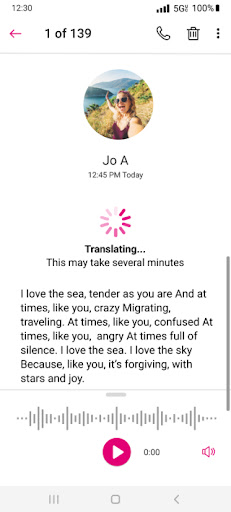
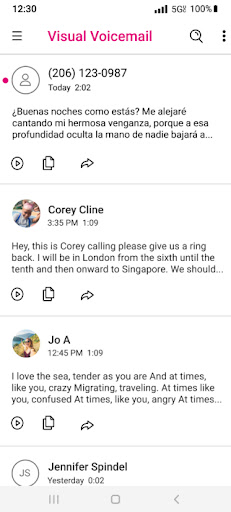
Visual Voicemail is Metro by T-Mobile’s app for managing voicemail without dialing into the traditional voicemail system. Instead of calling a number, sitting through prompts, and pressing keys to save or delete messages, you get a visual inbox where messages can be played in any order, saved, deleted, or responded to with one click. It’s built for Metro PCS/Metro by T-Mobile customers who want a faster, less tedious way to handle voicemail, and it activates automatically the first time you open it with no need to reconfigure forwarding or change your voicemail number.

Where It Genuinely Improves on Old-School Voicemail

The core appeal is simplicity. Users consistently point out that it eliminates the hassle of calling voicemail, listening through prompts, and manually pressing buttons to manage each message. For anyone who gets more than a couple voicemails a week, that alone is a real time-saver. The app is free to use for its basic function, and one reviewer specifically noted they didn’t even need the paid Voicemail to Text upgrade to get value out of it – the core visual inbox was enough. There’s also an Unread Messages widget for the home screen, which is a nice touch for people who don’t want to open the app just to check if anything new came in.

The Sync and Refresh Problems That Keep Coming Back

The most consistent complaint across reviews is a ‘we’re sorry, we’re having difficulty fetching your voicemail’ error that shows up after updates. Multiple users describe the same cycle: the app suddenly can’t connect, manual refresh doesn’t fix it, and they’re told to dial into voicemail the old-fashioned way instead – defeating the entire purpose of the app. Some users say uninstalling and reinstalling helps temporarily, but the problem returns. Others report the app simply stops notifying them of new voicemails at all, showing an empty inbox even when call logs confirm missed calls came in with messages attached.

Storage Limits and Stuck Messages

Beyond sync failures, there’s a recurring frustration with deleting old voicemails. One reviewer describes having to delete the same voicemail repeatedly – sometimes 20 times over a month – because the app refuses to actually remove it from storage, which becomes a real problem given how limited the inbox capacity seems to be. When storage fills up with messages that won’t delete, new voicemails can’t come through properly, compounding the sync issues mentioned above.

Who Should Actually Install This

If you’re a Metro by T-Mobile customer and the app is working normally on your device, it’s a clear upgrade over calling into voicemail – that’s not in dispute, and plenty of long-time users confirm it worked great for years. The problem is reliability has clearly degraded for a meaningful chunk of users, particularly after updates, with connection errors and stuck messages being the norm rather than the exception for them. Install it because it’s the only visual voicemail option for your carrier and it costs nothing to try, but go in expecting that you may need to troubleshoot, reinstall, or fall back on dialing 123 occasionally when the sync breaks.


Pros

  • ✓Skips calling into voicemail entirely
  • ✓One-click message playback and response
  • ✓Free to use for basic features
  • ✓Unread Messages home screen widget
  • ✓Simple, straightforward inbox interface

Cons

  • ✕Frequent fetch and sync errors
  • ✕Voicemails often won't delete permanently
  • ✕Limited storage causes inbox problems

What Real Users Say

Tiffany Hugo ★ 5/5

“One of the best, free voicemail apps that I've used. It does cost if you want to see the voicemails typed out in front of you, but that option was unnecessary to me. I just hate having to call my voicemail, listen through the promts, press a button to save or delete the voicemail, etc. It's tedious and impractical. This…”

👍 1,142 found this helpful
A Google user ★ 1/5

“Was working just fine, until the update. Now, I'm constantly getting a error message: "We're sorry, we're having difficulty fetching your voicemail. You may need to open the App and manually refresh your inbox, or dial 123 to listen to new voicemail." I tried doing this 3 times; and afterwards, I got the message: "Try again later"... Worthless & Annoying!”

👍 660 found this helpful
A Google user ★ 1/5

“I have been a Metro PCS customer for many years, and have used Visual Voicemail. it has been fine. Suddenly this week each time I tried to update my voicemails, I kept getting a "cannot connect" message. I knew I had new voicemails, since there were incoming call records. i uninstalled, then reinstalled the app. I was able to update…”

👍 581 found this helpful

Reviews sourced from Google Play, selected by helpfulness at the time of writing.

App Info & Permissions

Developer Metro by T-Mobile
Content rating Everyone
Contains ads No
Installs 79M+
Released 08/05/2014
Price Free

Permissions this app requests

👥 Contacts Read your contacts
📱 Device ID & call information Read phone status and identity
📍 Location Approximate location (network-based)
🎙️ Microphone Record audio
📞 Phone Read phone status and identity
🖼️ Photos/Media/Files Read the contents of your USB storage; modify or delete the contents of your USB storage
💾 Storage Read the contents of your USB storage; modify or delete the contents of your USB storage
📶 Wi-Fi connection information View Wi-Fi connections

Similar Apps

Frequently Asked Questions

1

What is Visual Voicemail?

Visual Voicemail is an app from Metro by T-Mobile that lets customers view and manage voicemail messages in a list instead of calling into a voicemail system. You can listen to messages in any order, delete or save them, and respond with one click. It activates automatically on first launch without needing to change your voicemail number or forwarding settings.

2

Is Visual Voicemail free?

Yes, the core app and basic voicemail management features are free to use. There is an optional paid upgrade, Voicemail to Text, which transcribes voicemails into text for a small monthly fee. Many users report the free version alone is enough for their needs.

3

Why does the app say it can't fetch my voicemail?

This is a widely reported issue, especially after app updates, where the app displays a connection or fetching error even though new voicemails exist. Manually refreshing often doesn't resolve it, and some users have had to uninstall and reinstall the app for a temporary fix. If the problem persists, dialing 123 directly is the suggested workaround.

4

Why can't I delete old voicemails?

Several users report that deleted voicemails reappear or fail to actually clear from the inbox, sometimes requiring repeated deletion attempts over many days. This seems tied to broader sync issues and limited storage capacity within the app. It can also block new voicemails from coming through properly until resolved.

5

Does Visual Voicemail work well overall?

For many long-time users it worked reliably for years and is praised for being far more convenient than calling into voicemail. However, a significant number of recent reviews describe ongoing sync failures, missing notifications, and messages that won't delete. Performance appears inconsistent depending on device and update version.

