Wikipedia

by Wikimedia Foundation

4.3 ★ 693K+ reviews
72M+ Installs
01/13/2012 Released
Wikipedia icon
Wikipedia icon
Books & Reference

Wikipedia

by Wikimedia Foundation

4.3 ★ 693K+ reviews
72M+ Installs
01/13/2012 Released
Advertisements
Wikipedia screenshot 1
Wikipedia screenshot 2
Wikipedia screenshot 3
Wikipedia screenshot 4
Wikipedia screenshot 5
Wikipedia screenshot 6

Ratings Breakdown

4.3 ★★★★★ 693K+ ratings
5 ★ 72%
4 ★ 10%
3 ★ 4%
2 ★ 4%
1 ★ 10%

Data from Google Play at the time of writing.

What This App Is and Who It’s For

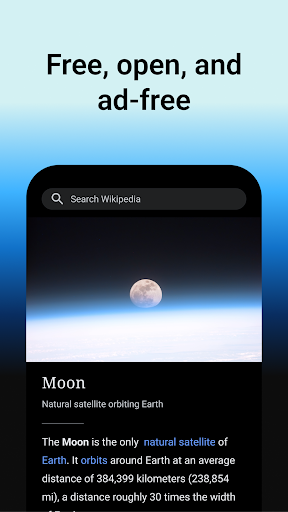
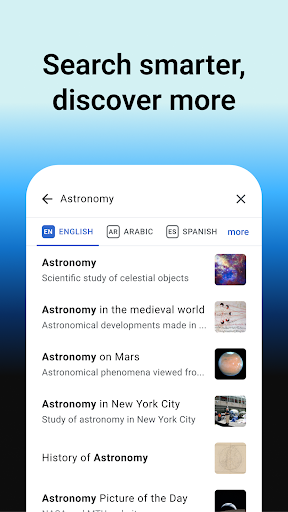
Wikipedia’s official mobile app gives you access to the same 40+ million articles across 300+ languages that you’d get on the website, but wrapped in a cleaner, ad-free reading experience. It’s built by the Wikimedia Foundation, a nonprofit, so there’s no advertising and no data tracking baked into the business model. This app is aimed squarely at people who look things up often, whether that’s students doing homework, curious readers going down rabbit holes, or anyone who wants a quick, reliable reference without wading through a browser full of ads.

Reading and Research Features That Actually Work

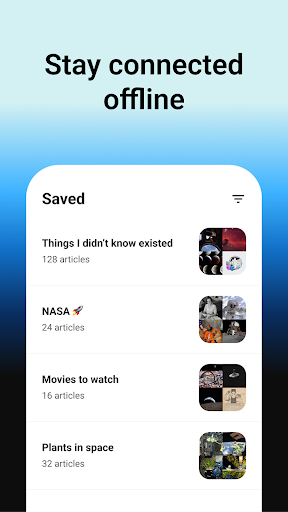
The core reading experience is where this app shines. Users consistently mention using it as a ‘jump-off point’ for research, appreciating that it gives a solid starting point even when facts need further verification elsewhere. The offline reading lists are a standout: you can save articles into named collections, access them without an internet connection, and have them sync across devices. One reviewer called it their most-used app on their phone, ahead of even their web browser. The tap-to-preview feature, where clicking a highlighted word pops up a summary overlay instead of yanking you to a new page, also gets specific praise for keeping you in the flow of the article you’re already reading.

Dark Mode and Display Quirks Worth Knowing

The app offers multiple themes, including pure black, dark, sepia, and light, plus adjustable text size, which is a nice touch for long reading sessions. But dark mode isn’t flawless: one user pointed out that image captions render in dark gray instead of white in dark mode, making them nearly unreadable against the dark background. It’s a small detail, but if you read a lot of image-heavy articles at night, it’s the kind of thing you’ll notice quickly.

Editing and Navigation Frustrations

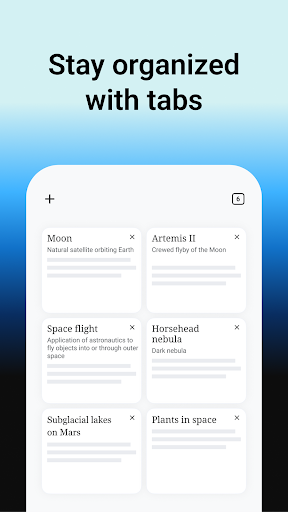
If you’re an editor rather than just a reader, this app has rougher edges. One reviewer described a persistent bug where the font size randomly enlarges while editing an article, and the built-in font size control does nothing to fix it, making substantial edits from mobile genuinely difficult. There are also complaints about inconsistent article formatting and occasionally missing current information compared to the desktop site. Opening links from outside browsers like Firefox has caused mismatched images and pages jumping to the wrong article after a refresh. The app’s 100-tab limit also draws confusion from users who don’t understand why it’s capped or what happens when you hit it.

Stability and the Verdict

Some reviewers reported the app occasionally freezing or showing ‘not responding’ messages after updates, though at least one user noted the issue was resolved in a later release, suggesting the developers do act on feedback. Overall, this is a well-made, genuinely useful app for casual readers and researchers who mainly want to read, save, and browse articles offline. It’s less polished for power users who edit frequently or rely heavily on dark mode for image-heavy content. If you want a fast, ad-free way to read Wikipedia on the go, download it. If you’re a heavy editor, expect some friction.


Pros

  • ✓Completely free with no ads
  • ✓Offline reading lists sync across devices
  • ✓Tap-to-preview summaries keep reading uninterrupted
  • ✓Multiple themes including dark and sepia
  • ✓Huge library across 300+ languages

Cons

  • ✕Font size bug disrupts article editing
  • ✕Dark mode captions hard to read
  • ✕Confusing 100-tab browsing limit

What Real Users Say

Ned Crooks ★ 5/5

“EDIT: The issue below is no longer happening, and the app runs great! This app is usually fantastic, and I'll happily increase my rating to a five if a recent issue is resolved. Since the most recent update, the app repeatedly says that it isn't responding when it's working just fine, and it won't stop until I quit out. Even…”

👍 844 found this helpful
A Google user ★ 5/5

“Great app if you like to do research often. I've always used Wiki as a "jump-of" point for learning about something. If the facts need to be verified, I've already got the information to confirm, and very seldom have I been mislead. Usually it gives me a good starting point for continued reach whether online or at a library. If…”

👍 605 found this helpful
Emily Breed ★ 2/5

“I have had some minor issues with this app, but by far, the most disruptive takes place while editing articles. As I edit, the page enlarges the font size at random. The built-in font size function is unaffected, making it effectively impossible to make large edits, as after a short time, I can't even make out sentences due to the…”

👍 420 found this helpfulDeveloper responded

Reviews sourced from Google Play, selected by helpfulness at the time of writing.

App Info & Permissions

Developer Wikimedia Foundation
Content rating Everyone 10+
Contains ads No
Installs 72M+
Released 01/13/2012
Price Free

Permissions this app requests

👥 Contacts Find accounts on the device
📱 Device ID & call information Read phone status and identity
🪪 Identity Find accounts on the device; add or remove accounts
📍 Location Approximate location (network-based); precise location (GPS and network-based)
📞 Phone Read phone status and identity
🖼️ Photos/Media/Files Read the contents of your USB storage; modify or delete the contents of your USB storage
💾 Storage Read the contents of your USB storage; modify or delete the contents of your USB storage
📶 Wi-Fi connection information View Wi-Fi connections

Similar Apps

Frequently Asked Questions

1

What is Wikipedia?

Wikipedia is a free online encyclopedia with over 40 million articles across more than 300 languages, edited collaboratively by volunteers worldwide. The official mobile app from the Wikimedia Foundation lets you search, read, and save these articles directly on your phone. It's designed to give you full access to Wikipedia's content in a clean, distraction-free interface. The app is available for both Android and iOS devices.

2

Is the Wikipedia app free?

Yes, the app is completely free to download and use, with no ads and no in-app purchases. It's run by the Wikimedia Foundation, a nonprofit that relies on donations rather than advertising revenue. The developers explicitly state the app doesn't track your data for monetization purposes. This makes it one of the more straightforward free apps in the reference category.

3

Can I read Wikipedia articles offline with this app?

Yes, you can save articles into custom named reading lists and access them without an internet connection. These saved lists sync across your devices, so you can start reading on your phone and pick up later on a tablet. This is one of the most praised features among regular users. It's especially useful for travel or areas with poor connectivity.

4

Does the app have any major bugs?

Some users have reported a bug where font size randomly enlarges while editing articles, making substantial mobile edits difficult. There are also reports of dark mode captions being hard to read due to color contrast issues, and occasional problems opening links from external browsers. One user noted a freezing issue was fixed in a later update, suggesting the developers are responsive to feedback. Overall stability for reading, as opposed to editing, seems solid.

5

Is this app good for someone who wants to edit Wikipedia articles?

It's usable for editing but not ideal for heavy editing work, based on user complaints about font size bugs and formatting inconsistencies. If you mainly want to make small corrections, it should work fine, but for extensive edits you may find the experience frustrating. Power editors might prefer using a desktop browser for serious editing sessions. Casual readers and researchers will have a much smoother experience than active contributors.