
YouCam Makeup – Selfie Editor

by Perfect Mobile Corp.

4.0 ★ 4.1M+ reviews
370M+ Installs
08/07/2014 Released
YouCam Makeup – Selfie Editor icon
Photography

YouCam Makeup – Selfie Editor

by Perfect Mobile Corp.

4.0 ★ 4.1M+ reviews
370M+ Installs
08/07/2014 Released
Advertisements
YouCam Makeup – Selfie Editor screenshot 1
YouCam Makeup – Selfie Editor screenshot 2
YouCam Makeup – Selfie Editor screenshot 3
YouCam Makeup – Selfie Editor screenshot 4
YouCam Makeup – Selfie Editor screenshot 5
YouCam Makeup – Selfie Editor screenshot 6

Ratings Breakdown

4.0 ★★★★★ 4.1M+ ratings
5 ★ 67%
4 ★ 8%
3 ★ 3%
2 ★ 3%
1 ★ 18%

Data from Google Play at the time of writing.

What YouCam Makeup Actually Offers

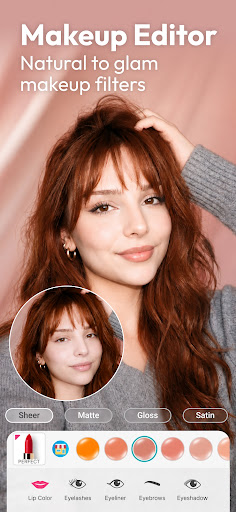
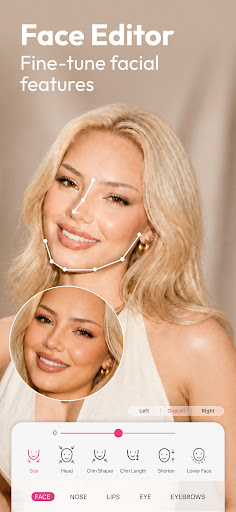
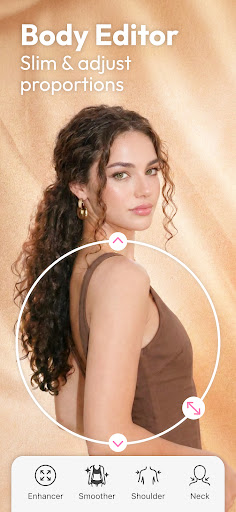
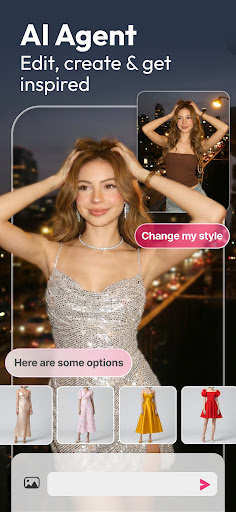
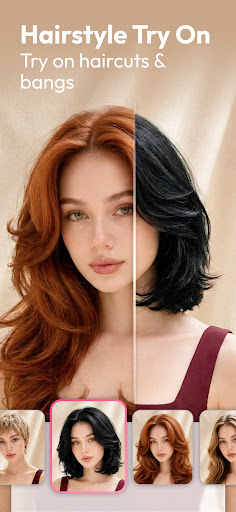
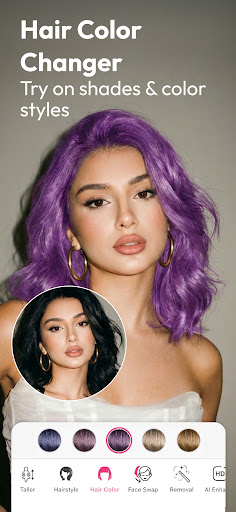
YouCam Makeup is a face and body editing app from Perfect Mobile Corp. that bundles a makeup try-on tool, face retouching, hairstyle and hair color previews, body reshaping sliders, and newer AI-driven features like an AI beauty agent, AI image generation, and AI video creation. It’s aimed at anyone who wants to preview makeup looks, smooth out selfies, or experiment with a new haircut or hair color before committing in real life. With hundreds of millions of installs and millions of ratings, it’s clearly one of the go-to apps in this space, but the real experience once you’re inside tells a more complicated story than the marketing copy suggests.

Where the Editing Tools Genuinely Work

When users get past the paywalls, the core retouching tools get real praise. One reviewer called it ‘great for retouching photos,’ highlighting the quick before/after comparison and adjustable intensity sliders as genuinely useful. Another long-time user said it became ‘a necessity’ for planning makeup and wig colors before buying, and several reviewers noted the virtual makeup application looks realistic rather than obviously fake, both live in the beauty cam and applied to still photos. For quick creative experiments, the app clearly delivers on fun and realism when the features are accessible.

The Subscription Wall Is the Real Problem

The most common and most upvoted complaints all point to the same issue: almost everything meaningful sits behind a subscription, and the app makes it hard to opt out. One reviewer with nearly 2,800 helpful votes described being forced into a free trial sign-up with no visible way to skip it just to access the app at all. Another called it an ‘absolute scam,’ noting hairstyle try-on gives only 3 free options before demanding a subscription for a total of 8 styles, with no color choices included. A third reviewer who returned after years away said the app ‘hasn’t changed much except for the fact that almost everything you try is now a paid feature,’ and multiple users flagged that canceling the subscription through the Play Store is confusing and not straightforward.

Limited Depth Even After Paying

Even setting aside the paywall friction, some reviewers found the actual feature set thinner than expected. Hair color options were repeatedly singled out as weak, with one user saying fun or punky colors are stuck in a separate tab that only works on your own natural hair rather than the try-on styles. Another described the skin smoothing as ‘too fake’ and the foundation shade options as slim, concluding it’s better suited for casual fun than for anything more credible or realistic-looking.

Who Should Actually Download This

YouCam Makeup makes sense for casual users who want a fun, low-stakes way to preview makeup or a new hairstyle and don’t mind paying for a subscription to unlock most of the useful features. If you’re hoping to fully test the app for free before deciding, be prepared to hunt for a way to skip the forced trial sign-up, and go in expecting the hairstyle and hair color options to be more limited than advertised. If subscription paywalls and cancellation hassles are a dealbreaker for you, this is one to approach cautiously.


Pros

  • ✓Realistic-looking makeup and retouching effects
  • ✓Quick before/after comparison sliders
  • ✓Useful for planning hair and makeup changes
  • ✓Live beauty cam preview feels natural
  • ✓Popular app with huge installed user base

Cons

  • ✕Most features locked behind subscription
  • ✕Hard to cancel or skip free trial
  • ✕Limited hair color and style choices

What Real Users Say

Kimberly P ★ 1/5

“Since they got my last review deleted I will rewrite it in a more detailed version. You have to sign up to a free trial before you can even access the app, much less check out the "free" content. There is no way to skip the free trial sign up, so you are forced to subscribe. Some people will likely…”

👍 2,809 found this helpfulDeveloper responded
Michelle Smith ★ 1/5

“ABSOLUTE SCAM. Very few hairstyle try on options. Not realistic at all. It gives you 3 free options. Then, you have to subscribe to see a total of 8 styles. No color choices at all. The subscription says you can cancel through the Play Store, but it's very hard to figure out how to cancel. If you try to Uninstall…”

👍 2,794 found this helpfulDeveloper responded
Audryna ★ 3/5

“Signed up again, looks good - can't waited to try! Update: Disappointed! I haven't used this app in years and it hasn't changed much - except for the fact that almost everything you try is now a paid feature. . . I understand that we all need to earn a living but maybe balance it a bit better. Have more…”

👍 2,257 found this helpful

Reviews sourced from Google Play, selected by helpfulness at the time of writing.

App Info & Permissions

Developer Perfect Mobile Corp.
Content rating Everyone
Contains ads Yes
In-app purchases $0.69 - $119.99 per item
Installs 370M+
Released 08/07/2014
Price Free

Permissions this app requests

📷 Camera Take pictures and videos
🪪 Identity Add or remove accounts
📍 Location Approximate location (network-based); precise location (GPS and network-based)
🎙️ Microphone Record audio
🖼️ Photos/Media/Files Read the contents of your USB storage; modify or delete the contents of your USB storage
💾 Storage Read the contents of your USB storage; modify or delete the contents of your USB storage
📶 Wi-Fi connection information View Wi-Fi connections

Similar Apps

Frequently Asked Questions

1

What is YouCam Makeup - Selfie Editor?

It's a photography app by Perfect Mobile Corp. that lets users apply virtual makeup, retouch faces and bodies, try on hairstyles and hair colors, and generate AI images or videos from selfies. It combines a beauty camera, photo editor, and newer AI-powered creative tools in one app. It's designed for users who want to preview beauty looks or enhance selfies before sharing them.

2

Is YouCam Makeup free to use?

It's technically free to download, but multiple reviewers report being pushed into a free trial sign-up with no clear way to skip it before accessing the app at all. Most meaningful features, including additional hairstyles, hair colors, and advanced retouching tools, are gated behind a paid subscription. Some users also report difficulty canceling the subscription once signed up.

3

Are the makeup and retouching effects realistic?

Several reviewers praised the makeup application as realistic-looking both live and on photos, and the retouching tools as quick and effective with adjustable intensity. However, others felt the skin smoothing looked overly fake and that foundation shade options were limited. Results seem to vary depending on which specific tool and photo you're using.

4

How good are the hairstyle and hair color options?

This is one of the most criticized areas, with reviewers noting only a handful of free hairstyle options and no color choices included with them. Fun or bold hair colors are reportedly stuck in a separate tab that only applies to your natural hair rather than the try-on styles. Users wanting a wide range of combined style-and-color previews may find this feature underwhelming.

5

Is it easy to cancel the subscription if I sign up?

Multiple reviewers specifically flagged that canceling the subscription through the Play Store is confusing and not intuitive. While the app states cancellation is possible through the Play Store, users report having trouble figuring out the actual steps. It's worth checking your subscription settings carefully soon after signing up if you plan to cancel.

