




Meta Business Suite

by Meta Platforms, Inc.

4.6 ★ 5.1M+ reviews
186M+ Installs
01/28/2014 Released
Meta Business Suite icon
Business

Meta Business Suite

by Meta Platforms, Inc.

4.6 ★ 5.1M+ reviews
186M+ Installs
01/28/2014 Released
Advertisements
Meta Business Suite screenshot 1
Meta Business Suite screenshot 2
Meta Business Suite screenshot 3
Meta Business Suite screenshot 4
Meta Business Suite screenshot 5

Ratings Breakdown

4.6 ★★★★★ 5.1M+ ratings
5 ★ 81%
4 ★ 9%
3 ★ 4%
2 ★ 2%
1 ★ 4%

Data from Google Play at the time of writing.

What Meta Business Suite Actually Does

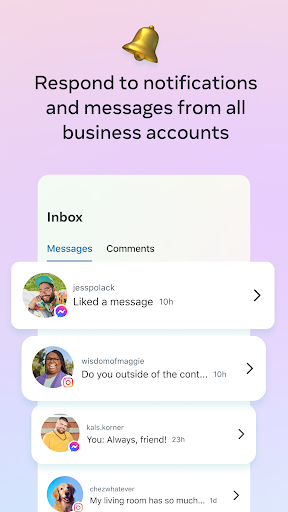
Meta Business Suite is the consolidated app for anyone running a Facebook Page and Instagram account, letting you create and schedule posts and stories, answer messages and comments from one inbox, check insights on posts and ads, and even take calls with customers. It’s aimed squarely at small business owners, freelancers, and social media managers who don’t want to juggle separate apps for Facebook and Instagram. With well over 186 million installs, it’s become the default tool for this job simply because Meta has folded most of its old business tools into it, whether users like the change or not.

Where It Genuinely Helps Day To Day

For businesses that just need to post content and glance at engagement, the core idea works: one app, two platforms, one inbox. Reviewers who’ve used it for years clearly rely on it as their main channel for customer contact, and the ability to respond to comments and messages in a single place is useful when it’s functioning normally. The insights section also gets credited for giving a real look at how posts and ads are performing, which matters for anyone trying to figure out what content actually resonates with an audience.

Messaging Problems That Keep Coming Up

The most consistent and serious complaint across reviews is messaging reliability. Multiple users report messages arriving delayed by more than 24 hours, which is a real problem for businesses depending on timely replies, especially ones mentioned in reviews like curbside pickup coordination. Notifications are described as unreliable too—one reviewer says they get alerts for unread messages that don’t actually show up in the inbox, while another says notifications simply stop coming for stretches of time, leaving client messages unanswered for days. There’s also no way to search past messages, which is a basic feature many users clearly expect and don’t have.

Editing And Posting Frustrations

Several long-time users report losing functionality they used to have, particularly around photo editing. One reviewer says the ability to edit photos added to a post was removed entirely, while another describes losing the ability to add photos to albums at all. There are also complaints about broken features that just don’t respond—one user specifically mentions that tapping ‘Events’ does nothing, no error, no loading, just silence, and that hours of composed posts have been lost to bugs like this. A separate wave of complaints followed the Meta name change, with users saying posting and scheduling broke immediately afterward and demanding fixes rather than rebranding.

Inconsistency And Trust Issues

Beyond bugs, there’s a deeper frustration in these reviews about data not lining up between the mobile app and desktop, and about messages failing to send when replying to clients. One reviewer states they had over $5000 worth of work sitting unresolved because of app failures, which points to real business risk, not just inconvenience. Comments are also reported to sometimes display without customer names attached, and message timestamps have reportedly disappeared for some users, making it hard to track when a conversation actually happened. Several reviewers describe feeling forced to use the app despite these problems because Meta has made it the only real option for managing a Page.

Should You Install Meta Business Suite

If you run a Facebook Page or Instagram business account, you don’t have much choice—this is the tool Meta wants you using, and for basic posting and browsing insights, it does the job. But go in with realistic expectations: messaging delays, missing notifications, no message search, and features that silently fail are recurring themes from people who’ve used it for years, not just newcomers hitting a learning curve. Businesses that depend heavily on fast customer response, especially for anything time-sensitive like pickups or urgent client work, should have a backup plan for reaching customers when the app lags or drops notifications. Casual users posting occasional content will likely have a smoother experience than businesses relying on it as a primary support channel.


Pros

  • ✓Combines Facebook and Instagram in one app
  • ✓Single inbox for messages and comments
  • ✓Useful insights on posts and ads
  • ✓Supports scheduling posts and stories
  • ✓Real-time calling with customers built in

Cons

  • ✕Messages delayed by over 24 hours
  • ✕No way to search past messages
  • ✕Photo editing and album features removed

What Real Users Say

Sam Lantz ★ 4/5

“Haven't been using this app for very long and already see some problems. First, Facebook doesn't seem to move messages to spam. That's not a huge deal if you know what is spam and what is not, but it's still super annoying. The other thing that's a bigger deal is I can't see the detailed results of an ad, because…”

👍 9,670 found this helpful
Julie Barajas ★ 1/5

“I hate this app; forced to use it nonetheless. messages to the page are regularly delayed, sometimes for more than 24 hours. There is no option to search messages, notifications don't clear so I'll have a notification saying I have an unread message while no unread messages display in my inbox, leading me to wonder if it's a glitch or…”

👍 1,659 found this helpful
Nikki ★ 1/5

“Not a huge fan of the app. I'm not able to edit photos I'm adding to a post anymore. Before the ability to edit photos was taken away, when you would add text to a photo, the options were hidden under my phone's keyboard; I would have to put my keyboard in float mode just to change the font style…”

👍 1,589 found this helpful

Reviews sourced from Google Play, selected by helpfulness at the time of writing.

App Info & Permissions

Developer Meta Platforms, Inc.
Content rating Everyone
Contains ads No
Installs 186M+
Released 01/28/2014
Price Free

Permissions this app requests

📷 Camera Take pictures and videos
👥 Contacts Find accounts on the device; read your contacts
📱 Device ID & call information Read phone status and identity
🪪 Identity Find accounts on the device
📍 Location Approximate location (network-based); precise location (GPS and network-based)
🎙️ Microphone Record audio
📞 Phone Directly call phone numbers; read phone status and identity
🖼️ Photos/Media/Files Read the contents of your USB storage; modify or delete the contents of your USB storage
💾 Storage Read the contents of your USB storage; modify or delete the contents of your USB storage
📶 Wi-Fi connection information View Wi-Fi connections

Similar Apps

Frequently Asked Questions

1

What is Meta Business Suite?

Meta Business Suite is Meta's app for managing a Facebook Page and Instagram account together. It lets business owners create and schedule posts and stories, respond to messages and comments from one inbox, view performance insights, and make calls to customers. It's designed to replace using separate apps for each platform's business tools.

2

Is Meta Business Suite free?

Yes, the app itself is free to download and use for managing your Page and Instagram account. Any costs come from optional advertising or boosted posts you choose to run through the platform, not from the app itself. Basic posting, messaging, and insights features don't require payment.

3

Does Meta Business Suite have reliable notifications?

Based on user reviews, notifications are a weak point, with multiple reports of delayed alerts, notifications that don't clear even after messages are read, and stretches where no alerts arrive at all. Several users say this has caused client messages to go unanswered for days. This is a recurring complaint rather than an isolated bug.

4

Can I edit photos before posting with this app?

Photo editing options have reportedly been reduced or removed for some users, according to reviews, with at least one reviewer saying they can no longer edit photos added to a post like before. Another user reported losing the ability to add photos to albums entirely. If photo editing is essential to your workflow, you may need a separate editing app before uploading.

5

Is Meta Business Suite good for urgent customer communication?

It's risky to rely on it exclusively for urgent messages, since reviewers report delays of over 24 hours in message delivery and inconsistent notifications. Businesses handling time-sensitive requests, like curbside pickups, have specifically flagged this as a problem. It may be worth having an alternative contact method as backup.

